Vector dimensionality is the number of numeric values in an embedding. A 384-dimensional embedding has 384 numbers, a 1536-dimensional embedding has 1536 numbers, and a 3072-dimensional embedding has 3072 numbers. Higher-dimensional vectors can give an embedding model more room to represent meaning, but they also increase storage, memory use, indexing cost, and query-time computation. The best dimension is not automatically the largest one; it is the smallest dimension that preserves enough retrieval quality for the application.
This guide explains what dimension means in vector search, why common embedding sizes often fall between 384 and 3072 or more dimensions, how to think about the trade-off between capacity and cost, what adjustable-dimension models change, and how dimensionality affects storage and speed in an AI database. By the end, you should be able to reason about dimensionality as a practical system design choice rather than a mysterious model setting.
What Vector Dimension Means
A vector is an ordered list of numbers. In AI search systems, that list is usually an embedding: a numeric representation of text, images, audio, code, or another kind of data. The dimension of the vector is simply the length of that list. If a model returns a vector with 768 values, the vector has 768 dimensions. Each dimension is one coordinate in the model’s learned vector space.
The easiest way to picture this is to start with a two-dimensional map. A point on a map can be described with two coordinates, such as x and y. A three-dimensional point adds a third coordinate, such as height. Embeddings use the same basic idea, but with hundreds or thousands of coordinates instead of two or three. Humans cannot visualize a 1536-dimensional space, but the database can still compare vectors mathematically.
The important detail is that individual dimensions usually do not have clean human-readable meanings. Dimension 42 does not reliably mean “legal topic” or “positive sentiment.” Instead, the whole pattern of numbers works together. Similar pieces of content tend to land near each other in the vector space, while unrelated content tends to land farther apart.
Dimension Is Fixed by the Embedding Model
For most embedding models, dimensionality is part of the model’s output design. A model that produces 384-dimensional vectors will produce that same length for every item it embeds, whether the input is a short phrase or a long paragraph. A model that produces 1536-dimensional vectors will produce 1536 values for every embedded item. The vector database expects vectors in the same indexed collection to have the same dimensionality because similarity calculations compare matching coordinates.
This is why dimensionality is usually chosen when the embedding model and database schema are selected. Once a collection is built around one vector size, changing to another size usually means re-embedding the data and rebuilding or migrating the vector index. In production systems, dimensionality is not just a model detail; it becomes part of the storage layout and retrieval pipeline.
Once the basic definition is clear, the next natural question is why so many embedding models use familiar sizes such as 384, 768, 1024, 1536, or 3072. These numbers are not magic, but they reflect a mix of model architecture, training decisions, hardware efficiency, and the amount of representational capacity the model is designed to provide.
Typical Vector Dimension Ranges
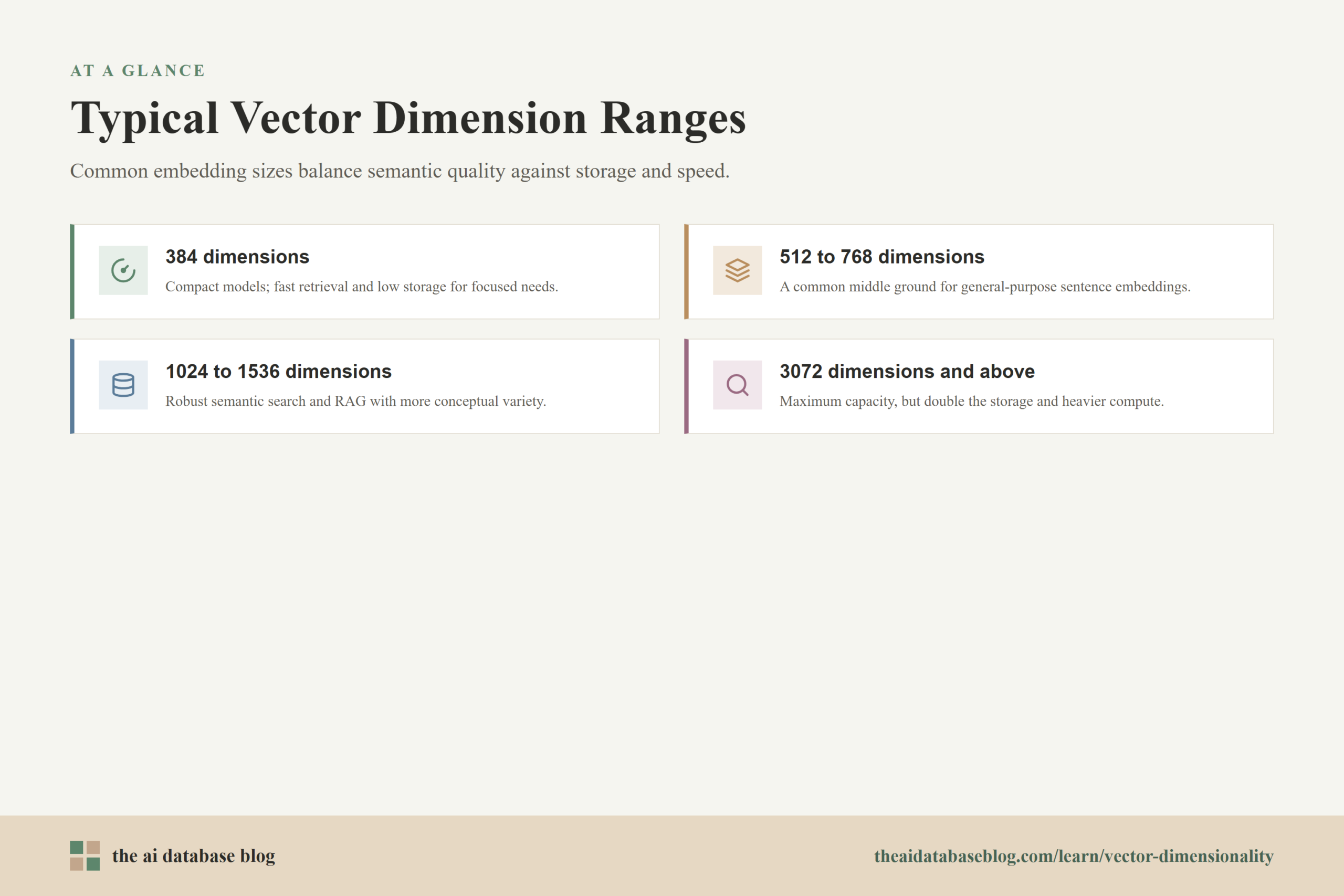
In modern AI database and retrieval systems, common dense text embedding dimensions often range from a few hundred to a few thousand values. Compact models may produce 384-dimensional vectors. Many sentence embedding models use 768 dimensions. Larger embedding models may use 1024, 1536, 3072, or even higher dimensions. These ranges are common because they balance semantic quality, compute cost, and memory efficiency across many retrieval tasks.
A 384-dimensional vector is often attractive for smaller systems, high-volume indexing, edge use cases, or workloads where speed and memory matter more than capturing every possible semantic nuance. A 768-dimensional vector is a common middle ground, especially for transformer-based sentence embeddings. A 1536-dimensional vector is often used for stronger general-purpose semantic retrieval. A 3072-dimensional vector gives more representational capacity, but it also doubles the raw vector storage compared with 1536 dimensions if the same numeric precision is used.
The following ranges are useful as a practical mental model:
- 384 dimensions: Often used by compact embedding models. This can be a good fit for fast retrieval, lower storage cost, and applications with relatively focused semantic needs.
- 512 to 768 dimensions: A common middle range for sentence embeddings and multilingual or general-purpose retrieval models. It often offers a stronger quality-cost balance than very small vectors.
- 1024 to 1536 dimensions: Frequently used for robust semantic search and retrieval-augmented generation systems where relevance matters and the data has more conceptual variety.
- 3072 dimensions and above: Used by larger embedding models that expose more representational capacity. These vectors can be useful for difficult retrieval tasks, but they increase memory and compute requirements.
These ranges should not be treated as universal quality rankings. A well-trained 768-dimensional model can outperform a weaker 1536-dimensional model. A smaller model trained on the right data can be better for a narrow domain than a larger generic model. Dimensionality affects capacity, but training quality, data coverage, similarity metric, chunking, metadata filtering, and evaluation methodology all matter too.
Seeing these ranges helps explain why dimensionality is a recurring infrastructure question. The next issue is what more dimensions actually buy you, and when that extra capacity becomes wasteful. The trade-off is not just “larger is better”; it is “larger may preserve more information, but every extra coordinate has to be stored, indexed, and compared.”
The Trade-Off Between Capacity and Cost
Higher-dimensional vectors give the embedding model more numeric space to encode differences between inputs. In theory, this can help represent subtle distinctions, domain-specific vocabulary, multiple meanings, and richer semantic relationships. For retrieval systems, that extra capacity may improve recall, ranking quality, or robustness when the documents and queries are complex.
But capacity is not free. Every added dimension increases the amount of data stored per vector. It also increases the amount of work required to compare vectors, build indexes, move data through memory, and keep vector-heavy workloads responsive. This matters because AI databases often store millions or billions of vectors, not dozens. A small per-vector increase can become a large infrastructure cost at scale.
For example, if vectors are stored as 32-bit floating-point numbers, each dimension takes 4 bytes. That means the raw vector size can be estimated with a simple formula:
raw vector bytes = number of dimensions * 4
Using that formula, a 384-dimensional vector uses about 1536 bytes, or roughly 1.5 KB, before database and index overhead. A 768-dimensional vector uses about 3072 bytes, or roughly 3 KB. A 1536-dimensional vector uses about 6144 bytes, or roughly 6 KB. A 3072-dimensional vector uses about 12,288 bytes, or roughly 12 KB. At one million vectors, those raw vectors alone are roughly 1.5 GB, 3 GB, 6 GB, and 12 GB respectively, before replication, metadata, indexing structures, caches, and compression choices.
Why More Dimensions Can Help
More dimensions can help when the embedding model has learned to use them effectively. A larger vector may give the model more room to separate concepts that would otherwise be compressed too tightly together. This can matter in domains with subtle distinctions, such as technical documentation, legal language, medical concepts, financial research, product catalogs, or multilingual retrieval.
The benefit is usually measured through retrieval evaluation rather than assumed from the dimension count. Useful measurements include recall at k, precision at k, mean reciprocal rank, normalized discounted cumulative gain, and task-specific answer quality for retrieval-augmented generation. If increasing dimensionality improves those measures enough to justify the added cost, the larger vector may be worthwhile.
Why More Dimensions Can Hurt Operationally
More dimensions can hurt system efficiency because similarity search has to compare more numbers. Even approximate nearest neighbor indexes avoid scanning every vector in full, but distance calculations still become heavier as dimension count rises. Index construction can also take longer, memory pressure can increase, and more data may need to move between disk, memory, and CPU.
Higher dimensionality can also make experimentation and migration more expensive. Re-embedding a large dataset with a bigger model costs time and compute. Rebuilding an index can temporarily require extra storage or operational planning. If the quality gain is small, the system may be better served by improving chunking, metadata filtering, hybrid search, reranking, or evaluation before jumping to a higher dimension.
This is why dimensionality should be treated as one lever among several. The next section looks at adjustable-dimension models, which make this lever more flexible by allowing the same model family to produce or use shorter embeddings without starting from a completely different embedding model.
Adjustable-Dimension Models
Adjustable-dimension embedding models let developers choose a shorter vector length than the model’s full native output. This is especially useful when a model has been trained so that its earlier dimensions remain meaningful on their own. Instead of treating truncation as a crude afterthought, the model is designed to preserve useful information at multiple vector lengths.
The research idea behind many of these systems is often called Matryoshka representation learning. The general idea is to train representations so that smaller prefixes of the vector remain useful, much like nested representations inside a larger one. A full 3072-dimensional vector may offer maximum capacity, but the first 1536, 1024, 512, or another supported prefix length can still perform well enough for many retrieval workloads if the model was trained for that behavior.
This matters because ordinary vector truncation is risky. If a model was not trained to make the first half of the vector independently useful, cutting off the remaining dimensions may remove important information unpredictably. Adjustable-dimension models are different because they are intentionally trained or configured to support shorter dimensions.
How Adjustable Dimensions Change System Design
Adjustable dimensions make embedding selection less rigid. Instead of choosing between entirely separate models, teams can test several output sizes from the same model family and evaluate the quality-cost trade-off on their own data. For example, a team might compare 512, 1024, and 1536 dimensions against the same benchmark queries, then choose the shortest dimension that meets the relevance target.
This can be especially useful for staged retrieval systems. A system might use shorter vectors for the first retrieval pass to reduce memory and speed up search, then use a larger representation, reranker, or additional scoring step for the final ranking. The goal is not always to make every step as rich as possible; the goal is to spend compute where it improves the result most.
What Adjustable Dimensions Do Not Solve
Adjustable dimensions do not remove the need for evaluation. A shorter vector can reduce cost, but it can also lose important distinctions. The loss may be tiny for one dataset and unacceptable for another. A customer-support knowledge base, a code-search system, and a scientific literature retrieval system may respond very differently to the same dimensionality reduction.
Adjustable dimensions also do not remove database constraints. A collection generally still stores vectors of one configured length. If a team decides to switch from 1536 dimensions to 768 dimensions, it typically needs a migration plan: regenerate embeddings, create or update the vector index, validate retrieval behavior, and route traffic carefully.
Adjustable models make dimension choice easier to test, but the practical cost still shows up inside the database. To understand that cost clearly, it helps to look at storage and speed separately: storage grows with the number of dimensions, while speed depends on dimensions plus indexing strategy, compression, memory layout, and query behavior.
How Dimension Affects Storage
Dimensionality has a direct effect on vector storage because each dimension is stored as a numeric value. With 32-bit floating-point storage, every dimension uses 4 bytes. With 16-bit floating-point storage, every dimension uses 2 bytes. With 8-bit scalar quantization, each dimension may be represented with 1 byte. Product quantization, binary quantization, and other compression methods can reduce the memory footprint further, often with some trade-off in recall or scoring precision.
The raw storage math is simple, but real database storage includes more than the vector itself. A vector database also stores object data, metadata, indexes, graph links or partition structures, deleted-object markers, caches, replication copies, and sometimes both compressed and original vectors for rescoring. This is why a 6 KB raw vector can contribute to much more than 6 KB of total infrastructure footprint once the full system is considered.
Here is a simple raw vector storage comparison for one million vectors using 32-bit floats:
| Dimensions | Approximate bytes per vector | Approximate raw storage for 1 million vectors |
|---|---|---|
| 384 | 1,536 bytes | 1.5 GB |
| 768 | 3,072 bytes | 3 GB |
| 1,536 | 6,144 bytes | 6 GB |
| 3,072 | 12,288 bytes | 12 GB |
This table is intentionally simplified. It does not include metadata, indexing overhead, replication, write-ahead logs, object payloads, or compression. Its purpose is to show the direction of the trade-off: doubling dimensions doubles raw vector storage when the numeric precision stays the same.
Compression Changes the Math
Compression can reduce the storage and memory cost of high-dimensional vectors. Scalar quantization reduces the number of bits used per dimension. Product quantization represents groups of dimensions more compactly. Binary quantization can reduce each dimension to a very small representation. Some systems also use rescoring, where compressed vectors quickly identify candidates and original vectors are used to refine the final ranking.
Compression means dimension count is not the only storage lever. A 1536-dimensional vector stored with compression may use less memory than a lower-dimensional vector stored as full 32-bit floats. However, compression introduces its own choices: how much recall loss is acceptable, whether original vectors are retained for rescoring, how index settings interact with compressed representations, and how the system behaves under real query traffic.
Storage is only half of the story. Once vectors are stored, the system still has to search them quickly. Dimensionality affects speed because similarity search ultimately depends on comparing vectors, and larger vectors require more numeric work per comparison.
How Dimension Affects Speed
Vector search speed depends on how many vectors are examined, how expensive each vector comparison is, and how efficiently the index narrows the search space. Dimensionality affects the cost of each comparison because distance or similarity calculations operate across the vector’s coordinates. A cosine similarity or dot product over 3072 dimensions does more arithmetic than the same operation over 768 dimensions.
Approximate nearest neighbor indexes, such as HNSW-style graph indexes, reduce search time by avoiding a full scan of every vector. Even then, the system still compares the query vector against candidate vectors. More dimensions mean each candidate comparison is heavier. At large scale, that can affect query latency, throughput, memory bandwidth, CPU usage, and index build time.
Indexing and Memory Pressure
Indexing structures add their own memory needs. In graph-based indexes, each vector may be connected to nearby vectors through graph links. The vector data and graph structure are both part of the operational footprint. Higher-dimensional vectors make the vector portion larger, while index parameters influence how much graph overhead is added and how many candidates are explored during search.
Memory pressure matters because vector search is often fastest when the active index and frequently accessed vectors fit in memory. If higher dimensionality pushes the working set beyond memory capacity, the system may become slower even if the theoretical index algorithm is efficient. In practice, dimension count interacts with caching, compression, replication, metadata filtering, and hardware limits.
Query-Time Trade-Offs
At query time, a smaller vector can often be compared faster and moved through memory more cheaply. This can improve latency and throughput, especially in high-volume applications. But if the vector is too small for the task, retrieval quality may suffer. The system may return semantically weaker candidates, forcing downstream rerankers or language models to work harder, or causing answer quality to drop.
The practical goal is to optimize the whole retrieval pipeline. A slightly larger vector that improves first-stage recall may reduce downstream failures. A shorter vector with a strong reranker may deliver similar final quality at lower cost. A hybrid search system that combines vector similarity with keyword matching and metadata filters may perform well without needing the largest possible embedding.
Because dimensionality affects both quality and cost, it should be chosen with measurement rather than intuition alone. The next section turns the concept into a practical selection process for teams building AI database systems.
How to Choose the Right Dimension
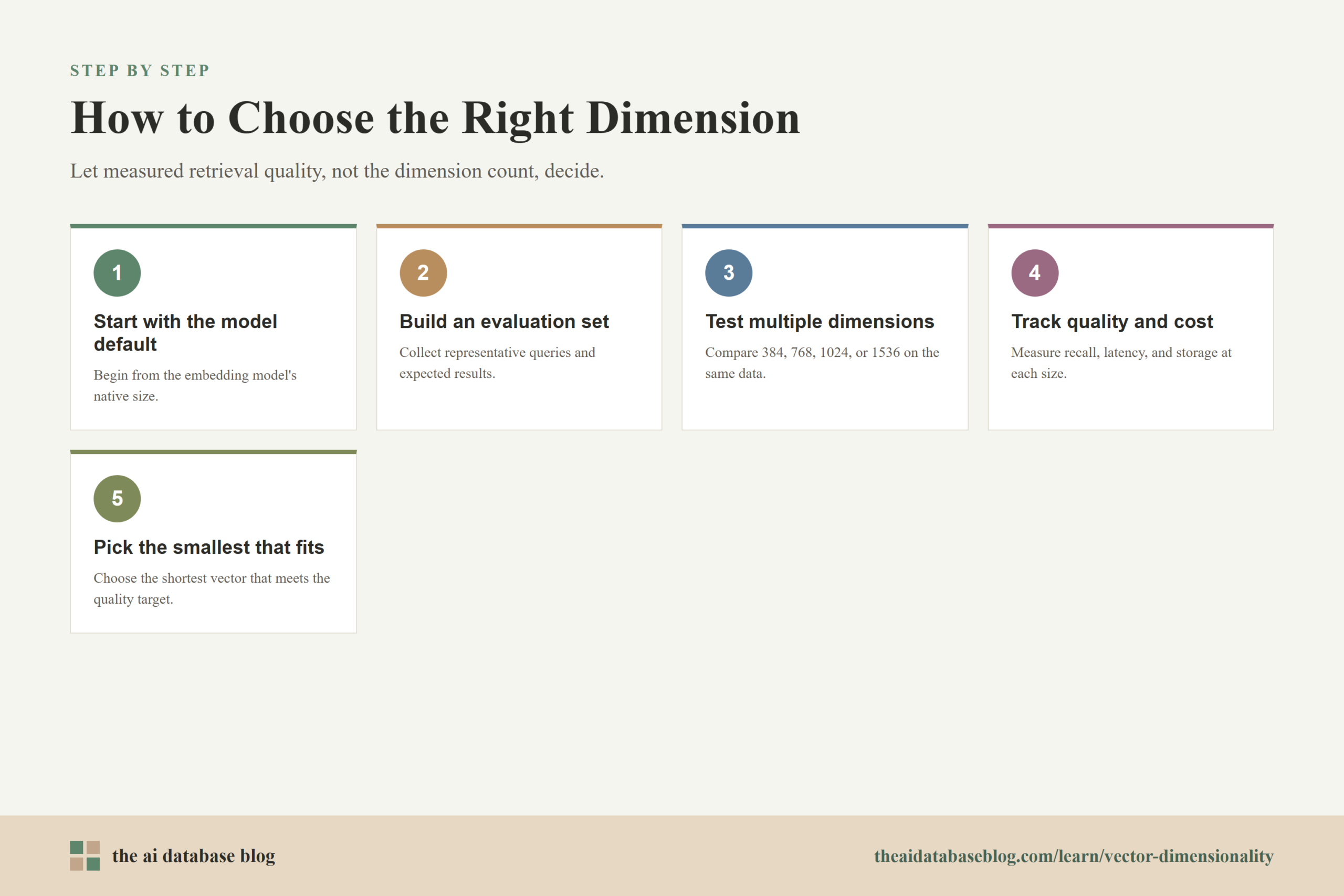
The right vector dimension depends on the retrieval task, data size, quality target, latency target, and budget. For small prototypes, it is reasonable to start with a common default from the chosen embedding model. For production systems, dimensionality should be evaluated against real queries and real documents. The best choice is usually the one that meets relevance requirements with the least operational burden.
A practical approach is to test multiple dimensions if the model supports it. Build a small evaluation set of representative queries, expected results, and difficult edge cases. Compare retrieval quality at several dimensions, such as 384, 768, 1024, 1536, or the model’s supported sizes. Track both search quality and system cost. If a shorter vector performs nearly as well as a larger one, the shorter vector may be the better production choice.
Teams should also consider whether the retrieval system has other quality controls. Metadata filters can narrow the search space before vector ranking. Hybrid search can combine lexical precision with semantic recall. Reranking can improve final ordering after the database retrieves candidates. Better chunking can improve embedding quality more than increasing dimensions. These techniques often matter as much as the dimension count itself.
Good Starting Points
For simple semantic search over a modest dataset, a compact or mid-sized embedding may be enough. For broad knowledge retrieval, customer support, documentation search, or retrieval-augmented generation, mid-to-large dimensions are often worth testing. For specialized domains with subtle terminology, larger vectors may help, but they should still be justified through evaluation.
When cost is the dominant concern, start by testing lower dimensions and compression options. When quality is the dominant concern, start with a stronger model and then reduce dimensions only after measuring the effect. When latency is the dominant concern, test smaller vectors, compression, efficient indexing settings, and reranking strategies together rather than treating dimension as the only performance knob.
Questions to Ask Before Committing
- How many vectors will the database store now, and how many will it store in a year?
- What level of retrieval quality is required for the application to be useful?
- Does the embedding model support adjustable dimensions safely?
- Will the database store full-precision vectors, compressed vectors, or both?
- How much latency can the search step add before the user experience suffers?
- Will metadata filtering, hybrid search, or reranking reduce the need for larger vectors?
These questions keep dimensionality tied to application needs. They also prevent a common mistake: choosing the largest available embedding because it feels safer, then discovering that storage, memory, and query costs are higher than the workload requires.
Common Misunderstandings About Vector Dimensionality
Vector dimensionality is easy to misunderstand because it sounds like a direct measure of intelligence or quality. It is not. Dimension count describes the size of the representation, not the usefulness of the model by itself. A larger vector can carry more information only if the model has learned to organize that information well and the retrieval task benefits from it.
Another misunderstanding is that dimensions map cleanly to human concepts. In most embedding models, the meaning is distributed across the vector. The system compares the entire vector pattern, not a single coordinate. This is why vector search feels powerful but can be hard to inspect directly: the representation is meaningful as a whole, not as a labeled list of features.
A third misunderstanding is that dimensionality alone determines speed. It matters, but it is only one factor. Index type, index settings, filtering strategy, compression, hardware, batching, caching, and candidate counts all influence performance. A well-tuned system with higher-dimensional vectors can outperform a poorly tuned system with smaller vectors.
Once these misconceptions are out of the way, dimensionality becomes easier to reason about. It is a capacity and cost setting inside a larger retrieval architecture, not a standalone guarantee. The final questions readers usually ask are practical ones: whether larger vectors are always better, whether dimensions can be changed later, and how dimensionality relates to storage and retrieval quality.
FAQs
1. What does dimension mean in a vector database?
Dimension means the number of numeric values in each vector. If an embedding model outputs 768 numbers for every document or query, the vector has 768 dimensions. The vector database uses those numbers to calculate similarity between the query vector and stored vectors.
2. Are higher-dimensional vectors always better?
No. Higher-dimensional vectors can provide more representational capacity, but they also cost more to store, index, and compare. A smaller vector from a strong model may outperform a larger vector from a weaker model, and a smaller vector may be entirely sufficient for a focused retrieval task.
3. What are common embedding dimensions?
Common dense embedding dimensions include 384, 512, 768, 1024, 1536, and 3072. Some models produce even larger vectors. The right size depends on the embedding model, the dataset, the retrieval task, and the infrastructure budget.
4. Can I change vector dimensions after building an index?
Usually not without reworking the collection or index. A vector index expects vectors of a consistent length. Changing dimensions typically means re-embedding the data, creating a new index or collection, validating retrieval quality, and migrating traffic or queries to the new setup.
5. How much storage does dimensionality add?
With 32-bit floating-point vectors, each dimension uses 4 bytes before database overhead. A 1536-dimensional vector uses about 6 KB of raw vector storage, while a 3072-dimensional vector uses about 12 KB. Real storage can be higher because of metadata, indexes, replication, and database internals.
6. What are adjustable-dimension embeddings?
Adjustable-dimension embeddings let developers use shorter vector lengths from a model that supports that behavior. When the model is trained for it, shorter prefixes of a larger vector can remain useful for retrieval. This allows teams to test quality and cost at different dimensions without always switching to a completely different model.
Takeaway
Vector dimensionality is the length of an embedding, and it directly shapes the balance between retrieval capacity and infrastructure cost. Smaller vectors are cheaper to store and faster to compare, while larger vectors may capture more nuance when the model and task justify the added size. This guidance is most useful for teams building semantic search, retrieval-augmented generation, product discovery, documentation search, or other AI database systems where relevance, latency, and cost all matter. A good production choice comes from testing real queries at realistic dimensions, then selecting the smallest representation that preserves the retrieval quality the use case requires.
Watch this video to learn more