A vector database and a graph database both help AI systems retrieve useful information, but they do it in different ways. A vector database finds items that are close in meaning because an embedding model has learned patterns in the data. A graph database follows explicit relationships that someone or some system has structured as entities and edges. The key difference is that vector search is strong at implicit similarity, while graph search is strong at explicit connection. In GraphRAG, the two approaches complement each other: vectors help find relevant starting points, and graphs help expand, constrain, and explain the connected context.
This guide explains how vector databases and graph databases differ, why implicit learned relationships are not the same as explicit structured relationships, when each database type fits best, and how they can work together in GraphRAG systems. By the end, you should be able to choose the right retrieval pattern for semantic search, relationship-heavy querying, and AI applications that need both relevance and reasoning over connected knowledge.
What a Vector Database Does
A vector database stores embeddings, which are numerical representations of content such as text, images, audio, code, products, support tickets, or document chunks. The embedding model places similar items near each other in a high-dimensional space. When a user asks a question, the query is embedded too, and the database looks for vectors that are nearest to it. This is why vector databases are often used for semantic search, recommendations, similarity matching, and retrieval-augmented generation.
The important point is that a vector database does not usually know relationships in a human-readable form. It does not naturally understand that one policy replaces another, that one supplier owns a subsidiary, or that a clinical term belongs to a particular diagnosis hierarchy. It retrieves content because the embedding model has learned that the query and stored content are meaningfully similar. That similarity can be powerful, but it is not the same as a structured relationship.
Implicit Learned Relationships
Vector search captures implicit learned relationships. These relationships are not usually stored as named edges. They are encoded in the geometry of the embedding space. If two passages discuss similar concepts, use related terminology, or describe the same topic in different words, their embeddings may be close even when they share few exact keywords.
For example, a user might ask, “How do I reduce hallucinations in a customer support chatbot?” A vector database may retrieve documents about grounding answers in retrieved context, improving chunk quality, adding citations, or evaluating RAG outputs. None of those documents needs to contain the exact phrase “reduce hallucinations.” The embedding model can connect the query to conceptually related material.
This makes vector databases especially useful when users do not know the exact terms used in the data. They are also useful when the data is unstructured, such as long documents, knowledge base articles, transcripts, and emails. The retrieval system can find meaning across varied language without requiring every relationship to be manually modeled.
Once vector search finds semantically relevant content, the next question is whether similarity alone is enough. For many AI applications, it is. But when the task depends on known entities, relationship paths, constraints, provenance, or multi-hop reasoning, the system needs a more explicit representation of how things connect. That is where graph databases become important.
What a Graph Database Does
A graph database stores data as nodes and relationships. Nodes represent entities such as people, documents, products, accounts, claims, projects, topics, or events. Relationships connect those nodes and can describe how they relate, such as “authored by,” “depends on,” “approved by,” “mentions,” “replaces,” “belongs to,” or “purchased with.” In many graph models, both nodes and relationships can also have properties that add more detail.
The strength of a graph database is that relationships are first-class data. Instead of asking, “Which text chunk is most similar to this query?” a graph query can ask, “Which contracts involve this vendor, depend on this regulation, were updated after this date, and are connected to unresolved risk findings?” That kind of question is not only about semantic closeness. It is about navigating a known structure.
Explicit Structured Relationships
Graph databases capture explicit structured relationships. The connection is represented directly, usually with a type, direction, and sometimes metadata. If a node for “Policy A” has a relationship to “Policy B” labeled “replaced by,” the system can follow that edge and explain why the two records are connected.
This explicitness matters when the relationship itself is part of the answer. A vector database might retrieve two policies that sound similar, but it may not know which one supersedes the other. A graph database can store that one policy replaced another on a specific date, that a department approved the change, and that certain teams are affected. The graph does not just retrieve related information; it preserves the structure of the relationship.
Graph databases are especially useful when the application needs traceable paths. In fraud detection, the path between accounts may matter. In compliance, the link between a regulation, internal control, audit finding, and owner may matter. In product data, the relationship between components, suppliers, versions, and known issues may matter. These are cases where “similar to” is too vague by itself.
So far, the difference is simple: vector databases are good at finding meaning, while graph databases are good at following structure. The practical design question is not which one is universally better. It is which kind of relationship your application depends on, and whether your data has enough structure to make graph retrieval worth the extra modeling effort.
Vector Database vs Graph Database: The Core Difference
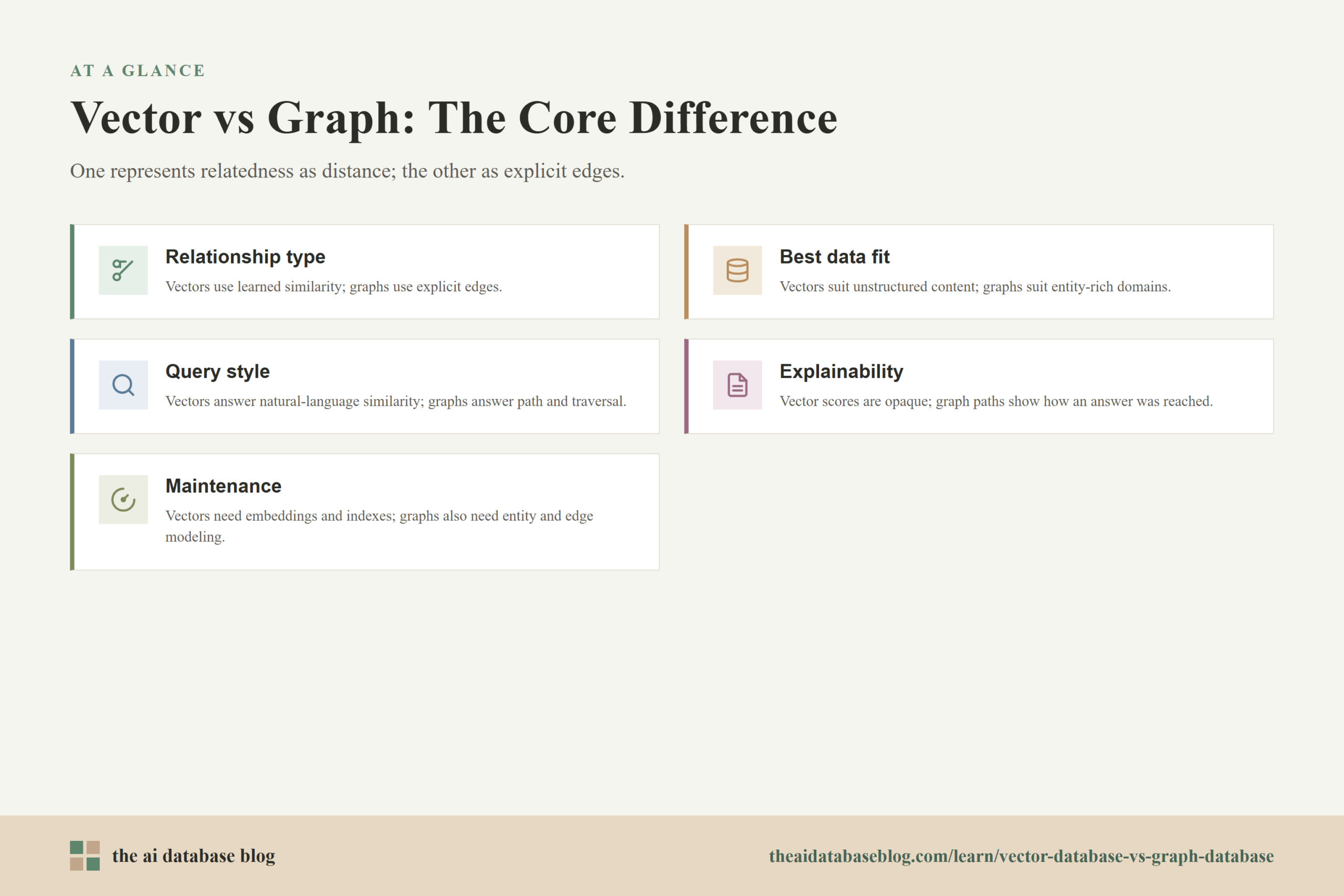
The core difference between a vector database and a graph database is how each system represents relatedness. A vector database represents relatedness as distance in embedding space. A graph database represents relatedness as stored edges between entities. Both can retrieve relevant data, but they answer different retrieval questions and fail in different ways.
A vector database asks, “What content is semantically close to this query?” That makes it strong for broad discovery, paraphrase matching, fuzzy intent, and unstructured text retrieval. A graph database asks, “What entities are connected by known relationships?” That makes it strong for multi-hop paths, dependency chains, provenance, and relationship-aware filtering.
Here is a practical comparison:
- Relationship type: Vector databases use learned similarity. Graph databases use explicit edges.
- Best data fit: Vector databases fit unstructured or semi-structured content. Graph databases fit entity-rich domains where relationships matter.
- Query style: Vector search fits natural-language questions and similarity search. Graph search fits structured traversal, path finding, and constrained queries.
- Explainability: Vector results can often be explained by retrieved text, but the similarity score itself is not a human-readable relationship. Graph results can show the path of relationships used to reach an answer.
- Maintenance cost: Vector systems usually require embedding, indexing, and metadata management. Graph systems also require entity modeling, relationship extraction, schema design, and ongoing graph quality work.
Neither approach removes the need for evaluation. Vector search can return plausible but incomplete context if the embedding model groups content too broadly or misses domain-specific meaning. Graph search can return precise but incomplete context if the graph is stale, sparse, or incorrectly extracted. The stronger the retrieval requirement, the more important it becomes to measure recall, precision, latency, freshness, and answer quality rather than assuming one architecture is automatically superior.
That comparison leads naturally to a practical decision: use vector retrieval when meaning is the main signal, use graph retrieval when relationships are the main signal, and combine them when the application needs both. The next sections make that choice more concrete.
When a Vector Database Fits Best
A vector database fits best when the main problem is finding semantically relevant material from a large body of content. This is common in AI applications because user questions are often messy, varied, and imprecise. People ask questions in their own language, not in the exact words used by the source data. Vector search helps bridge that language gap.
Vector databases are a strong fit for document search, internal knowledge assistants, semantic product search, support ticket retrieval, recommendations, code search, media similarity search, and classic RAG over text chunks. In these cases, the system usually needs to retrieve a small set of relevant passages or records that can help an AI model answer a question.
They are also useful when the data changes often and the relationships are not stable enough to model as a graph. Embedding and indexing new content is often simpler than building and maintaining a full entity relationship layer. Metadata filters can add useful constraints, such as date, department, language, document type, region, or access permission, without requiring a graph model.
Example Use Case
Imagine a company has thousands of support articles and wants an AI assistant to answer product troubleshooting questions. Users may describe the same problem in many ways. A vector database can retrieve articles that discuss related symptoms, error messages, configuration issues, or recommended fixes even when the wording differs. If the task is mostly about finding the right explanatory text, vector search is usually the natural starting point.
The limitation appears when the question requires specific relationship logic. If the assistant must know which product version depends on which component, which patch replaces another patch, or which customer entitlement applies to a case, semantic similarity may not be enough. That kind of structure points toward graph retrieval.
When a Graph Database Fits Best
A graph database fits best when the relationships between entities are central to the application. This is especially true when the answer depends on paths, dependencies, hierarchies, ownership, causality, lineage, or other connections that should be represented explicitly. In these cases, the graph is not just a storage choice. It is part of the meaning of the data.
Graph databases are useful for knowledge graphs, fraud networks, identity resolution, recommendation systems based on known relationships, access control, supply chains, compliance mapping, data lineage, and enterprise knowledge retrieval. They are also useful when users need explainable answers that can show how one entity connects to another.
A graph database is not automatically the right choice for every AI search problem. Building a useful graph requires decisions about entity types, relationship types, extraction quality, deduplication, updates, and governance. If the graph is poorly designed, too sparse, or full of noisy relationships, graph traversal can make retrieval worse instead of better. The value comes from trustworthy structure, not from the word “graph” itself.
Example Use Case
Consider a compliance assistant that needs to answer, “Which internal controls are affected by this new regulation, and who owns the open remediation tasks?” A vector database may find documents that discuss the regulation. A graph database can follow explicit links from the regulation to obligations, controls, audit findings, owners, deadlines, and systems. The answer depends on a chain of relationships, so graph retrieval fits the task well.
This does not mean the graph should work alone. The user may ask the question in natural language, and the relevant starting entity may be described differently across documents. Vector search can help locate the right regulation, policy, or control first. Then graph traversal can expand from that starting point into the connected structure. That combined pattern is the foundation of many GraphRAG designs.
How Vector and Graph Databases Complement Each Other in GraphRAG
GraphRAG is retrieval-augmented generation that uses graph-structured knowledge as part of the retrieval process. In practice, many GraphRAG systems do not replace vector search. They combine vector search with graph traversal so the AI system can use both semantic similarity and explicit relationships. This is important because user questions often begin as ambiguous natural language but require structured context to answer well.
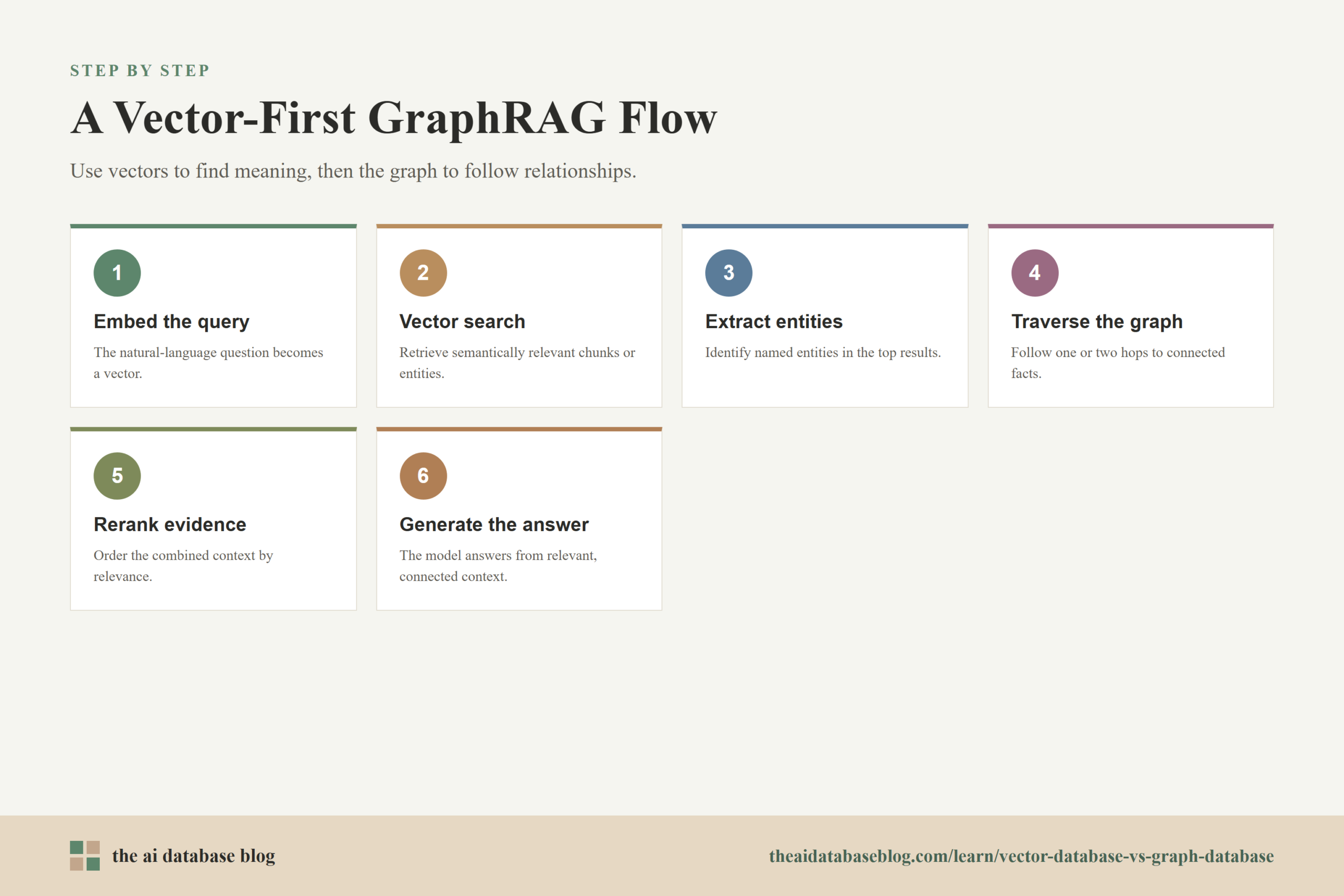
A common pattern is to use vector search for initial discovery. The system embeds the user query and retrieves relevant chunks, entities, or summaries. It then identifies entities from those results and uses the graph to expand context around them. The graph may pull neighboring entities, relationship paths, community summaries, source documents, or linked facts. The final answer can then be generated from a richer context set than vector search alone would provide.
Another pattern starts with entity extraction. The system identifies named entities or concepts in the query, matches them to nodes in the graph, and then traverses relationships to collect relevant evidence. Vector search may still help when entity matching is uncertain, when the graph needs text evidence, or when the question includes broad semantic intent rather than a precise entity name.
Why the Combination Works
The combination works because vectors and graphs solve different retrieval problems. Vectors are good at finding likely relevance when the query and source material use different wording. Graphs are good at preserving relationships after relevant entities are found. Together, they can support questions that are both semantic and relational.
For example, a user might ask, “What risks are connected to our customer onboarding workflow?” Vector search can find documents about onboarding, account verification, customer identity, fraud checks, and support handoffs. The graph can then connect those materials to systems, owners, incidents, controls, vendors, and known dependencies. The answer becomes more complete because the system can move from topical relevance to relationship-aware context.
GraphRAG is especially valuable for multi-hop questions. A multi-hop question requires the system to connect several pieces of information rather than retrieve one obvious passage. For example, “Which teams are affected by the policy that replaced the old vendor review process?” requires identifying the policy, understanding that it replaced another process, finding affected teams, and possibly checking dates or ownership. A graph gives the retrieval system a path to follow.
Once GraphRAG enters the picture, the architecture becomes less about choosing one database and more about designing a retrieval flow. The right flow depends on whether the query should start with meaning, entities, filters, graph paths, or some combination of these. That design choice is where many successful AI database systems are won or lost.
Practical Design Patterns for GraphRAG
A useful GraphRAG system usually has more than one retrieval step. It may need to search semantically, map results to entities, traverse the graph, fetch source passages, rerank evidence, and pass a carefully selected context to the language model. The goal is not to add complexity for its own sake. The goal is to retrieve the smallest useful context that is relevant, connected, and grounded in the source data.
Several practical patterns are common:
- Vector-first retrieval: Start with vector search to find relevant chunks or entities, then expand through graph relationships. This works well when user queries are broad or phrased in unpredictable language.
- Graph-first retrieval: Start by matching entities in the query to graph nodes, then traverse relationships and fetch supporting text. This works well when the query contains known entities and the graph is reliable.
- Hybrid retrieval: Run vector search and graph retrieval in parallel, then merge or rerank the results. This works well when both topical similarity and relationship structure matter.
- Graph-constrained vector search: Use graph relationships or metadata to limit the vector search space. This can improve precision when the system should only search within a connected business domain, time period, customer group, or access boundary.
- Vector-assisted graph expansion: Use vector similarity to choose which neighboring nodes, communities, or documents are most relevant after graph traversal. This can keep the graph expansion from becoming too broad.
These patterns are often mixed in real systems. A GraphRAG pipeline might start with vector search, extract entities from the top results, traverse one or two hops in a graph, retrieve original passages attached to the nodes, and rerank everything before generation. The exact design depends on the quality of the embeddings, the quality of the graph, the complexity of user questions, and the latency budget.
The main risk is assuming that adding a graph automatically improves retrieval. It does not. GraphRAG works best when the graph captures relationships that are actually useful for the questions users ask. If most questions are simple semantic lookups, vector search with good chunking, metadata filters, and reranking may be enough. If users ask relationship-heavy questions, the graph can provide the structure that vector search lacks.
Choosing the Right Approach
The best choice depends on the kind of question your AI system needs to answer. If the user asks for related passages, similar examples, or relevant explanations, a vector database is usually the first tool to consider. If the user asks how things are connected, what depends on what, who owns what, or which path links one entity to another, a graph database becomes more important.
A practical rule is to look at the answer your system must produce. If the answer can be grounded by a few semantically relevant chunks, vector retrieval may be enough. If the answer must show a chain of entities and relationships, graph retrieval is likely needed. If the answer requires both discovering relevant material and following explicit relationships, use a GraphRAG pattern that combines the two.
It also helps to consider operational maturity. Vector search is often easier to start with because most AI teams already have documents or records that can be embedded. Graph systems require more modeling discipline. The team must decide what counts as an entity, what relationships should be stored, how extraction will be validated, how updates will be handled, and how graph quality will be measured.
For many teams, the best path is incremental. Start with vector retrieval for broad semantic coverage. Add metadata filters and evaluation. Then introduce graph structure where relationship-aware retrieval would clearly improve answer quality. This keeps the architecture tied to real use cases instead of building a complex graph before the retrieval problem is understood.
FAQs
1. Is a vector database the same as a graph database?
No. A vector database stores embeddings and retrieves items by similarity in embedding space. A graph database stores entities and relationships and retrieves information by traversing explicit connections. They can both support AI retrieval, but they represent relatedness in different ways.
2. What does implicit learned relationship mean in vector search?
An implicit learned relationship is a similarity pattern captured by an embedding model. The database does not store a named connection such as “owns” or “replaces.” Instead, related items are near each other because the model learned that their meanings, contexts, or features are similar.
3. What does explicit structured relationship mean in a graph database?
An explicit structured relationship is a stored connection between entities. For example, a graph may record that a policy “replaces” another policy, a person “owns” a task, or a product “depends on” a component. The relationship is directly represented and can be queried or explained.
4. Does GraphRAG replace vector search?
Not usually. Many GraphRAG systems use vector search and graph traversal together. Vector search helps find relevant content or starting entities, while the graph helps expand the context through known relationships. In many applications, the combination is more useful than either method alone.
5. When should I avoid using a graph database for AI retrieval?
You may not need a graph database if your questions are mostly simple semantic lookups, your data has few meaningful relationships, or your team is not ready to maintain entity and relationship quality. A graph adds value when relationships are central to the answer, but it also adds modeling and maintenance work.
6. Can metadata filtering replace a graph database?
Metadata filtering can handle many useful constraints, such as date, category, department, permissions, or document type. It does not fully replace a graph when the application needs to follow multi-hop relationships, explain entity paths, or reason over connected structures. Metadata filters and graphs can also work together.
Takeaway
Vector databases and graph databases are both useful for AI retrieval, but they solve different problems. Vector databases are best for semantic similarity and implicit learned relationships across unstructured content, while graph databases are best for explicit structured relationships between known entities. This distinction is especially useful for teams building RAG, enterprise search, knowledge assistants, compliance tools, support systems, and other AI applications that must retrieve the right context. In GraphRAG, the strongest pattern is often complementary: use vectors to find meaning, use graphs to follow relationships, and combine both when the answer depends on relevant content and connected knowledge.