Semantic caching helps LLM applications reuse answers when a new query means the same thing as a previous query, even if the wording is different. Instead of caching only exact text matches, the system embeds each query, searches for nearby cached queries in a vector index, and returns a stored response when the match is close enough. Done well, this can reduce model calls, lower cost, and make common interactions faster. Done poorly, it can reuse an answer that is not actually valid for the new question, so threshold selection, context handling, freshness, and safety checks matter as much as the cache itself.
This guide explains how semantic caching works in LLM applications, why it is useful for cost and latency, how to choose a similarity threshold, and how to reduce the risk of wrong-answer reuse. By the end, you should understand where semantic caching fits in an AI database architecture, what data to store, how to evaluate cache hits, and when a cached response should be rejected in favor of a fresh model call.
What Semantic Caching Means in an LLM Application
Semantic caching is a caching pattern that stores previous query-response pairs and retrieves them by meaning rather than by exact wording. A traditional cache usually needs the key to match exactly. If a user asks “How do I reset my password?” and another user asks “What is the process for changing a forgotten password?”, an exact-match cache sees two different strings. A semantic cache can recognize that the intent may be similar enough to reuse a response, depending on the application and the chosen safety rules.
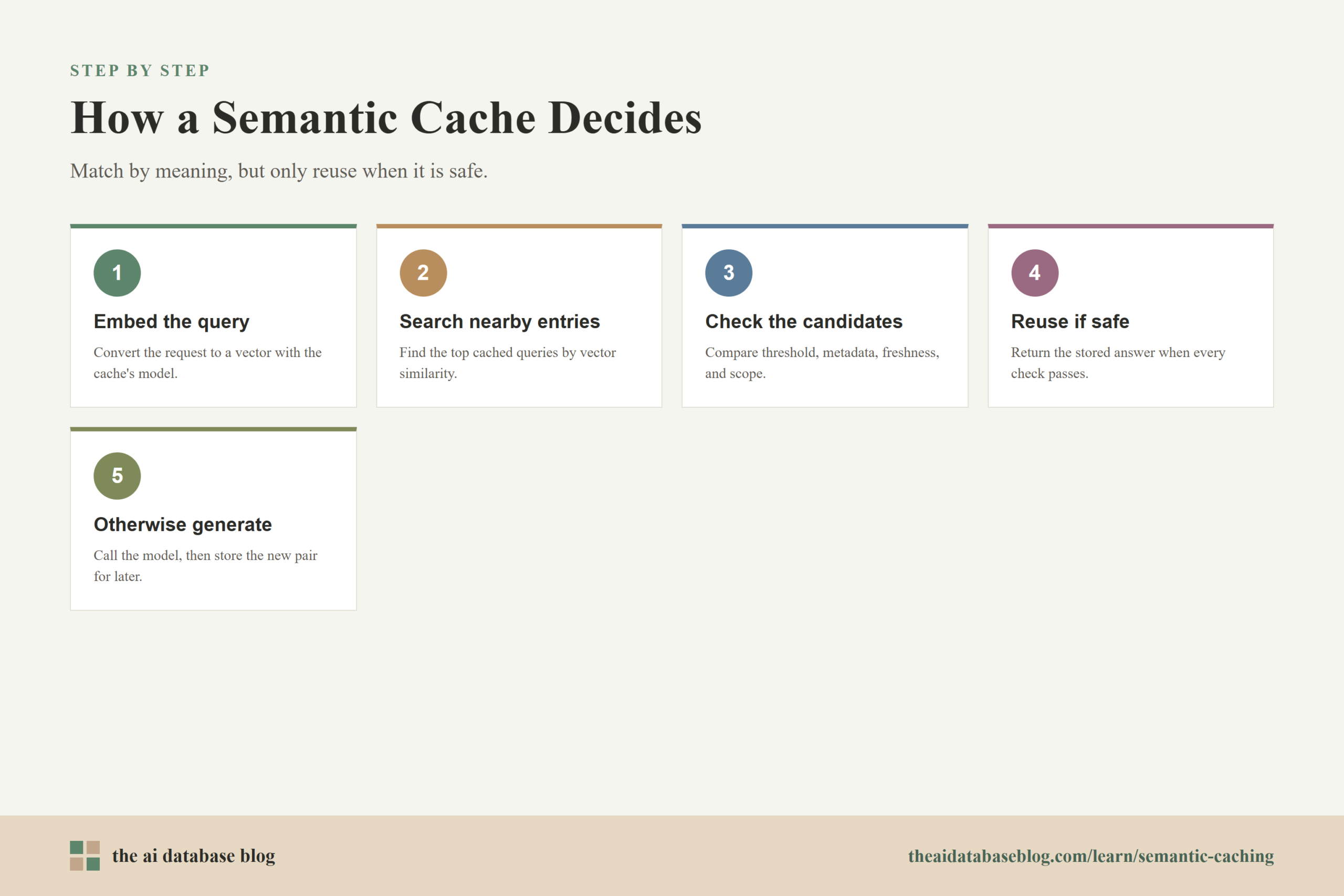
The basic idea is simple. When a user sends a query, the application converts the query into an embedding. An embedding is a numerical representation of text that places similar meanings closer together in vector space. The application then searches a vector index for cached queries with similar embeddings. If the best match passes a similarity threshold, the system can return the cached response instead of calling the LLM again. If no match is safe enough, the system sends the query to the model, stores the new query-response pair, and makes it available for future reuse.
This is why semantic caching is closely connected to AI databases. The cache is not just a simple key-value store. It often needs vector search, metadata filtering, freshness rules, tenant boundaries, observability, and lifecycle management. In many systems, the semantic cache is a small specialized retrieval system that sits in front of the LLM.
The useful question is not only whether two queries sound similar. It is whether the cached answer remains correct, relevant, permitted, and fresh for the new request. That distinction is what separates a convenient optimization from a production-ready semantic cache.
How Caching Responses by Query Meaning Works
A semantic cache usually follows a predictable flow. The application receives a user request, normalizes the parts that matter, embeds the request, searches for similar cached entries, checks the best candidates against policy, and then either serves a cached answer or calls the LLM. Each step gives the system a chance to improve relevance or prevent unsafe reuse.
A typical cache entry includes more than the original user query and the model response. It should also include metadata that helps decide whether the entry can be reused. Useful fields include the embedding model version, creation time, source data version, user or tenant scope, conversation context, tool state, answer type, language, permissions, and any quality score assigned after generation. Without this metadata, the cache may treat two similar-looking requests as interchangeable when they are not.
Query Embedding
The first step is to create an embedding for the incoming query. The embedding model should be consistent with the embeddings already stored in the cache. If the application changes embedding models, it should either re-embed cached entries or keep model-version metadata so it does not compare vectors from incompatible spaces.
For simple stateless questions, the query text may be enough. For conversational applications, the query alone is often not enough. A follow-up question such as “What about the second one?” has little meaning without the previous turn. In those cases, the cache key should include relevant conversation context, or the application should avoid semantic caching for ambiguous follow-ups.
Vector Lookup
After embedding the query, the application searches the cache for nearby vectors. The vector index may use cosine similarity, dot product, or another distance metric depending on the embedding model and database configuration. The search usually returns the top candidate entries with similarity scores.
Returning one nearest neighbor is often not enough for a safe design. It is better to inspect the top few candidates, compare metadata, and reject entries that fail freshness, permissions, category, language, or context checks. A slightly lower-scoring entry with the right metadata can be safer than a high-scoring entry from the wrong domain or outdated source.
Reuse Decision
The reuse decision is the heart of semantic caching. The system asks whether the best candidate is similar enough and safe enough to reuse. This usually starts with a similarity threshold, but it should not end there. A strong cache decision may combine similarity score, metadata filters, answer confidence, source freshness, tenant boundaries, and application-specific rules.
If the entry passes all checks, the cached response is returned. If it fails any required check, the query goes to the LLM. The resulting response can then be stored with its own metadata so the cache improves over time.
This flow explains why semantic caching can be powerful, but it also shows why it cannot be treated as a shortcut around retrieval quality. The cache is making a relevance judgment on behalf of the model. That judgment needs to be observable, testable, and conservative enough for the use case.
How Semantic Caching Cuts Cost and Latency
Semantic caching reduces cost by avoiding repeated LLM inference for questions that have already been answered well enough. In many LLM applications, model calls are among the slowest and most expensive parts of the request path. A vector lookup is usually much cheaper than generating a new response, especially when the original answer would require a long prompt, retrieved context, multiple tool calls, or a large output.
The latency benefit comes from returning a stored response instead of waiting for the model to generate one. This matters most for high-volume applications where users repeatedly ask similar questions, such as support assistants, internal knowledge tools, product help systems, onboarding assistants, policy Q&A systems, and workflow copilots. In these settings, many users may express the same intent with different wording.
The cost benefit is not only the saved completion. A cache hit can also avoid retrieval work, prompt assembly, tool execution, reranking, validation, and model-side reasoning. In a retrieval-augmented generation system, a single response may depend on embedding the query, searching knowledge sources, adding context chunks, and sending a long prompt to the LLM. When the same answer can be reused safely, semantic caching can skip much of that path.
However, the savings depend on hit rate and correctness. A cache that is too conservative may rarely hit, which limits its value. A cache that is too aggressive may save money while quietly harming answer quality. The goal is not the highest possible hit rate. The goal is the highest useful hit rate at an acceptable error rate.
Once cost and latency are understood as tradeoffs rather than guaranteed wins, the next design question becomes practical: how similar is similar enough?
Choosing a Similarity Threshold
The similarity threshold controls when the cache treats a previous query as close enough to answer the new query. A higher threshold means the system requires a stronger match, which usually reduces wrong-answer reuse but creates more cache misses. A lower threshold increases cache hits but raises the chance that the cached response does not fully answer the new request.
There is no universal threshold that works for every application. Scores depend on the embedding model, distance metric, query length, domain vocabulary, language, index configuration, and the type of answer being cached. A threshold that works for short factual support questions may be unsafe for legal policy explanations, medical triage, code generation, account-specific troubleshooting, or any task where small wording differences change the correct answer.
Start with an Evaluation Set
The safest way to choose a threshold is to build a small evaluation set from real or representative queries. Group queries that should share an answer and queries that look similar but require different answers. Then run those queries through the cache candidate selection process and inspect the similarity scores. This helps reveal where correct matches and risky near-matches overlap.
For example, “How do I delete a project?” and “How do I archive a project?” may appear close in embedding space, but they might require different answers in the product. “Can I export my data?” and “Can an admin export another user’s data?” may also be close, while permissions make the second answer different. These examples are especially valuable because they expose the cases where semantic similarity alone is not enough.
Tune by Answer Type
Different answer types deserve different thresholds. Stable informational answers can often tolerate a lower threshold than account-specific, time-sensitive, or procedural answers. A cache for general documentation questions may reuse answers more freely than a cache for billing, security, compliance, or personal data requests.
One practical pattern is to classify queries before caching. Categories such as “definition”, “how-to”, “troubleshooting”, “policy”, “account-specific”, and “fresh-data request” can each have different thresholds and cache rules. Some categories may be cacheable only within a user session. Others may be cacheable across users. Some should bypass semantic caching entirely.
Watch the Margin Between Candidates
The top similarity score is useful, but the gap between the best and second-best candidate can also matter. If the top candidate barely beats several other candidates, the system may be uncertain about intent. In that case, it may be better to call the LLM, ask a clarification question, or use a verification step before returning a cached answer.
Thresholds should be treated as operating parameters, not one-time configuration. As the product changes, the knowledge base changes, query patterns shift, and models are updated, the threshold may need to be retuned. Logs should track cache hit rate, rejection rate, user corrections, downstream errors, and similarity-score distributions so teams can see when the cache is drifting.
A threshold is a useful first gate, but it cannot carry the full responsibility for correctness. The next layer is designing the cache so that similar-but-different questions do not receive the wrong answer.
Avoiding Wrong-Answer Reuse
Wrong-answer reuse is the main risk in semantic caching. It happens when the cache returns a response that was correct for the original query but wrong for the new query. This can be caused by ambiguous context, stale information, permission differences, subtle wording changes, or unsafe shared entries. Because the response may bypass a fresh model call, the application needs guardrails before the answer reaches the user.
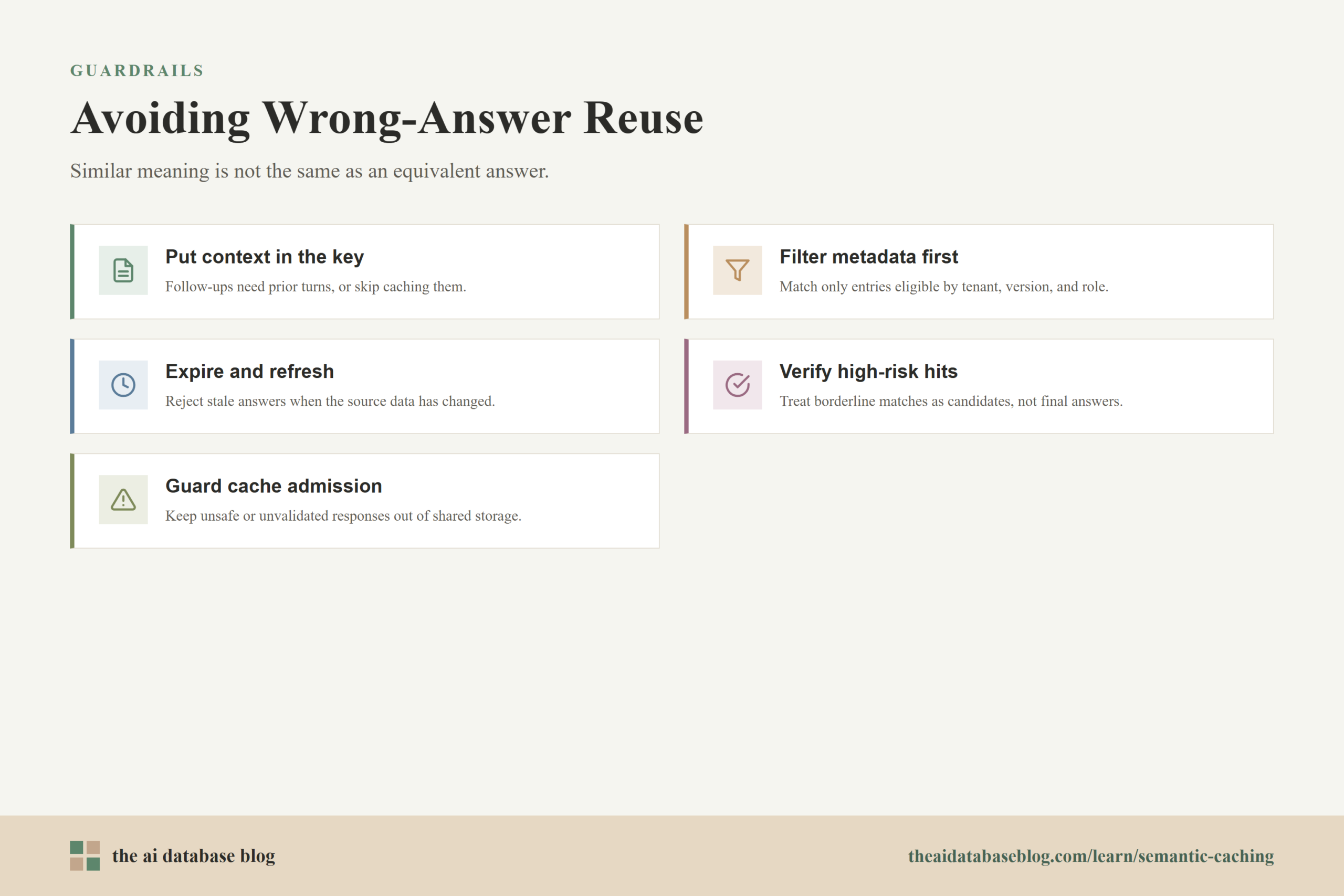
The most important principle is that semantic similarity is not the same as answer equivalence. Two questions can be close in meaning while still requiring different responses. The cache should therefore check whether the cached answer is valid for the new request, not merely whether the cached query is nearby in vector space.
Include Context in the Cache Key
Conversational context can change the meaning of a query. A standalone follow-up like “Can I do that for all users?” is not reusable across conversations unless the system knows what “that” refers to. For chat applications, the cache key should include the relevant prior turns, a compact conversation summary, or a structured representation of the current task state.
If the system cannot capture enough context, it should avoid caching follow-up questions or treat them as session-local only. This prevents an answer from one conversation from leaking into a different conversation where the same short phrase means something else.
Use Metadata Filters Before Similarity
Metadata filters reduce the search space before the vector comparison is trusted. A support assistant might filter by product area, documentation version, language, user role, region, tenant, or permission level. A RAG application might filter by source collection, source freshness, or policy version. These filters help ensure that the cache compares only entries that are eligible for reuse.
This is especially important in multi-tenant systems. A cached response generated from one customer’s data should not be available to another customer unless the content is intentionally public and safe to share. Cross-user semantic caches can be efficient, but they need clear boundaries.
Expire and Refresh Cached Answers
Semantic caches need lifecycle rules. Some answers become outdated quickly because the underlying source data changes. Others remain valid for months. Time-to-live values, source-version checks, and cache invalidation events help prevent stale answers from surviving longer than they should.
For example, a cached answer based on a policy page should include the policy version or last-updated timestamp. If the policy changes, the cache can reject old entries even when the query is semantically similar. Freshness checks are often more reliable than hoping the model will notice outdated information, because a cache hit may skip the model entirely.
Add Verification for High-Risk Matches
For higher-risk tasks, a cache hit can be treated as a candidate answer rather than a final answer. The application can run a lightweight verifier, compare the new query and cached answer against source data, or ask a smaller model whether the cached response fully answers the new query. This adds some latency, but it can still be cheaper than full generation and safer than blind reuse.
Verification is most useful near the threshold, for sensitive categories, or when the top candidate has a weak margin over other candidates. It can also help detect cases where two prompts are structurally similar but differ in a detail that changes the answer, such as a date, number, location, role, or constraint.
Protect the Cache from Unsafe Entries
A semantic cache should not store every model response automatically. Unsafe, low-confidence, private, user-specific, or ungrounded responses may need to be excluded. If an attacker or accidental bad interaction can place a misleading response in a shared cache, later users may receive that response without the normal generation path. This makes cache admission rules as important as cache retrieval rules.
Good cache admission practices include storing only responses that pass validation, isolating tenant-specific entries, avoiding shared caching for sensitive workflows, logging cache provenance, and rejecting entries generated from prompts that triggered safety or policy concerns. The cache should be treated as part of the application state, not as disposable infrastructure.
These safeguards make semantic caching more than a speed optimization. They turn it into a controlled retrieval layer with clear rules about what can be reused, when it can be reused, and who can receive it.
Where Semantic Caching Fits in an AI Database Architecture
In an LLM application, semantic caching usually sits before the expensive generation path. The incoming query first goes through normalization, embedding, and cache lookup. If the cache returns a safe hit, the application responds immediately. If it misses or rejects the candidate, the request continues into retrieval, prompt construction, model generation, validation, and storage of a new cache entry when appropriate.
The AI database layer may support both the knowledge retrieval system and the semantic cache, but they are not the same thing. A RAG database stores source documents, chunks, metadata, and embeddings used to ground new answers. A semantic cache stores previously generated answers and the query contexts that produced them. The RAG database helps the model answer from knowledge. The semantic cache helps the application avoid repeating work when an answer already exists.
A clean architecture keeps these responsibilities separate. The semantic cache should know which response it is returning, why it matched, and what constraints allowed reuse. The knowledge retrieval system should remain available when the cache cannot safely answer. This makes the system easier to evaluate because cache failures and retrieval failures can be measured separately.
Operationally, the cache should expose metrics such as hit rate, miss rate, rejection rate, average similarity score, threshold distribution, answer age, saved model calls, estimated cost savings, and user feedback after cache hits. These metrics help teams avoid the common mistake of celebrating cache hits without measuring whether the reused answers were actually helpful.
Once the architecture is in place, the final design question is whether a semantic cache is appropriate for the workload at all. Some applications benefit immediately. Others are better served by exact caching, prompt caching, retrieval improvements, or no response cache.
When Semantic Caching Is a Good Fit
Semantic caching is most useful when many users ask repeated or paraphrased questions that can safely share answers. It works well for stable informational content, common how-to flows, documentation assistants, internal help desks, educational explanations, and routine troubleshooting. These workloads often have repeated intent, predictable answer formats, and enough tolerance for reuse when the cache is properly filtered.
It is less suitable when the answer depends heavily on private user state, recent data, exact wording, legal interpretation, medical context, financial advice, or changing external conditions. It is also risky for tasks where small differences in numbers, dates, permissions, or entities change the correct output. In those cases, the cache should either be very conservative, limited to intermediate artifacts, scoped to a session, or skipped entirely.
A useful middle ground is to cache only parts of the workflow. Instead of caching the final user-facing answer, the system might cache retrieved context summaries, rewritten queries, tool outputs that are safe to reuse, or verified explanation templates. This can still reduce cost and latency while lowering the chance that a final answer is reused in the wrong situation.
The best semantic cache is designed around the application’s error tolerance. For a casual learning assistant, a cautious cache may be enough. For a system that affects accounts, permissions, transactions, or compliance decisions, every cache hit should be treated as a decision that requires evidence.
Practical Checklist for Building a Safer Semantic Cache
A production semantic cache should be evaluated as part of the application, not just as a database feature. The following checklist can help teams design for both efficiency and answer quality.
- Define which query categories are cacheable and which should always bypass the cache.
- Store enough metadata to evaluate context, permissions, freshness, language, tenant, source version, and answer type.
- Build an evaluation set with both safe paraphrases and dangerous near-matches.
- Choose thresholds by category instead of relying on one global value for every request.
- Use metadata filters before accepting vector similarity as meaningful.
- Reject cache hits when the candidate is stale, out of scope, low confidence, or close to multiple competing entries.
- Use verification for high-risk categories or borderline matches.
- Track user feedback, cache-hit quality, and downstream errors, not only cost savings.
- Expire entries based on the volatility of the underlying information.
- Prevent unsafe or unvalidated responses from entering shared cache storage.
This checklist keeps the design focused on the real goal: reuse answers only when reuse preserves the user’s intent, the application’s rules, and the underlying truth of the response.
FAQs
1. What is semantic caching in an LLM application?
Semantic caching is a way to store previous LLM responses and retrieve them when a new query has the same or very similar meaning. Instead of matching the exact text of the prompt, the system compares embeddings in a vector index and reuses a response when the match is considered safe.
2. How is semantic caching different from exact-match caching?
Exact-match caching only works when the incoming request uses the same cache key as a previous request. Semantic caching can match paraphrases and related wording because it compares meaning through embeddings. This makes it more flexible, but it also introduces the risk of returning an answer that is close but not correct for the new query.
3. Does semantic caching replace retrieval-augmented generation?
No. Semantic caching and retrieval-augmented generation solve different problems. RAG retrieves source information so the model can generate a grounded answer. Semantic caching reuses an answer that has already been generated. A common architecture tries the semantic cache first, then falls back to retrieval and generation when the cache cannot safely answer.
4. What similarity threshold should a semantic cache use?
The right threshold depends on the embedding model, domain, query type, and risk level of the application. A higher threshold is safer but produces fewer hits. A lower threshold increases reuse but raises the chance of wrong-answer reuse. Most teams should tune thresholds with an evaluation set and use different thresholds for different answer categories.
5. What causes wrong-answer reuse in semantic caching?
Wrong-answer reuse happens when two queries are semantically close but require different answers. Common causes include missing conversation context, stale source data, different user permissions, different tenants, subtle wording changes, and cached responses that were never validated before storage.
6. When should an LLM application avoid semantic caching?
An application should avoid or tightly restrict semantic caching when answers depend on private user data, fast-changing information, exact numbers, legal or medical judgment, financial decisions, security permissions, or other high-risk context. In those cases, exact caching, session-local caching, verified intermediate caching, or fresh generation may be safer.
Takeaway
Semantic caching can make LLM applications faster and less expensive by reusing responses based on query meaning, but it should be designed as a controlled AI database retrieval layer rather than a simple shortcut. The guidance is most useful for teams building support assistants, internal knowledge tools, RAG systems, and other high-volume LLM applications where users often ask similar questions. A strong implementation combines embeddings, vector search, metadata filtering, threshold tuning, freshness rules, and verification so that common questions can be answered quickly without increasing the risk of stale, unsafe, or incorrect reuse.
Watch this video to learn more