Multimodal RAG is retrieval-augmented generation that can search across more than one type of content, most commonly text and images, before giving context to a language model. Instead of retrieving only text chunks, a multimodal RAG system can retrieve passages, screenshots, charts, diagrams, product photos, document pages, and other visual evidence in a shared retrieval workflow. The goal is to give the model the kind of evidence a person would need: not just words, but the visual context that may carry important meaning.
This guide explains how multimodal RAG works, why shared embedding spaces matter, where the approach is useful, how to think about embedding choices, and how to prompt a model when the retrieved context includes both text and images. By the end, you should understand the main design decisions behind a multimodal RAG system and how AI databases support retrieval across mixed content.
What Multimodal RAG Means
Traditional RAG usually starts with a text question, retrieves relevant text from a database, and gives that text to a language model as grounding context. Multimodal RAG expands that pattern so the retrieval system can work with different forms of evidence. In a text-and-image system, the retrieved context might include a paragraph from a manual, a screenshot from an interface, a table rendered as an image, and a diagram that explains how a process works.
This matters because many real knowledge sources are not purely textual. A legal filing may include exhibits. A medical or engineering workflow may depend on images. A product catalog may require searching by appearance. A financial report may contain charts that carry information not fully captured in surrounding prose. If the retrieval layer only indexes text, the system may miss the evidence that actually answers the question.
Multimodal RAG does not mean every system must treat every file type the same way. The best design depends on what the user asks, what kind of data exists, and what the final model can understand. Some systems retrieve visual items directly. Others convert images into captions, OCR text, structured metadata, or summaries. Many production systems combine both approaches so visual material is searchable through text and still available as an image when visual inspection matters.
Once the basic idea is clear, the next question is how the database can compare a text query with an image, or compare an image query with text. That is where shared embedding spaces become central.
Retrieving Text and Images in a Shared Space
A shared embedding space is a representation where different content types can be placed into comparable vectors. In a text-image retrieval system, the embedding model maps text and images into a space where semantically related items are close together. A query such as “a wiring diagram showing a failed connection” can be embedded as text and compared with image embeddings for diagrams, screenshots, or page images. The database then returns the nearest items according to vector similarity.
This idea is usually learned through contrastive training. During training, the model sees matched image-text pairs and learns to put matching pairs closer together while pushing unrelated pairs farther apart. The result is not a perfect understanding of every visual detail, but it gives the retrieval system a practical way to search across modalities. A user can ask with words and retrieve images, search with an image and retrieve captions, or combine both query types.
For AI databases, the shared space is the foundation for cross-modal search. Each stored item receives one or more vectors. A text passage may have a text vector. An image may have an image vector. A document page may have a page-image vector, an OCR text vector, and metadata fields such as document type, date, author, product line, or region. At query time, the system searches the relevant vector fields and applies filters or reranking to improve the result set.
Shared space retrieval is useful, but it is not magic. The model may understand broad visual concepts well while missing tiny text, dense tables, small labels, or domain-specific symbols. For that reason, multimodal RAG often works best when it stores several complementary representations of the same source. A diagram can be indexed as an image, as generated descriptive text, and as extracted text if labels are visible. A document page can be indexed as a whole page image and as separate text chunks. This gives the retriever more ways to find the right evidence.
After retrieval has a common comparison layer, the system still needs to decide what kind of content to store and how granular each stored unit should be. Those choices shape relevance more than many teams expect.
How Content Is Indexed for Multimodal RAG
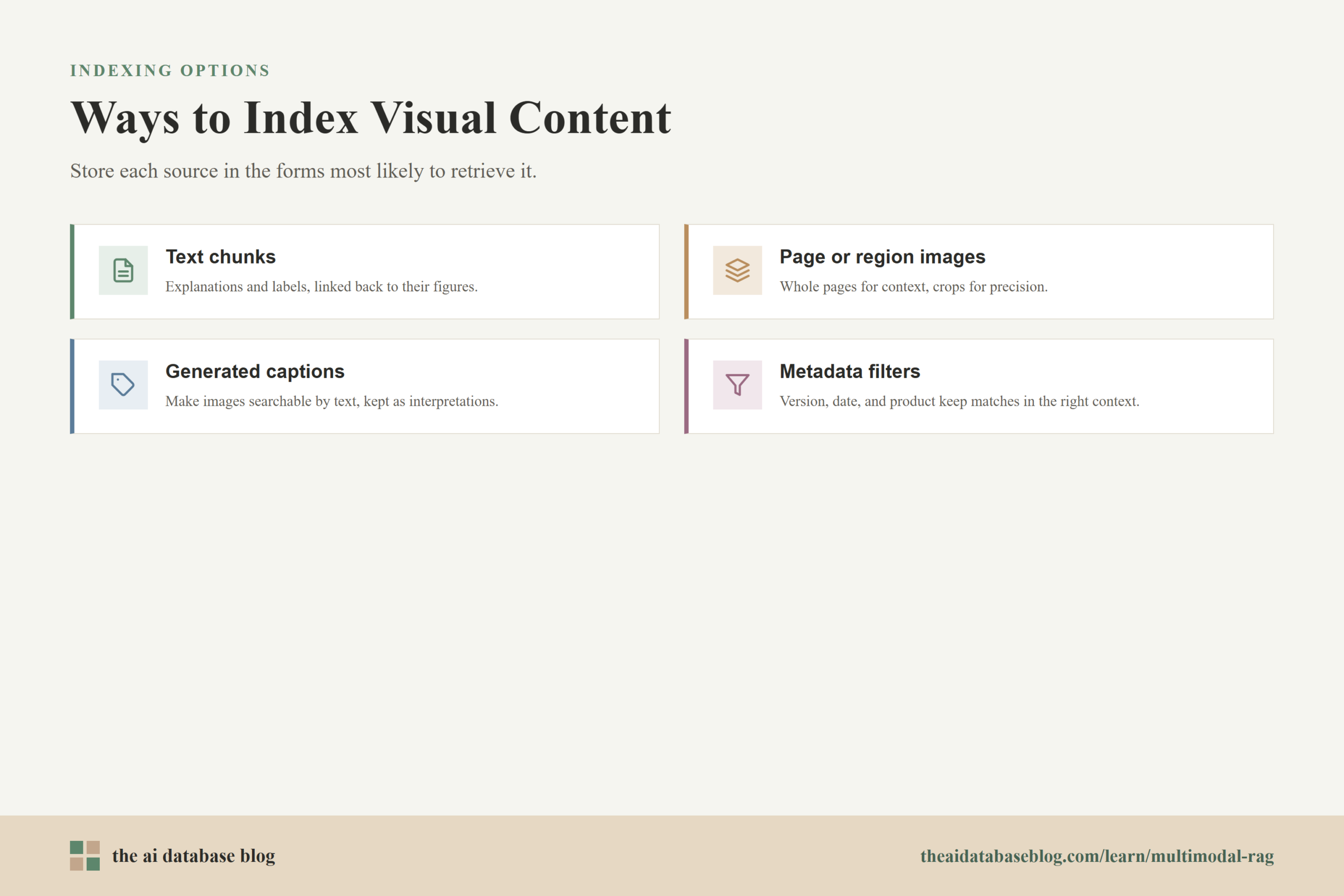
Indexing is where a multimodal RAG system turns source material into searchable objects. A simple system might store each image and each text chunk separately. A more advanced system might preserve relationships between the original page, its visual elements, its OCR text, generated captions, and structured metadata. The right approach depends on whether users need broad discovery, precise question answering, or traceable evidence.
Text Chunks
Text chunks are still important in multimodal RAG. They capture explanations, labels, instructions, policies, and surrounding context that images alone may not express. Good chunking keeps related ideas together without making each chunk so large that retrieval becomes vague. For example, a maintenance guide might chunk each procedure step with nearby warnings and references to figures.
Text chunks should often include pointers back to their source page, image, table, or section. That relationship lets the system retrieve a paragraph and then provide the associated diagram to the model. Without that linkage, the system may retrieve the right words but fail to include the visual evidence that makes the answer reliable.
Images and Page Images
Images can be indexed as standalone assets, document page renderings, screenshots, chart images, or cropped regions. Page-level image indexing is useful for visually rich documents because it preserves layout, tables, annotations, and spatial relationships. Region-level indexing can be better when users need to find a specific chart, object, label, or UI component inside a larger page.
The tradeoff is granularity. Whole-page images preserve context but may be too broad. Cropped images are more precise but can lose surrounding clues. Many systems store both levels: page images for context, regions for precision, and metadata to connect each region back to its parent document.
Generated Captions and Visual Summaries
Captions make images easier to retrieve with text-only queries. A caption might describe a chart trend, a diagram relationship, a screenshot state, or the visible objects in a product image. Captions are especially useful when the embedding model or downstream language model struggles with small text or specialized visual conventions.
However, captions should be treated as helpful interpretations, not as a replacement for the original image. A caption can omit details, simplify relationships, or introduce errors. For high-stakes use cases, the system should keep the original visual asset available and make it clear when an answer is based on visual evidence rather than only generated text.
Metadata and Filters
Metadata helps the retrieval system narrow the search before or after vector matching. Useful metadata can include source type, timestamp, department, document version, product category, customer segment, language, image type, or access permissions. In multimodal RAG, metadata becomes even more important because mixed content can produce broad semantic matches that are plausible but not appropriate for the user’s exact context.
For example, a query about “installation diagram for model A” should not retrieve visually similar diagrams for model B if the product metadata says they are different. Metadata filtering keeps retrieval grounded in the operational facts that embeddings may not reliably enforce.
Indexing gives the system searchable evidence. The next design decision is where multimodal RAG actually adds enough value to justify the extra complexity.
Use Cases for Multimodal RAG
Multimodal RAG is most useful when the answer depends on visual evidence, document layout, or a relationship between text and images. If all important information is already cleanly captured in text, standard RAG may be enough. But when the knowledge base contains charts, figures, screenshots, diagrams, tables, photos, forms, or annotated images, multimodal retrieval can make the system more complete and more reliable.
Document Question Answering
Many business documents combine prose with visual structure. Annual reports, contracts, manuals, policies, research papers, and technical files often include tables, images, and diagrams that are essential to the answer. Multimodal RAG can retrieve the relevant page image along with the matching text chunk, allowing the model to reason over both the written explanation and the visual layout.
Technical Support and Troubleshooting
Support workflows often depend on screenshots, error states, device photos, wiring diagrams, or configuration panels. A user may upload an image and ask what is wrong, or describe a visible state in words. A multimodal system can retrieve similar past cases, relevant documentation, and visual examples that show the correct or incorrect state.
Product and Asset Search
Retail, manufacturing, media, and design teams often need to search by appearance. A text query such as “blue jacket with a quilted pattern” may need to retrieve images, while an uploaded image may need to retrieve product descriptions, inventory records, or similar assets. Shared embeddings make this kind of cross-modal discovery possible.
Charts, Dashboards, and Data-Rich Visuals
Some questions depend on charts or dashboards rather than raw text. A system may need to retrieve a chart that shows a trend, then pair it with surrounding commentary or underlying metric definitions. In these cases, captions and OCR can help, but the model may still need the image itself to verify labels, axes, and visual relationships.
Training, Compliance, and Field Operations
Teams that work with procedures, inspections, safety checks, or compliance documentation often rely on photos and diagrams. Multimodal RAG can retrieve the correct procedure, the image that demonstrates it, and the relevant rule or checklist. This is useful when workers ask practical questions that combine written requirements with visual interpretation.
These use cases show why multimodal RAG is attractive, but they also reveal an important practical issue: not every embedding approach fits every kind of content. Choosing embeddings carefully is one of the main engineering decisions.
Embedding Choices for Multimodal RAG
Embedding choice determines what the system can retrieve well. A text embedding model may be excellent for policy documents but unable to directly compare a query with an image. A multimodal embedding model may handle image-text similarity but underperform on dense legal prose or code-like technical language. A strong multimodal RAG system usually starts by matching the embedding strategy to the content and task rather than assuming one model should handle everything.
Single Shared Multimodal Embeddings
A single shared multimodal embedding model is the most direct approach. It embeds text and images into the same vector space, allowing one similarity search to compare different modalities. This is useful for cross-modal retrieval, such as text-to-image search, image-to-text search, and mixed result ranking.
The benefit is simplicity. The system can use one vector space for broad retrieval across content types. The limitation is that a single vector may compress too much information, especially for detailed document pages or complex images. If the task requires fine-grained matching, a single embedding per item may not be enough.
Separate Text and Image Embeddings
Another approach is to use specialized embeddings for each modality. Text chunks use a text embedding model, images use an image or vision-language embedding model, and the retrieval system combines results from multiple searches. This can improve quality when each modality needs a different model, but it requires careful score normalization and result merging.
Separate embeddings are common when text retrieval and visual retrieval have different quality requirements. For example, policy text may need a text model tuned for semantic precision, while screenshots may need a vision-language model that understands interface states. The database can store multiple vector fields per object and search the most relevant fields for each query.
Multi-Vector and Late Interaction Retrieval
Multi-vector retrieval stores several vectors for one item rather than forcing the entire item into one vector. This is useful for long documents, detailed pages, and images with multiple meaningful regions. Late interaction methods compare query vectors with multiple candidate vectors and combine those interactions into a relevance score.
The benefit is better fine-grained matching. The cost is more storage, more compute, and more complex retrieval infrastructure. This approach is often worth considering for visually rich document retrieval, where a page contains many separate signals such as titles, tables, figures, labels, and body text.
Text Conversion Before Embedding
Some systems convert images into text before retrieval by using OCR, captioning, object detection, or visual summarization. This makes visual content searchable through standard text retrieval and can be easier to integrate into an existing RAG pipeline. It is especially useful when the downstream model is text-only or when the most important visual information is visible text.
The downside is information loss. A caption may say “a line chart showing revenue growth” but miss the exact slope, axis labels, legend, or outlier. OCR may capture text but lose layout. Text conversion works best as an additional representation, not as the only representation, when the image itself contains important evidence.
Hybrid Retrieval
Hybrid retrieval combines vector search with keyword search, metadata filters, or structured constraints. In multimodal RAG, hybrid retrieval is often valuable because visual similarity alone may retrieve items that look right but are wrong in context. Keyword matches, OCR terms, product identifiers, document titles, and metadata can keep results grounded.
A practical pattern is to retrieve a broad set of candidates using vector search, filter by metadata, rerank with a stronger model, and then assemble a final context package for generation. This pattern gives the system room to find semantically related evidence while still enforcing domain constraints.
Once the system retrieves the right candidates, it still has to present them to the language model in a useful way. Multimodal RAG often succeeds or fails at this handoff stage.
Prompting an LLM With Multimodal Context
Prompting with multimodal context means giving the model both the user’s question and the retrieved evidence in a format it can use. If the final model can process images, the prompt can include retrieved images or page screenshots along with text snippets and metadata. If the final model is text-only, the system must convert visual evidence into text first. The prompting strategy should match the model’s actual input capabilities.
Keep the Evidence Clearly Labeled
Each retrieved item should have a clear source label. The prompt can identify whether a piece of context is a text passage, a page image, a cropped diagram, a chart, a screenshot, or a generated caption. This helps the model distinguish between original evidence and interpreted evidence. It also makes the answer easier to trace back to the retrieved source.
For example, a context package might include “Text excerpt from page 12,” “Image of figure 3,” and “Generated caption for figure 3.” The model can then use the text for exact wording, the image for visual verification, and the caption as a quick guide.
Ask the Model to Ground Claims in Retrieved Evidence
The prompt should instruct the model to answer using the provided context and to avoid relying on unsupported assumptions. This is especially important for multimodal RAG because visual matches can be suggestive rather than definitive. A retrieved image may look relevant but belong to the wrong product, time period, or scenario.
A useful instruction is to tell the model to cite or refer to the evidence by source label when explaining its answer. Even if the final article, chatbot, or application does not expose formal citations, source-aware prompting helps keep the model’s reasoning tied to retrieved material.
Control How Much Context Is Included
More context is not always better. Too many images, captions, and text chunks can crowd the context window and distract the model. Multimodal inputs may also consume more context budget than plain text. The system should select the smallest set of evidence that can answer the question reliably.
Reranking is useful here. The retriever can gather candidates broadly, while a reranker chooses the most relevant items for the final prompt. For image-heavy tasks, reranking can also reduce positional bias by ensuring that the best evidence is placed where the model is most likely to use it effectively.
Preserve Visual Context When It Matters
When the answer depends on layout, shape, color, relative position, chart structure, or visible objects, the prompt should include the image itself if the model supports visual input. A generated caption alone may be too thin. The model should be able to inspect the retrieved visual evidence, not only read a summary of it.
At the same time, images should not be thrown into the prompt without guidance. The prompt should tell the model what to inspect, such as the highlighted region, the chart axis, the warning label, or the relationship between two visual elements. This keeps the visual reasoning focused on the user’s question.
Separate Retrieval Context From User Instructions
A clean prompt separates the user’s task from the retrieved context. The model should know which text is the user’s question, which content was retrieved, and what answer format is expected. This reduces confusion and makes it easier to update the prompt template as the system evolves.
A practical prompt structure is: user question, retrieved evidence list, source labels, answer rules, and output format. For multimodal context, the evidence list should include both text and image references in the order the model should inspect them.
Good prompting makes retrieved evidence usable, but the system also needs evaluation. Without evaluation, it is hard to know whether multimodal retrieval is actually improving answers or only making the pipeline more complex.
Evaluation and Practical Design Tradeoffs
Evaluating multimodal RAG requires looking at both retrieval quality and answer quality. Retrieval evaluation asks whether the system found the right text, image, page, region, or metadata-constrained item. Answer evaluation asks whether the final model used that evidence correctly. A system can fail at either stage: it may retrieve the wrong visual evidence, or it may retrieve the right evidence and still produce an unsupported answer.
Common retrieval metrics include recall at a chosen result count, precision, ranking quality, and whether the correct evidence appears near the top. For multimodal systems, teams may also evaluate text-to-image, image-to-text, image-to-image, and mixed retrieval separately. This matters because a model that performs well for text queries may perform poorly when the user uploads an image as the query.
Answer evaluation should include faithfulness, completeness, visual grounding, and source traceability. If the model describes a chart, can the description be verified against the chart? If it answers a product question, did it use the right product image and metadata? If it explains a diagram, did it preserve the actual relationship shown in the visual?
The main tradeoffs are quality, latency, storage, and complexity. Storing multiple vectors per item can improve retrieval but increase cost. Passing images into the model can improve grounding but consume more context budget. Captioning images can simplify retrieval but introduce interpretation errors. Hybrid retrieval can improve precision but requires tuning. The best system is usually the one that matches the use case closely, not the one that uses the most advanced architecture by default.
These tradeoffs lead to a practical architecture pattern: start with the evidence users actually need, index each item in the forms most likely to retrieve it, preserve links between modalities, and evaluate whether the final answers improve.
A Practical Architecture for Multimodal RAG
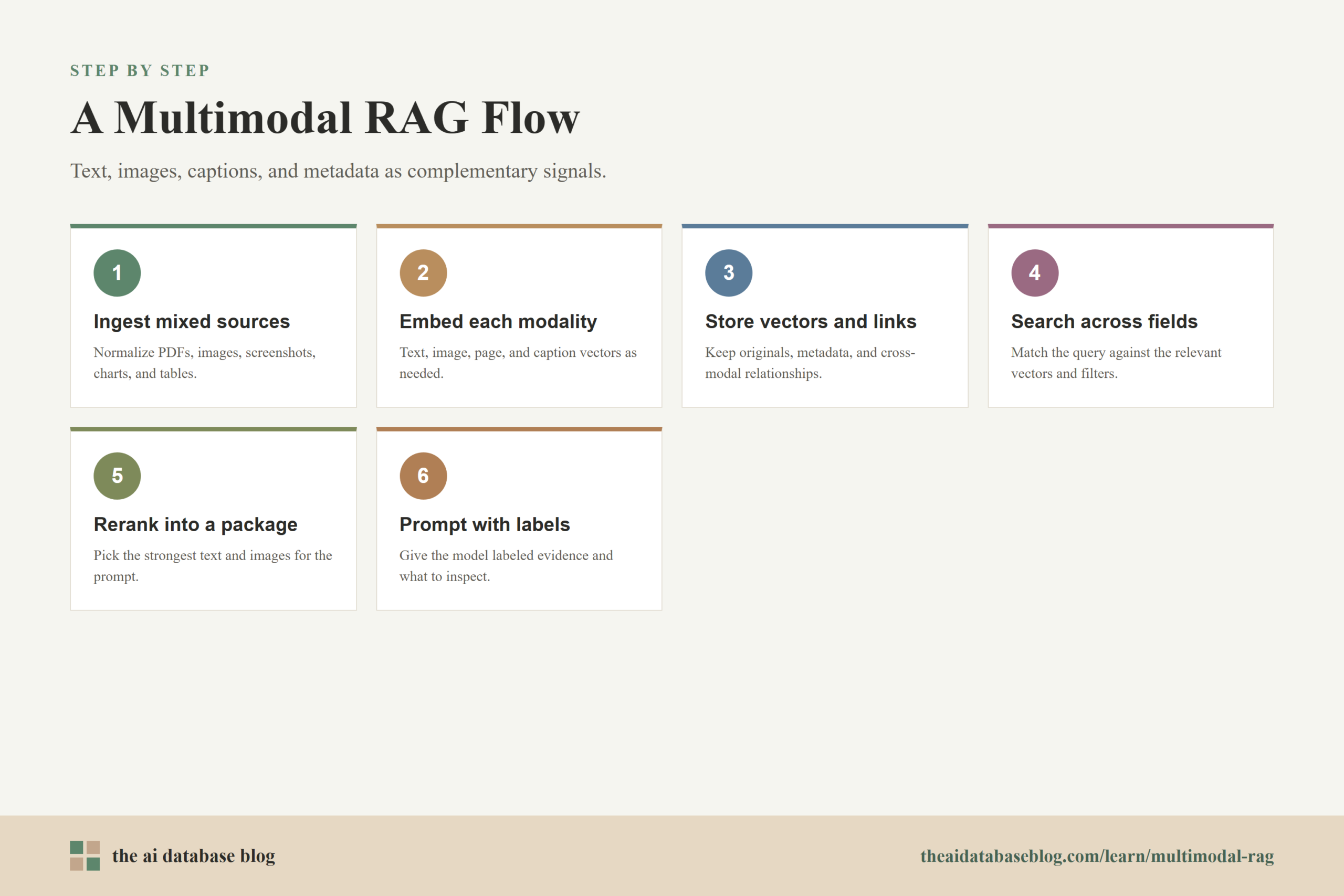
A practical multimodal RAG architecture begins with ingestion. Source documents, images, screenshots, tables, charts, and PDFs are collected and normalized. The system extracts text where available, renders pages or visual elements when needed, generates captions or summaries when helpful, and stores metadata that will support filtering and traceability.
Next, the system creates embeddings. Text chunks may receive text embeddings. Images may receive multimodal embeddings. Page images may receive visual document embeddings. Captions may receive text embeddings. The AI database stores these vectors along with the original content, source references, and relationships between related objects.
At query time, the system determines what kind of search to run. A text question might search text vectors, image vectors, captions, and metadata. An uploaded image might search visual vectors and then retrieve associated text. A query about a specific product, date, or document type may apply filters before ranking results.
The retrieved candidates are then reranked and assembled into a context package. The final prompt includes the user question, the strongest text evidence, the most relevant images or page views, source labels, and instructions for using the context. The model generates an answer that is grounded in the retrieved evidence, and the system may return source references so users can inspect the underlying material.
This architecture is flexible because it does not assume one representation is always best. It treats text, images, captions, metadata, and source links as complementary signals. That is the core strength of multimodal RAG: it gives the model a richer evidence base while keeping retrieval organized enough to remain useful.
Common Mistakes to Avoid
Multimodal RAG can become complicated quickly, so it helps to avoid a few common mistakes early. The first is indexing images only as captions and discarding the original visual evidence. Captions are useful, but they are lossy. If the image contains important spatial, numeric, or visual details, the system should keep the image available for model inspection or user review.
The second mistake is assuming that a shared embedding space removes the need for metadata. Embeddings capture semantic similarity, but they may not enforce product versions, dates, permissions, geography, or document status. Metadata filters are often what keep a plausible match from becoming a wrong answer.
The third mistake is overloading the prompt with every retrieved item. Multimodal context can be expensive and distracting. It is better to retrieve broadly, rerank carefully, and give the model a focused set of evidence. The model should receive enough context to answer, not a noisy pile of loosely related material.
The fourth mistake is evaluating only the final answer. If an answer is wrong, the team needs to know whether retrieval failed, reranking failed, prompting failed, or the model failed to interpret the image. Evaluating each stage separately makes the system easier to improve.
With these pitfalls in mind, the final step is to answer the most common questions teams ask when deciding whether and how to use multimodal RAG.
FAQs
1. What is multimodal RAG?
Multimodal RAG is retrieval-augmented generation that retrieves and uses more than one type of content, such as text and images, to help a model answer a question. It extends standard RAG by allowing the system to search visual evidence, document pages, screenshots, charts, diagrams, or image captions alongside text passages.
2. Why use a shared embedding space for text and images?
A shared embedding space lets the system compare text and images using vector similarity. This means a text query can retrieve relevant images, an image query can retrieve related text, and mixed content can be ranked in one retrieval workflow. It is especially useful when users describe visual content in words or upload images as part of the query.
3. Should images be embedded directly or converted into text first?
Both approaches can be useful. Direct image embeddings preserve visual information and support cross-modal search. Text conversion through OCR, captions, or summaries makes images easier to search with standard text retrieval. For many systems, the best approach is to store both the original image representation and a text representation, then use each one where it is strongest.
4. What kinds of applications benefit most from multimodal RAG?
Multimodal RAG is valuable for document question answering, technical support, product search, chart analysis, training workflows, compliance review, design research, and field operations. It is most useful when the answer depends on visual details, document layout, diagrams, screenshots, or the relationship between written and visual evidence.
5. How should retrieved images be included in an LLM prompt?
If the model supports visual input, retrieved images should be included with clear source labels, related text snippets, and instructions about what the model should inspect. If the model is text-only, the system should provide OCR, captions, or visual summaries instead. In both cases, the prompt should distinguish original evidence from generated descriptions.
6. How do you evaluate a multimodal RAG system?
Evaluation should measure retrieval quality and answer quality separately. Retrieval evaluation checks whether the correct text, image, page, or region was found and ranked highly. Answer evaluation checks whether the model used the evidence accurately, avoided unsupported claims, and produced a response that can be traced back to the retrieved context.
Takeaway
Multimodal RAG helps AI systems answer questions when important knowledge lives across both text and images. It is useful for teams working with visually rich documents, product images, screenshots, diagrams, charts, and operational knowledge where text-only retrieval misses key evidence. The main design choices are how to index each modality, which embeddings to use, how to combine vector search with metadata and reranking, and how to prompt the model with focused multimodal context. For a use case such as technical support, this means a system can retrieve the relevant troubleshooting text, the matching device image, and a diagram of the correct setup before generating an answer that is more grounded than text alone.
Watch this video to learn more