Multimodal embeddings are numerical representations that place different types of data, such as text, images, audio, video, and documents, into a shared vector space so they can be searched and compared by meaning. Instead of treating a product photo, a written description, and a spoken query as unrelated formats, a multimodal embedding model maps them into comparable coordinates. This makes cross-modal search possible, including examples like using text to search images, using an image to find similar products, or retrieving diagrams and documents that match a natural language question.
This guide explains how multimodal embeddings work, why shared embedding spaces matter for AI databases, how CLIP-style models learn from paired data, and how cross-modal search is used in real applications such as visual product search. By the end, you should understand the core idea, the training pattern behind many multimodal systems, the role of vector databases, and the practical tradeoffs that affect relevance, performance, and application design.
How Multimodal Embeddings Represent Different Data Types
Multimodal embeddings begin with a simple but powerful goal: represent different kinds of content in a format that can be compared. A text sentence is not naturally shaped like an image, and an image is not naturally shaped like a video clip or audio recording. Embedding models solve this by converting each input into a vector, which is a list of numbers that captures useful patterns in the input.
For a text-only embedding model, the vector usually represents the meaning of a phrase, sentence, paragraph, or document. For an image embedding model, the vector may represent visual features such as objects, colors, composition, texture, layout, or higher-level concepts. A multimodal embedding model tries to align these representations so that content with related meaning lands near each other, even when it comes from different formats.
For example, a photo of a red running shoe and the phrase “red running shoe with white sole” should produce vectors that are close together. The model does not need the image and text to look alike as raw data. It only needs to learn that they refer to the same or similar concept.
Once different data types can be represented as vectors, an AI database can store them, index them, and retrieve them by similarity. This is the foundation that allows multimodal search systems to go beyond keyword matching and work with meaning across formats.
Understanding vectors explains the basic representation step, but the more important question is how different modalities end up in the same space. That shared space is what separates a basic image embedding system from a true multimodal retrieval system, because it allows one type of input to search another type of content.
Mapping Multiple Data Types Into One Shared Space
A shared embedding space is a coordinate system where related items are positioned near each other, even if they were created from different data types. In a multimodal system, the model may use separate encoders for each modality, such as one encoder for text and another for images. Each encoder produces vectors with the same dimensional shape, making it possible to compare them with similarity measures such as cosine similarity or dot product.
CLIP is a well-known example of this approach for text and images. In a CLIP-style architecture, one encoder turns images into vectors while another encoder turns text into vectors. The training process encourages the image vector and the matching text vector to be close together, while pushing unrelated image-text pairs farther apart.
This shared-space design is useful because it creates a bridge between formats. A person can type “minimal black desk lamp,” and the system can retrieve product images whose vectors sit near that text vector. The query and the stored result do not need to be the same data type, because the comparison happens in the shared embedding space rather than in the original raw format.
The same idea can extend beyond text and images. Modern multimodal embedding systems may map text, screenshots, diagrams, video clips, audio recordings, and document pages into one searchable space. The implementation details vary, but the practical goal is the same: make different forms of content comparable by meaning.
Once multiple formats are mapped into one space, search can become much more flexible. The next step is to understand what cross-modal search actually does in an AI database and why it changes the way applications retrieve information.
What Cross-Modal Search Means
Cross-modal search means using one type of input to retrieve another type of output. Instead of searching text with text, the system might use a text query to retrieve images, use an image query to retrieve product records, or use a video frame to retrieve related documentation. The search engine compares vectors, so the original format of the query does not have to match the original format of the stored content.
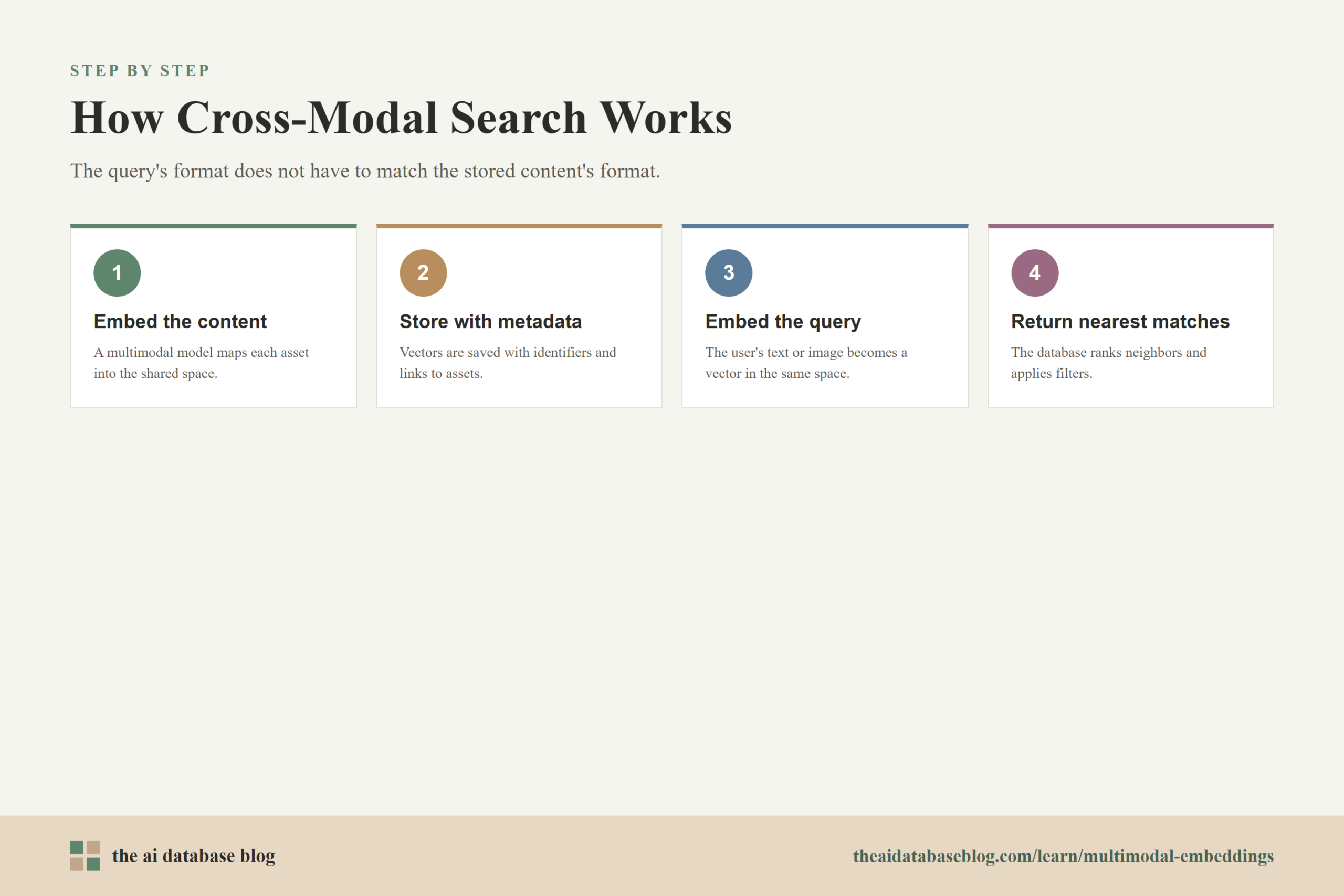
In an AI database workflow, cross-modal search usually follows a few steps. First, content is embedded with the appropriate multimodal model. Second, the vectors are stored alongside metadata, identifiers, and links to the original assets. Third, a user query is embedded into the same vector space. Finally, the database returns the nearest vectors, often with filters or ranking logic applied.
A simple text-to-image search might work like this:
User query: "blue ceramic mug with a handle"
Embedding model: converts the query into a text vector
AI database: searches stored image vectors in the same space
Results: product images that visually match the phrase
Cross-modal search can also work in the opposite direction. A user can upload a photo of a chair and search for similar catalog items, related replacement parts, or written descriptions that match the object in the image. The query is visual, but the returned results may include images, text records, or structured product entries.
This kind of search is not limited to e-commerce. It can support media archives, insurance claims, design asset libraries, medical imaging workflows, customer support systems, and enterprise knowledge retrieval. In each case, the database is not merely storing vectors; it is making content searchable across the boundaries that usually separate media types.
Cross-modal retrieval depends heavily on how well the model learned alignment between formats. To understand why some systems work well and others return odd matches, it helps to look at how multimodal embedding models are trained.
How Training On Paired Data Creates Alignment
Many multimodal embedding models learn from paired data, which means examples where two different formats describe the same thing. The most common example is an image paired with a caption, title, alt text, label, or nearby natural language description. During training, the model learns that the image and its matching text should be close in vector space, while mismatched pairs should be farther apart.
This is often done with contrastive learning. The model sees a batch of image-text pairs and tries to identify which text belongs with which image. If a photo of a mountain is paired with the caption “snow-covered mountain at sunrise,” the model is rewarded for making those two vectors similar and penalized when unrelated captions score too highly.
The important point is that the model is not simply memorizing labels. It learns patterns that connect visual features with language. Over many examples, it can learn that “sofa,” “couch,” “living room seating,” and an image of upholstered furniture may be semantically related, even when the exact words do not appear in every training example.
Paired training is powerful, but it is not perfect. The model can inherit noise from weak captions, incomplete metadata, ambiguous language, and biased training data. It may also struggle with fine-grained details such as exact counts, small text in images, product compatibility, measurements, or subtle differences between visually similar items.
For AI database design, this means the embedding model is only one part of the retrieval system. The database, metadata model, filters, reranking steps, and evaluation process all matter when turning multimodal embeddings into reliable search results.
After training explains how alignment is created, the practical question becomes how to use that alignment in a real application. Visual product search is one of the clearest examples because it combines images, text, metadata, and user intent in a way that many readers can recognize.
Example Application: Visual Product Search
Visual product search lets a user search a catalog using an image, text, or both. A shopper might upload a photo of a jacket and ask for similar items, or type “green velvet sofa with gold legs” and expect visual matches rather than pages that merely contain those words. Multimodal embeddings make this possible by representing product images and product language in the same searchable space.
A typical visual product search system stores an embedding for each product image, along with product metadata such as category, brand, color, size, price, availability, and material. When a user enters a text query or uploads an image, the system embeds the query and searches for nearby product vectors. Metadata filters can then narrow the result set, such as only showing in-stock products under a certain price or within a specific category.
This approach is helpful because product discovery often starts with vague or visual intent. A shopper may not know the exact name of a style, but they may know what it looks like. Multimodal search allows the system to respond to concepts like “modern,” “formal,” “similar shape,” or “same pattern” better than a pure keyword system can.
However, visual product search also shows why embeddings need supporting structure. If the user searches for “waterproof hiking boot size 10,” the vector may help find visually relevant boots, but structured metadata is better for size and waterproofing requirements. A strong AI database design combines vector similarity with metadata filtering so the results are both visually relevant and practically usable.
The product-search example shows the value of multimodal embeddings in a concrete setting, but the same architecture appears in many AI systems. The next section generalizes the pattern so it is easier to apply across other retrieval use cases.
Common AI Database Patterns For Multimodal Embeddings
AI databases make multimodal embeddings useful by giving applications a place to store, index, search, filter, and update vectors at scale. The database does not create the meaning by itself. Instead, it manages the vectors produced by embedding models and provides the retrieval tools needed to turn those vectors into application results.
One common pattern is to store each asset with one or more embeddings. A product may have an image embedding, a text-description embedding, and a combined product-summary embedding. A support article may have embeddings for its text, diagrams, screenshots, and attached videos. The right structure depends on whether the application needs one unified search path or separate retrieval paths for different modalities.
Another pattern is hybrid retrieval. A system may combine vector search with keyword search, metadata filters, and reranking. This matters because embeddings are strong at semantic similarity, while keyword and metadata systems are often better for exact constraints, names, identifiers, dates, prices, and compliance-sensitive terms.
Multimodal RAG is another important pattern. In a retrieval-augmented generation system, the application may retrieve images, charts, screenshots, document pages, or audio-derived records before generating an answer. The retrieval layer helps the model ground its response in relevant content, while the embedding database helps locate that content across formats.
These patterns are useful, but they require careful choices. A team needs to decide which content to embed, which metadata to store, how to handle updates, how to evaluate relevance, and whether the application needs text-to-image, image-to-image, image-to-text, or fully mixed retrieval.
Design patterns help organize the system, but they do not remove the need to measure quality. Multimodal embeddings can feel impressive in demos while still failing on important edge cases, so the next question is how to think about relevance and limitations.
Practical Tradeoffs And Limitations
Multimodal embeddings are useful because they make different data types searchable by meaning, but they are still approximate representations. A vector captures patterns that the model learned, not a complete understanding of every detail in the original content. This is why a retrieval system can return results that are semantically close but still wrong for the user’s exact need.
One limitation is detail sensitivity. A model may understand that an image contains a handbag, but it may miss the exact hardware finish, interior pocket layout, or small logo placement. In a product setting, those differences can matter. In a technical-support setting, a small diagram label or warning symbol may completely change the meaning of a result.
Another limitation is modality imbalance. A model may perform better on image-text retrieval than on audio, video, or visually complex documents, depending on how it was trained. Even when a model supports many input types, each modality should be evaluated with realistic queries and content from the actual application domain.
Latency and cost also matter. Embedding large image collections, videos, or document libraries can require more processing than embedding short text. Query-time workflows may also involve additional steps such as image preprocessing, frame extraction, reranking, or metadata filtering. These steps can improve quality, but they add engineering complexity.
The best practical approach is to treat multimodal embeddings as a retrieval foundation rather than a complete answer. Pair them with structured metadata, clear evaluation sets, human review for high-risk domains, and careful monitoring of search failures. This creates a system that benefits from semantic flexibility without pretending that vector similarity is perfect.
With the benefits and tradeoffs in view, it becomes easier to decide where multimodal embeddings fit. They are strongest when the application needs to connect meaning across formats, especially when users cannot express their intent through exact keywords alone.

When Multimodal Embeddings Are A Good Fit
Multimodal embeddings are a good fit when the application needs to search, compare, or organize content across different media types. They are especially useful when visual, spoken, or document-based information carries meaning that would be lost in a text-only index. If users need to search images with text, find related media from an uploaded file, or retrieve mixed evidence for an AI answer, multimodal embeddings can provide the shared representation layer.
They are also useful when metadata alone is incomplete. Many media collections have weak tags, inconsistent naming, or missing descriptions. A multimodal embedding model can make that content discoverable by interpreting the content itself, then allowing the AI database to retrieve similar items even when the exact words are absent.
They are less useful when the task is mostly exact lookup. If the user needs a specific order number, SKU, legal clause, or timestamp, structured fields and keyword systems may be more reliable. In many production systems, the strongest design combines multimodal vector search with exact search and filtering rather than choosing only one method.
A practical rule is to use multimodal embeddings when meaning crosses format boundaries. If the query and the best result may not have the same data type, a shared embedding space is often the right foundation. If the query requires strict facts, constraints, or identifiers, embeddings should be supported by structured retrieval logic.
This brings the concept full circle: multimodal embeddings are not just a machine learning technique, but a database and retrieval design choice. The FAQ section answers common questions that come up when teams consider using them in real systems.
FAQs
1. What is a multimodal embedding?
A multimodal embedding is a vector representation that can encode more than one type of data, such as text and images, into a comparable numerical format. The goal is to let a system compare meaning across formats instead of being limited to one type of input and one type of result.
2. How is a multimodal embedding different from a text embedding?
A text embedding represents written language, while a multimodal embedding can represent multiple formats in a shared space. A text embedding is useful for semantic document search, but a multimodal embedding can support tasks like searching images with a sentence or finding text records related to an uploaded image.
3. Why is CLIP important for multimodal embeddings?
CLIP is important because it popularized a practical way to align images and text through contrastive training on paired data. It showed how separate encoders for images and text could produce vectors that are comparable in the same embedding space, enabling flexible image-text search and classification workflows.
4. What does cross-modal search mean?
Cross-modal search means using one type of input to retrieve another type of content. For example, a user might type a text query and retrieve images, upload an image and retrieve similar products, or search a document collection using a screenshot or diagram.
5. Do multimodal embeddings replace metadata?
No. Multimodal embeddings are good at semantic similarity, but metadata is still important for exact constraints such as price, size, date, category, permissions, availability, or product identifiers. In production systems, embeddings and metadata usually work together.
6. What are common use cases for multimodal embeddings?
Common use cases include visual product search, media library search, document retrieval with charts or screenshots, multimodal RAG, design asset discovery, image-to-text retrieval, video search, and support systems that need to search across diagrams, screenshots, and written instructions.
Takeaway
Multimodal embeddings make it possible to represent different data types in a shared vector space, allowing AI databases to search across text, images, audio, video, and documents by meaning rather than by exact format. This is useful for teams building retrieval systems where user intent may be visual, textual, or mixed, such as visual product search, media discovery, multimodal RAG, and knowledge systems that include screenshots or diagrams. The key lesson is that multimodal embeddings work best as part of a broader retrieval design that combines shared-space similarity with metadata, filtering, evaluation, and careful attention to the limits of the model.
Watch this video to learn more