Migrating between vector databases is not only a data copy task. A reliable migration preserves vectors, metadata, IDs, embedding provenance, query behavior, filtering logic, and search quality while rebuilding the target system with equivalent schemas and index settings. The safest approach is to export a complete portable dataset, recreate the target schema and indexes deliberately, validate recall parity against a measured baseline, and cut over through a staged process that keeps the old database available until the new one proves it can serve production traffic.
This guide explains how to plan a vector database migration from the application and retrieval perspective. It covers what to export, how to rebuild collections and indexes, how to compare search quality before and after the move, and how to reduce downtime during the final cutover. By the end, you should understand how to treat a migration as a controlled retrieval-system change rather than a simple infrastructure swap.
Why Vector Database Migrations Need More Care Than Ordinary Data Moves
A vector database stores data that is both structural and behavioral. The structural part includes object IDs, embeddings, text chunks, metadata fields, namespaces, tenants, and access-control fields. The behavioral part includes the distance metric, index type, filtering behavior, ranking pipeline, hybrid search settings, query-time parameters, and the way the application interprets retrieved results. If either side changes unexpectedly, the application may still run but return different answers.
This is why vector database migrations should be planned around retrieval equivalence, not just row counts. Two systems can contain the same number of vectors and still behave differently because one uses cosine similarity while the other uses dot product, one applies filters before vector search while another applies them after search, or one index is tuned for lower latency at the cost of recall. For retrieval-augmented generation, recommendation, semantic search, and similar workloads, those differences directly affect what users see.
The practical goal is not to make the target database identical in every internal detail. Different vector databases may use different index implementations, storage layouts, and query planners. The goal is to preserve the application contract: the same queries should return sufficiently similar candidates, with acceptable latency, correct filtering, stable IDs, and no lost metadata.
Once the migration is framed this way, the first question becomes simple: what must be exported so the target system can rebuild the same retrieval behavior?
Exporting Vectors And Metadata
The export should capture everything needed to reconstruct the searchable corpus, not only the raw embedding arrays. A complete export usually includes the vector ID, embedding vector, original text or chunk reference, metadata payload, namespace or collection name, tenant or access-control fields, embedding model information, vector dimension, distance metric, timestamps, and any fields used for filtering or reranking. Without these details, the target database may contain the vectors but lack the context needed to retrieve, filter, cite, or debug them correctly.
Use a portable export format that is easy to validate before import. For smaller migrations, JSON Lines can be convenient because each line represents one object with its vector and metadata. For larger migrations, columnar formats such as Parquet are often easier to compress, inspect, and process in batches. The format matters less than the discipline: every exported record should have a stable primary key, a vector of the expected dimension, metadata that can be parsed reliably, and enough provenance to explain how the embedding was created.
What To Include In Each Exported Record
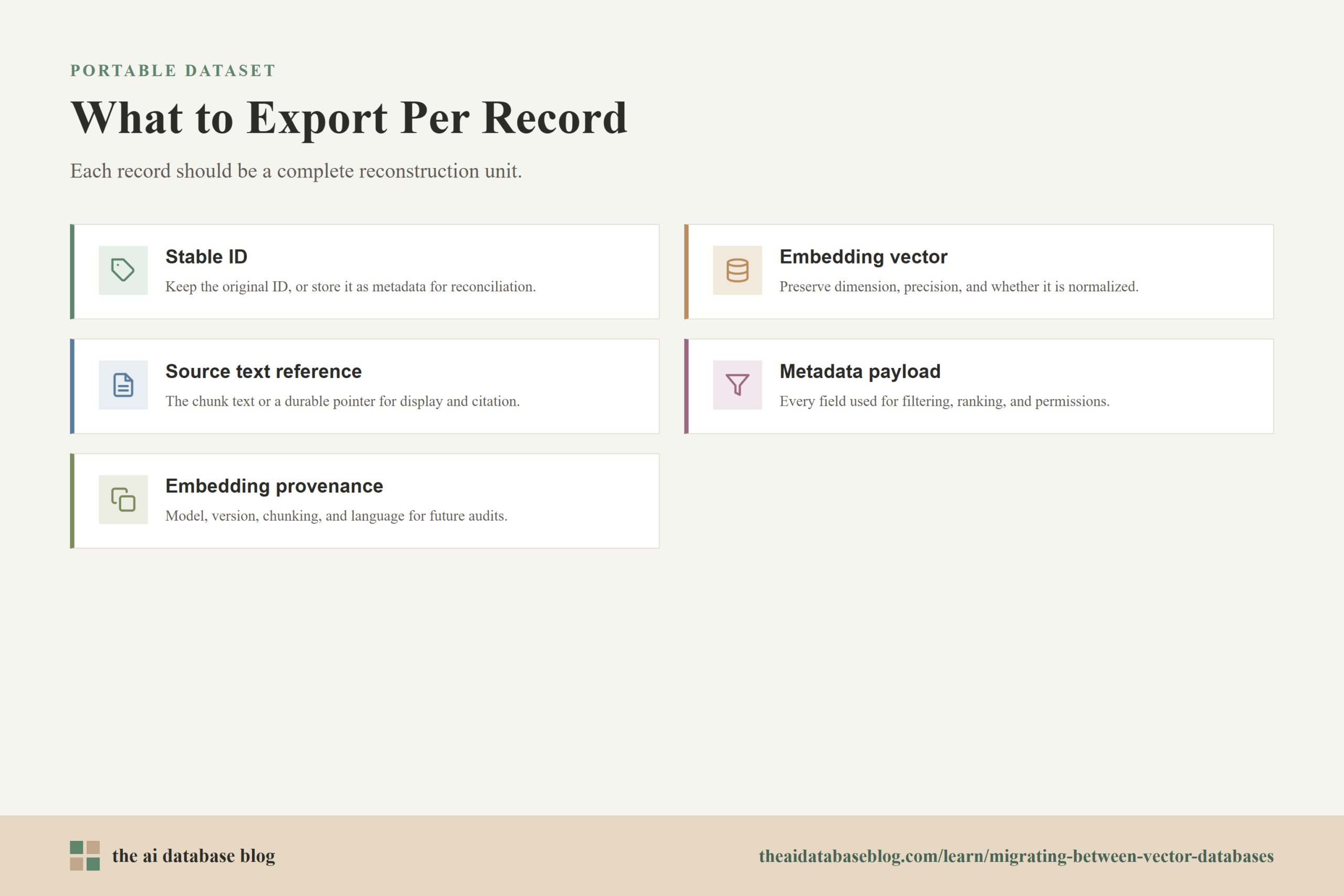
Each exported record should be treated as a reconstruction unit. If one record is imported into the target database, it should be possible to search it, filter it, display it, and trace it back to the source content without reaching into the old system. This reduces migration risk because validation can happen directly against the exported dataset.
- Stable ID: Keep the original object ID when possible. If the target requires a different ID format, store the old ID as metadata so application logs and citations can still be reconciled.
- Embedding vector: Preserve the numeric vector exactly enough for the target database. Confirm the dimension, numeric precision, and whether the vector is normalized.
- Source text or content reference: Store the chunk text or a durable pointer to it. Retrieval systems often need this for answer generation, display, citation, or re-embedding.
- Metadata payload: Include all fields used for filtering, ranking, permissions, analytics, freshness, and user-facing labels.
- Embedding provenance: Record the embedding model, model version if known, chunking strategy, content language, and creation timestamp when available.
- Collection context: Preserve collection, namespace, tenant, partition, or shard information so data lands in the correct target location.
Export Validation Before Import
Before loading anything into the new database, validate the export independently. Count records by collection, check for missing IDs, confirm that every vector has the expected dimension, test that metadata fields have the expected types, and sample records to make sure text, metadata, and vectors still belong together. If the source database stores multiple vector fields per object, verify that each vector field is named and mapped correctly.
This step also exposes schema drift that may have accumulated over time. For example, a metadata field that began as a string may now contain arrays, nulls, or mixed date formats. It is better to discover that in the export file than after the target database has built an index over partially malformed data.
With the export checked, the migration moves from preserving data to preserving meaning. The next step is to rebuild the target schema and index layout so the imported records behave like the source system under real queries.
Re-Creating Indexes And Schemas
Re-creating the schema starts with mapping source concepts to target concepts. A source collection may become a target collection, table, namespace, or index, depending on the database design. Metadata fields may need explicit types, filterable flags, tokenization settings, or nested-object handling. Vector fields need the correct dimension and distance metric, and the application must know whether the target uses cosine distance, inner product, dot product, Euclidean distance, or another similarity function.
Index recreation is where many migrations become unintentionally lossy. Approximate nearest neighbor indexes trade search quality for speed, and different index families expose different build-time and query-time controls. HNSW, IVF, flat search, compressed indexes, and disk-backed indexes can all be valid choices, but they do not produce the same latency, memory usage, update behavior, or recall profile. The target index should be selected and tuned for the workload, not copied by name.
Schema Mapping Checklist
A schema mapping should be written before import begins. This does not need to be elaborate, but it should be explicit enough that engineers, data owners, and application developers agree on what each field means in the new system. The most important fields are the ones that affect search behavior, security, and user-visible output.
- Vector fields: Map each source vector field to a target vector field with the correct dimension, distance metric, and intended use.
- Metadata filters: Identify fields used in filters and confirm how the target database handles strings, numbers, booleans, arrays, dates, nulls, and nested objects.
- Text fields: Decide which text fields are stored, indexed for keyword search, displayed to users, or used only for generation context.
- Tenancy and permissions: Preserve tenant IDs, user access fields, document visibility, and any metadata required for authorization-aware retrieval.
- Hybrid search fields: If the application combines vector and keyword search, map the keyword-indexed fields and ranking settings separately from the vector index.
Index Configuration Decisions
The target index configuration should be tested against the actual workload. Important inputs include corpus size, embedding dimension, update frequency, filter selectivity, expected top-k value, latency target, memory budget, and whether queries are mostly broad semantic searches or narrow filtered searches. Filter-heavy workloads deserve special attention because post-filtering can reduce useful recall when the vector search first retrieves candidates and only later removes records that do not match the filter.
For HNSW-style indexes, parameters commonly affect graph density, build cost, memory use, and query recall. For IVF-style indexes, decisions often involve the number of partitions and the number searched at query time. For compressed or quantized indexes, storage and speed may improve while ranking fidelity can decrease. None of these settings should be treated as universal defaults. They should be tuned until the new system reaches the needed quality and latency range.
At this point, the migration has a target structure and a loaded dataset, but the most important question is still unanswered: does the new database retrieve the same useful neighbors as the old one?
Validating Recall Parity
Recall parity means the target database retrieves a comparable set of relevant nearest neighbors for the same queries. It does not always mean exact result equality, especially when two systems use different approximate indexes or tie-breaking rules. Instead, recall parity asks whether the target system preserves retrieval quality at the level the application needs. A customer-support search tool, a legal research assistant, and a product recommendation engine may each require different acceptance thresholds.
The baseline should come from the old system and, where practical, an exact or high-recall comparison set. In vector search, recall is commonly measured by comparing approximate nearest neighbor results with exact nearest neighbor results for the same query and top-k value. Current benchmarking guidance emphasizes comparing latency and throughput only at similar recall levels, because a faster system that misses many true neighbors is not necessarily better.
Build A Representative Query Set
A useful validation set should reflect the real traffic the application serves. Include common queries, rare queries, short queries, long queries, multilingual queries if relevant, filter-heavy queries, hybrid search queries, and queries from important business workflows. If production logs are available, sample them carefully and remove sensitive content as needed. If logs are not available, create a test set from known user tasks and expected retrieval scenarios.
The query set should also include negative and edge cases. These might include queries with very restrictive filters, queries that should return no results, queries that rely on recent documents, and queries where permissions matter. Migration failures often hide in these cases because broad unfiltered semantic searches may look healthy even when filtering, tenancy, or hybrid ranking has changed.
Compare Retrieval Results
Run the same validation queries against the source and target databases using equivalent filters, top-k values, and ranking settings. Compare overlap in returned IDs, rank movement, filtered result correctness, latency, and error rates. For RAG systems, it can also be useful to compare downstream answer quality, but the retrieval comparison should happen first because it isolates the database and index behavior from the language model response.
Use several measures rather than one score. Recall at k shows how many expected neighbors appear in the target results. Rank-aware measures can show whether the best results are still near the top. Filter correctness checks whether the target database respects metadata constraints. Latency percentiles show whether quality was achieved at an acceptable operational cost. Together, these measurements give a clearer picture than average recall alone.
Set Acceptance Thresholds Before Cutover
Define acceptance thresholds before the team starts tuning the target system. A typical threshold might require minimum recall at k for critical query groups, no permission or tenant leaks, no missing required metadata, and latency within an agreed range under expected concurrency. The exact numbers should come from the application risk level. A casual discovery interface can tolerate more approximation than a retrieval system used for compliance or high-stakes internal decisions.
If the target misses the threshold, tune search parameters, adjust index configuration, inspect metadata filtering behavior, or revisit schema mapping. Do not rush to cutover simply because the import completed. In vector systems, a completed import only proves that records were loaded; recall parity proves that retrieval behavior survived the move.
Once the target database has passed data validation and recall validation, the remaining challenge is operational: how do you move production traffic with as little disruption as possible?
Cutting Over With Minimal Downtime
A low-downtime cutover depends on keeping the source and target databases synchronized long enough to test the new system under realistic conditions. The simplest unsafe pattern is to stop writes, export everything, import everything, and hope the new database works. That may be acceptable for a small non-critical system, but production retrieval systems usually need a staged approach that separates historical backfill, live synchronization, shadow testing, and final traffic switch.
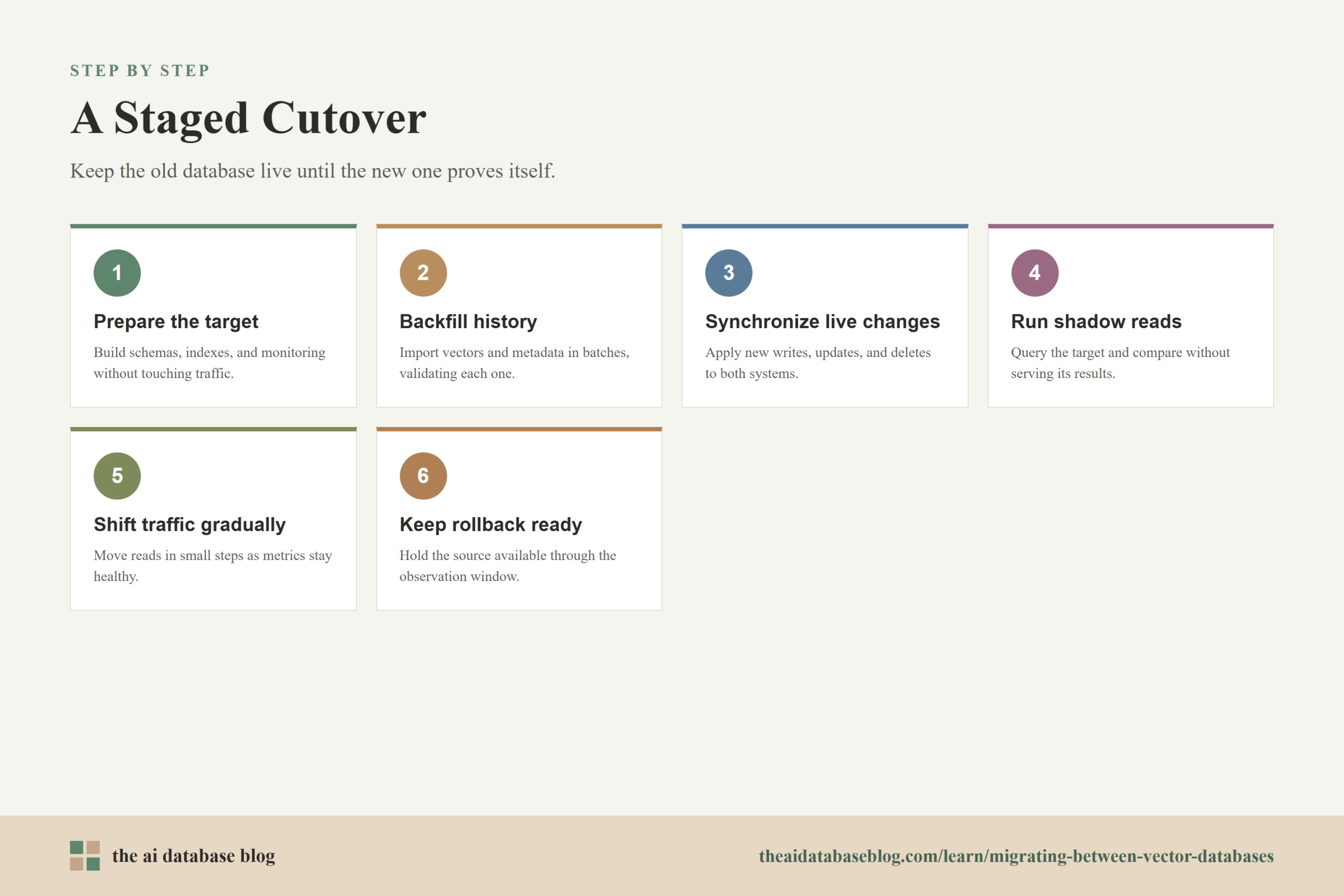
The common pattern is backfill first, then dual-write or change-data-capture style synchronization, then shadow reads, then controlled cutover. During backfill, historical vectors and metadata are loaded into the target. During synchronization, new writes and updates are applied to both systems or replayed from an event stream. During shadow reads, the application sends production-like queries to the target without serving target results to users. During cutover, traffic gradually moves to the target while the old system remains available for rollback.
Use A Staged Migration Plan
A staged plan gives the team multiple chances to catch issues before users feel them. Each stage should have a clear entry condition, exit condition, and rollback decision. This keeps the migration from becoming a single tense release window where too many unknowns are discovered at once.
- Prepare the target: Create schemas, collections, indexes, credentials, monitoring, and application configuration without changing production traffic.
- Backfill historical data: Import exported vectors and metadata in batches, then validate counts, dimensions, metadata fields, and sample records.
- Synchronize live changes: Apply new inserts, updates, and deletes to both systems through dual writes, event replay, or another controlled synchronization method.
- Run shadow reads: Send production-like queries to the target, compare results with the source, and monitor latency, errors, and recall-related differences.
- Shift traffic gradually: Move a small percentage of read traffic to the target, then increase only after metrics remain healthy.
- Keep rollback ready: Maintain the source database and synchronization path until the target has served stable production traffic for a defined observation period.
Plan For Writes, Updates, And Deletes
Writes are often the hardest part of a low-downtime migration. Inserts are straightforward if both systems receive the same new vector and metadata. Updates require more care because a document edit may change text, metadata, embeddings, or all three. Deletes are equally important because stale vectors can continue to appear in search results if deletion events are missed.
For applications that generate embeddings asynchronously, the migration plan should account for the embedding pipeline too. The system should not write a new object to one database with an updated embedding and to the other with an older embedding. If embedding generation, chunking, or enrichment logic changes during the migration, recall parity becomes harder to interpret because the migration is no longer testing only the database move.
Monitor The Cutover
Cutover monitoring should include both database metrics and retrieval metrics. Database metrics include query latency, throughput, indexing lag, memory pressure, disk usage, error rates, and batch import status. Retrieval metrics include result overlap, filter correctness, empty-result rates, top-k distribution, cache behavior, and user-facing quality signals when available.
The team should also watch for application-level symptoms. A vector migration can look healthy at the database level while causing more fallback responses, fewer cited sources, lower click-through rates, or more user reformulations. Those signals can reveal ranking or filtering changes that raw availability metrics miss.
A careful cutover gets the application onto the new system, but the work is not finished until the team has reviewed what changed and preserved the lessons for future retrieval operations.
Common Migration Risks And How To Reduce Them
Most vector database migration problems come from small mismatches that compound. A distance metric mismatch changes ranking. A missing metadata field breaks filtering. A different null-handling rule changes which records qualify for a query. A lower-recall index setting improves latency but removes useful context from the generated answer. These issues are avoidable when the team treats the migration as a search-quality project as well as a data movement project.
The biggest risk is assuming that the target database is correct because it contains the right number of records. Count validation is necessary, but it is not enough. The database must also return the right records, respect the same filters, meet the same permission boundaries, and perform within operational limits. That is why export validation, schema mapping, recall testing, and staged cutover all matter together.
- Metric mismatch: Confirm whether vectors were trained or normalized for cosine similarity, dot product, or Euclidean distance, then configure the target accordingly.
- Metadata type drift: Normalize inconsistent field types before import so filters behave predictably.
- Filter behavior changes: Test pre-filtering, post-filtering, array matching, date ranges, and nested metadata behavior with real query patterns.
- Index under-tuning: Tune query-time and build-time parameters until recall and latency meet the agreed threshold.
- Lost provenance: Preserve embedding model, chunking, source document, and timestamp information so future audits and re-embedding projects remain possible.
- Weak rollback plan: Keep the source database synchronized and available until the target has proven stable in production.
Reducing these risks is mainly a matter of discipline. A migration that moves slowly through validation often finishes faster overall because it avoids emergency debugging after production traffic has already moved.
Practical Migration Checklist
A checklist helps keep the migration concrete. It also gives non-specialist stakeholders a clearer view of what is being protected: data completeness, retrieval quality, security, uptime, and operational stability. The exact checklist will vary by system size and risk level, but the core sequence is similar across most AI database migrations.
- Inventory collections, namespaces, vector fields, dimensions, distance metrics, metadata fields, filters, hybrid search settings, and application query patterns.
- Export vectors, IDs, metadata, text or content references, embedding provenance, and collection context into a portable format.
- Validate the export for counts, missing IDs, vector dimensions, metadata types, duplicate records, and sample record integrity.
- Create the target schema, including vector fields, filterable metadata, text fields, tenancy fields, and hybrid search configuration when needed.
- Build and tune target indexes based on workload requirements such as recall, latency, memory, update rate, and filter selectivity.
- Import the data in batches and verify that each batch is complete before moving to the next stage.
- Run recall parity tests against a representative query set and compare results, ranking, filters, latency, and errors.
- Synchronize live writes, updates, and deletes until the target remains current with the source.
- Run shadow reads and staged traffic shifts before completing the final cutover.
- Keep rollback available until the target database has served stable production traffic through the agreed observation period.
This checklist turns a migration into a sequence of observable decisions. Instead of asking whether the new database is ready in a vague sense, the team can ask whether each requirement has been proven with evidence.
FAQs
1. What is the hardest part of migrating between vector databases?
The hardest part is usually preserving retrieval behavior, not copying vectors. The target database must return comparable results, apply filters correctly, respect permissions, and meet latency requirements. This requires schema mapping, index tuning, and recall validation in addition to data export and import.
2. Do I need to export the original text along with the vectors?
Yes, if the application needs the text for display, citations, generation, re-ranking, debugging, or future re-embedding. Even if the vector database stores only embeddings and metadata, the migration should preserve a durable reference to the original content. Without it, the new system may retrieve an ID but lack the context needed to use the result properly.
3. Can I reuse the same index settings in the new vector database?
Sometimes, but it should not be assumed. Different databases may implement similar index types differently, and query-time parameters can change recall and latency. Use the source settings as a starting point, then tune the target index against representative queries and acceptance thresholds.
4. How do I know whether recall parity is good enough?
Recall parity is good enough when the target system meets the quality threshold required by the application. That threshold should be defined before cutover and measured with a representative query set. For many systems, the evaluation should include recall at k, rank movement, filter correctness, latency percentiles, and checks for empty or unexpected results.
5. What is the safest way to cut over with minimal downtime?
The safest approach is to backfill historical data, synchronize live changes, run shadow reads, then gradually shift production traffic. The source database should remain available during the observation period so the team can roll back if quality, latency, or correctness problems appear.
6. Should I re-embed documents during a vector database migration?
Only re-embed during the migration if that is an explicit project goal. Re-embedding changes the vector space, which makes it harder to tell whether differences come from the database migration or from the new embeddings. For a cleaner migration, move the existing embeddings first, validate parity, and treat re-embedding as a separate change unless there is a strong reason to combine them.
Takeaway
Migrating between vector databases is safest when it is handled as a retrieval-quality migration, not just a storage migration. The key steps are to export vectors with their metadata and provenance, rebuild schemas and indexes around the target workload, validate recall parity with representative queries, and cut over through synchronization, shadow testing, gradual traffic shifting, and rollback readiness. This guidance is most useful for teams running semantic search, RAG, recommendation, or knowledge retrieval systems where small changes in ranking or filtering can affect user trust and application quality.