In-memory vector search keeps the active vector index, and often the vectors themselves, in RAM so graph traversal can happen with very low latency. Disk-based vector search moves more of the index or vector data to SSD to lower memory cost and support much larger collections, but it usually adds latency because search must wait on storage reads. The right choice depends on corpus size, recall needs, query volume, update patterns, and whether the workload can tolerate higher tail latency in exchange for lower infrastructure cost.
This guide explains how in-memory and disk-based vector search differ, why graph indexes can become expensive in memory, what latency trade-offs disk-based approaches introduce, how hybrid tiering works, and when each approach is appropriate at small, medium, large, and billion-scale deployments.
Why Vector Search Placement Matters
Vector search is usually used when an application needs to find items by semantic similarity rather than by exact keyword matching. A query is converted into an embedding, and the database searches for stored embeddings that are close to it in vector space. Because comparing the query against every stored vector can be too slow at scale, most production systems use approximate nearest neighbor indexes that trade a small amount of exactness for much faster search.
The placement of that index matters because vector search is not just a storage problem. It is also a latency, memory, and access-pattern problem. A system may store terabytes of embeddings on disk, but if each query has to jump unpredictably through thousands of index nodes, the difference between RAM access and SSD access becomes visible very quickly. This is why two systems with the same number of vectors can behave very differently depending on whether the active search path stays in memory or repeatedly touches disk.
At a high level, in-memory search optimizes for speed and predictable latency, while disk-based search optimizes for scale and cost control. The difficult part is that most real applications want both. They want low-latency retrieval for user-facing experiences, but they also want to store more vectors as documents, products, events, images, or user interactions accumulate. Understanding the tradeoff starts with the most common in-memory design: graph-based indexing.
How In-Memory Graph Indexes Work
Many low-latency vector search systems use graph indexes. The best-known example is HNSW, which stands for Hierarchical Navigable Small World. In a graph index, each vector is represented as a node, and each node stores links to other nearby nodes. During search, the system starts from one or more entry points and walks the graph toward vectors that appear closer to the query.
This graph walk is efficient because the system does not need to compare the query with every vector. It can follow useful neighbor links and explore a controlled candidate set. Parameters such as graph degree, construction quality, and search breadth affect the tradeoff between recall and latency. Higher recall usually means exploring more candidates, which increases CPU work and memory access.
The reason graph indexes are usually kept in RAM is that traversal involves many small, irregular reads. The next node to inspect depends on the current distances and graph links, so the access pattern is not a clean sequential scan. RAM handles this kind of random access well. SSDs are much faster than older disks, but they are still slower and more variable than memory for repeated random reads inside a latency-sensitive query.
Once the basic graph behavior is clear, the next question is cost. Graph indexes are fast because they keep useful navigation data close to the CPU, but that navigation data is extra data. It sits on top of the raw vector storage and can become a major part of the deployment budget.
The Memory Cost Of Graph Indexes
The memory cost of an in-memory graph index comes from more than the raw embeddings. A simple estimate starts with vector size: number of vectors multiplied by dimension multiplied by bytes per dimension. For example, one million 768-dimensional float32 vectors require about 3 GB for raw vector values alone, before graph links, metadata, allocator overhead, deleted records, caches, or replication are considered.
Graph indexes add neighbor lists and other navigation structures. If each node stores many graph connections, those connections consume memory. If the system keeps full-precision vectors in memory for final distance calculation, that consumes additional memory. If the database also stores metadata filters, inverted indexes, tombstones, segment structures, or multiple replicas, the real memory footprint can be much higher than the raw vector estimate.
A practical planning formula is:
total memory budget = raw vectors + graph links + index overhead + metadata/filter indexes + cache/headroom + replication overhead
This formula is intentionally conservative. In production, memory pressure rarely appears as a neat failure. More often, latency becomes less predictable, garbage collection or compaction becomes more expensive, cache hit rates fall, or the operating system begins paging index data. When a graph index designed for RAM starts relying on disk paging, search can degrade sharply because every graph hop may become a storage wait.
Compression can reduce this pressure. Quantization stores smaller vector representations for search, such as product quantized or binary representations, and may keep full vectors elsewhere for reranking. This can lower memory cost substantially, but it introduces another tradeoff: compressed vectors can affect recall, require calibration, and may still need full-precision reads for the final candidate set.
These memory costs explain why in-memory graph search is attractive but not universal. For collections that fit comfortably in memory, it is often the simplest way to get fast retrieval. Once the collection grows beyond the available RAM budget, teams have to choose between adding more memory, compressing more aggressively, partitioning the workload, or moving part of the search path to disk.
How Disk-Based Vector Search Works
Disk-based vector search is designed for cases where keeping the full index and vector set in RAM is too expensive or impossible. Instead of treating disk as a failure mode, disk-native approaches organize the index so SSD reads are expected and controlled. The goal is to use a smaller in-memory structure to guide search while storing larger graph structures, full vectors, or posting lists on disk.
One important family of approaches is based on disk-resident graph search, often associated with DiskANN-style designs. These systems use graph structures optimized for SSD access, along with in-memory compressed representations or cached entry points. The search process uses memory to choose promising candidates, reads selected graph or vector pages from disk, and may rerank candidates using more accurate vector data.
Another disk-friendly pattern uses partitioning or inverted-file approaches. Instead of walking a single large graph entirely in memory, the system narrows the search to selected partitions, clusters, or posting lists, then scans or reranks candidates from those areas. Compression is often paired with this design so the system can evaluate many candidates with less memory and less I/O.
The key idea is that disk-based vector search does not mean blindly storing a normal RAM-first graph on disk. A RAM-first graph can perform poorly when paged because its access pattern was not designed around storage latency. Disk-based methods try to reduce the number of random reads, align reads with storage pages, cache frequently visited nodes, and use compressed in-memory summaries to keep the search focused.
This makes disk-based search useful, but it does not make storage latency disappear. The next practical question is what kind of latency tradeoff an application should expect and how that tradeoff changes under load.
Latency Tradeoffs In Disk-Based Search
Disk-based vector search usually has higher latency than a well-tuned in-memory index on a dataset that fits comfortably in RAM. The reason is straightforward: even modern SSDs are slower than memory, and vector search often needs many dependent reads. If the next read cannot be known until the current node or page has been evaluated, the system cannot fully hide storage latency with parallelism.
The biggest risk is tail latency. Average latency may look acceptable in a benchmark, while p95 or p99 latency rises when the SSD is busy, the cache misses, the query explores more candidates, or filters force the search to visit additional regions. User-facing applications often care about these tail latencies because a small fraction of slow searches can make the overall product feel inconsistent.
Disk-based approaches also add tuning complexity. Search quality and latency depend on cache size, SSD bandwidth, read amplification, graph degree, candidate expansion, compression settings, reranking depth, and query concurrency. A configuration that works for low query volume may not hold up when many searches run at once and compete for I/O.
That said, the tradeoff can be worthwhile. If a dataset is far larger than memory, a disk-native index may provide acceptable recall and latency at a much lower cost than scaling RAM across many machines. For offline enrichment, analytics, internal tools, long-tail retrieval, or RAG systems where the language model call dominates total response time, an extra few milliseconds or tens of milliseconds in retrieval may be acceptable.
Disk-based search is therefore not simply a slower version of in-memory search. It is a different cost-performance point. The next step is to understand how systems combine the two, because many production deployments do not choose only one placement for all data.
Hybrid Tiering: Keeping Hot Data Fast And Cold Data Affordable
Hybrid tiering uses both memory and disk so the system can spend expensive resources where they matter most. The basic idea is to keep hot, frequently queried, latency-sensitive, or high-value data in memory, while placing colder, older, larger, or less frequently queried data on disk. Instead of treating all vectors equally, the architecture matches storage placement to access patterns.
A common design is to keep a small in-memory index for recent or popular data and a larger disk-based index for the full collection. Queries can search the hot tier first, search both tiers in parallel, or search the cold tier only when needed. The final results are merged and reranked so the user sees a single result set even though the data came from multiple storage layers.
Another pattern is to keep compressed navigation data in memory while storing full vectors on disk. In this design, the system uses the compact representation to find candidates quickly, then reads a smaller number of full vectors for accurate scoring. This can be especially useful when full-precision vectors are large, but the candidate set after approximate search is relatively small.
Hybrid tiering is also useful for freshness. New vectors can be written into a smaller mutable in-memory segment, while older segments are compacted into disk-friendly indexes. This avoids rebuilding a massive disk index for every update, but it requires good merge logic, deletion handling, and periodic maintenance so quality does not drift over time.
The strength of hybrid tiering is flexibility. The weakness is operational complexity. Teams must decide what counts as hot data, how often tiers are rebuilt, whether queries search one or multiple tiers, how to preserve recall across tiers, and how to monitor cache hit rates and tail latency. Those choices are easier when the team has a clear scale model.
When Each Approach Is Appropriate At Different Scales
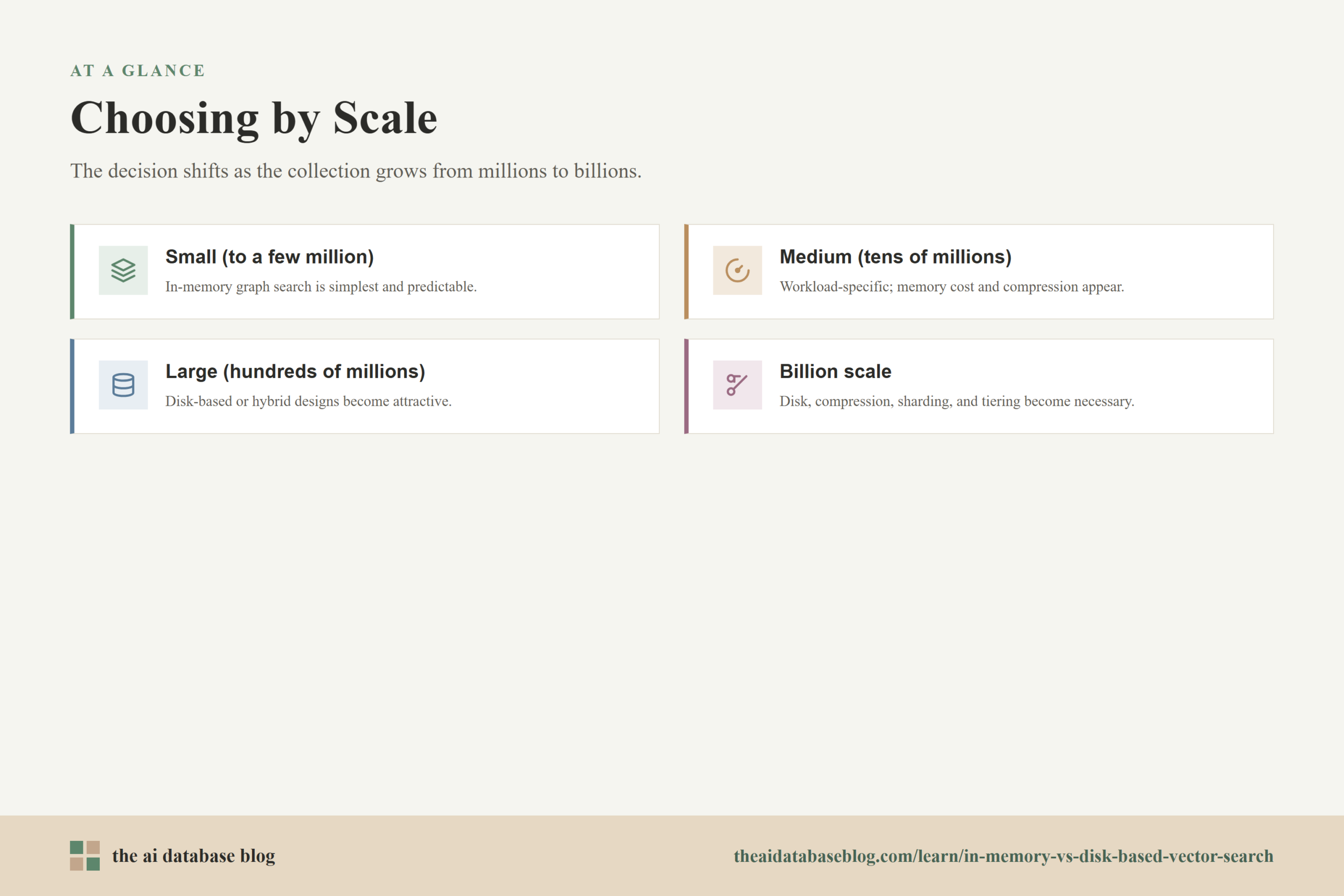
The best architecture depends less on a single vector count and more on the relationship between vector count, vector dimension, memory budget, latency target, and query rate. A few million small vectors can be easy to keep in memory, while the same number of very high-dimensional vectors with heavy metadata and replicas may already require careful planning. Still, scale bands are useful for thinking about the decision.
Small Scale: Thousands To A Few Million Vectors
At small scale, in-memory vector search is usually the simplest and most predictable choice. The index can often fit on one machine with enough headroom for metadata, caches, and growth. Query latency is low, tuning is easier, and operational complexity stays manageable. For prototypes, internal tools, small RAG systems, and early product features, starting with an in-memory graph index is often reasonable.
Disk-based search is usually unnecessary at this stage unless memory is extremely constrained or the vectors are unusually large. The bigger risk is premature complexity. A disk-native design may save memory, but it can add tuning and debugging work before the application has enough traffic or data to justify it.
Medium Scale: Millions To Tens Of Millions Of Vectors
At medium scale, the decision becomes workload-specific. If the application needs low p95 or p99 latency and the index still fits comfortably in RAM, in-memory graph search remains strong. This is common for user-facing semantic search, recommendations, autocomplete-like retrieval, and interactive RAG where retrieval latency must stay tight.
However, this is also the stage where memory cost starts to become visible. Teams may introduce vector compression, reduce dimensionality, partition by tenant or domain, or move less important data to a colder tier. Hybrid tiering can be useful when a small fraction of the corpus receives most queries, because keeping only the hot working set in memory may preserve user-facing speed while lowering total cost.
Large Scale: Tens To Hundreds Of Millions Of Vectors
At large scale, keeping everything in memory can become expensive quickly, especially with high-dimensional embeddings, multiple replicas, and metadata filters. In-memory search may still be appropriate for high-value workloads with strict latency requirements, but the cost must be justified by the product experience or business need.
Disk-based or hybrid designs become much more attractive here. A disk-native graph index, partitioned index, or compressed memory-plus-disk layout can reduce RAM requirements while keeping search latency within an acceptable range. The tradeoff is that engineering teams need stronger observability around cache behavior, SSD saturation, recall, and tail latency. At this scale, tuning search parameters without measuring recall and latency together is risky.
Billion Scale And Beyond
At billion scale, disk-based and hybrid approaches are often necessary unless the organization is prepared to spend heavily on memory and distributed serving. The raw vectors alone can consume terabytes, and graph overhead can multiply the serving footprint. Disk-native search, compression, sharding, partitioning, and tiering become core architectural tools rather than optional optimizations.
The main question at this scale is not whether disk can be used, but how carefully the system controls disk access. The architecture must minimize random I/O, use memory for the most valuable navigation data, place data intelligently across machines, and evaluate results against realistic query distributions. For some applications, slightly higher retrieval latency is acceptable because it unlocks far larger corpora. For others, only a hot subset should be served at very low latency while the full corpus remains available through a slower path.
These scale bands are useful starting points, but the final decision should be made with concrete measurements. The same index can behave differently depending on embedding dimension, filter selectivity, update frequency, SSD type, concurrency, and recall target.
How To Choose Between In-Memory, Disk-Based, And Hybrid Search
A good choice starts by defining the workload rather than picking an index name first. The most important questions are how fast search must be, how much recall can be traded for speed, how often vectors change, how selective metadata filters are, and how much memory the system can afford. Once those constraints are clear, the architecture becomes easier to reason about.
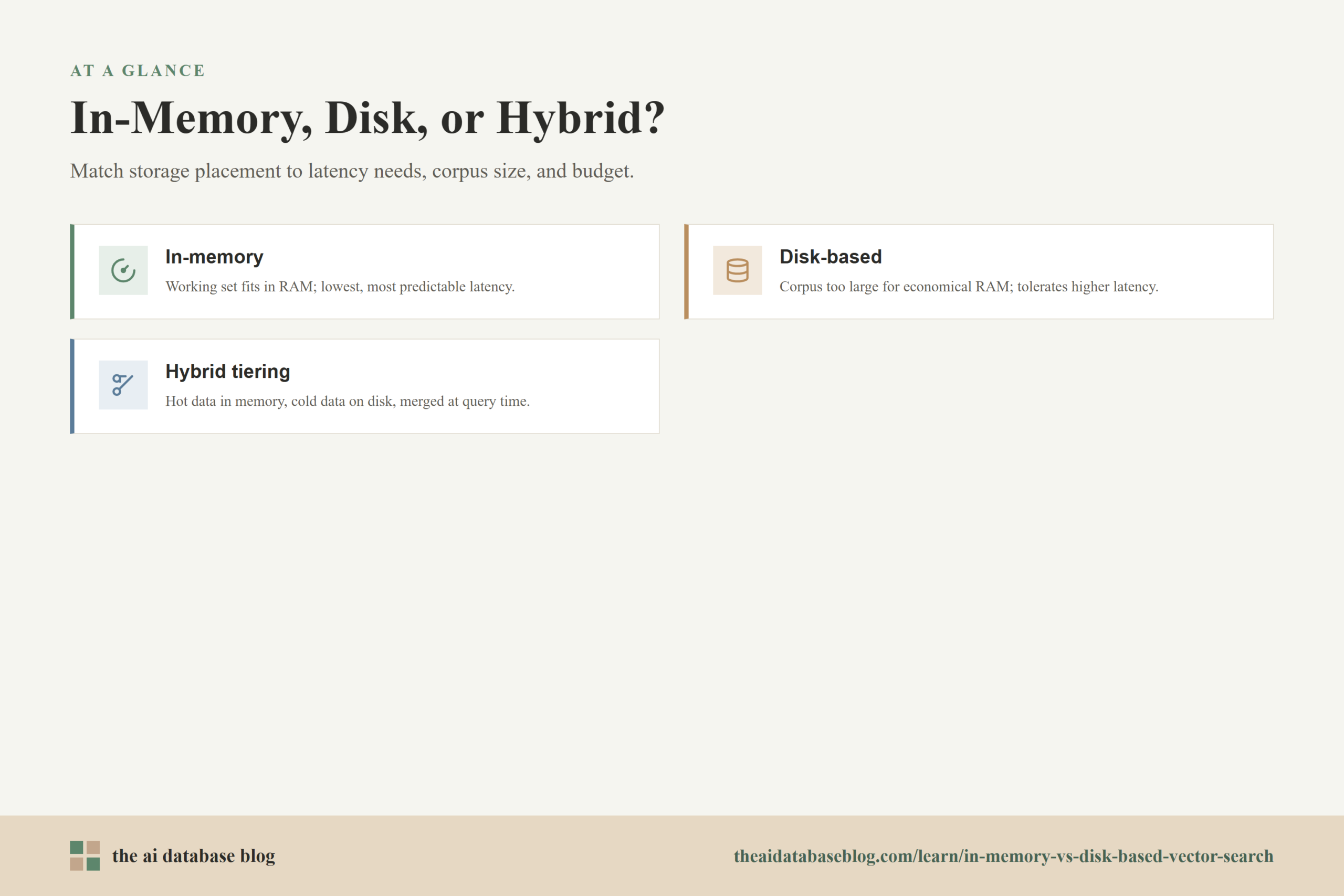
Choose in-memory graph search when the working set fits in RAM with comfortable headroom, latency matters more than memory cost, and the system needs predictable interactive performance. This is often the right fit for smaller corpora, high-query-volume applications, fresh indexes with frequent updates, and user-facing features where slow retrieval directly affects experience.
Choose disk-based search when the corpus is too large for economical RAM serving, the application can tolerate somewhat higher latency, and the system has fast SSDs with enough I/O capacity. This is often appropriate for large archives, broad semantic discovery, long-tail RAG retrieval, batch enrichment, and applications where storage cost matters more than the absolute lowest latency.
Choose hybrid tiering when the workload has a meaningful hot set, when recent data needs faster access than older data, or when the application needs both broad coverage and strong latency for common queries. Hybrid designs are often the best long-term shape for growing systems because they let teams spend memory on the most valuable part of the corpus instead of treating every vector as equally urgent.
The most reliable answer is usually found through benchmark loops. Build a representative query set, compute exact or high-quality reference results, test candidate index settings, and compare recall, p50 latency, p95 latency, p99 latency, memory footprint, build time, update cost, and operating cost. Vector indexes are not one-time configuration choices. They are performance systems that need measurement as data and traffic change.
Common Mistakes To Avoid
One common mistake is estimating memory from raw vector size alone. Raw vectors are only part of the footprint. Graph links, index metadata, filter structures, caches, replicas, and headroom can materially change the real memory requirement. A design that looks affordable in a spreadsheet can become unstable when deployed with production filters and traffic.
Another mistake is assuming that any index can be moved to disk without changing behavior. A RAM-first graph index that spills to disk is not the same as a disk-native index. The former may suffer from unpredictable paging and poor tail latency, while the latter is designed to reduce and control storage reads.
A third mistake is optimizing only average latency. Disk-based and hybrid systems often fail first at the tail. If p99 latency matters to the application, the evaluation must include realistic concurrency, realistic filters, realistic cache warmup, and realistic query distributions.
Finally, teams sometimes overlook update patterns. Some disk-based indexes are easier to build in batches than to update continuously. If the corpus changes frequently, the architecture needs a freshness plan, such as mutable hot segments, periodic compaction, or a separate update-friendly tier.
Avoiding these mistakes comes down to treating vector search as a full retrieval system rather than a single index setting. Memory, disk, compression, filtering, freshness, and evaluation all interact. The FAQ below answers the most common practical questions that come up when making this decision.
FAQs
1.
1. Is in-memory vector search always faster than disk-based vector search?
Usually, yes, when the dataset fits comfortably in RAM and the index is well tuned. RAM is better suited to the random access patterns used by graph traversal. However, a well-designed disk-native index can outperform a poorly configured in-memory system, and it may be the better choice when memory pressure would otherwise cause paging or unstable latency.
2.
2. Why do graph indexes use so much memory?
Graph indexes store more than vectors. They also store neighbor links, navigation layers or graph structures, candidate data, metadata needed for search, and sometimes full-precision vectors for scoring. Higher recall settings often require richer graph connectivity or broader search, which can increase both memory usage and query-time work.
3.
3. What happens if an in-memory graph index no longer fits in RAM?
If the system begins paging index data to disk, latency can rise sharply. Graph search depends on many small random reads, and each disk-backed graph hop can add delay. In that situation, it is usually better to reduce memory pressure deliberately through compression, partitioning, more RAM, sharding, or a disk-native index rather than relying on accidental paging.
4.
4. Does disk-based vector search reduce recall?
It can, but it does not have to. Recall depends on the index design, compression, search parameters, reranking strategy, and how much candidate exploration the system allows. Disk-based systems often trade some latency, I/O, or memory against recall, so they should be evaluated with a representative query set instead of judged by storage placement alone.
5.
5. When is hybrid tiering better than choosing only memory or disk?
Hybrid tiering is useful when access is uneven. If recent, popular, or high-value vectors receive most queries, keeping that subset in memory can preserve low latency while colder data lives on disk. It is also useful when an application needs broad retrieval coverage but only some queries require the fastest possible response.
6.
6. What metrics should teams compare before choosing an approach?
Teams should compare recall, p50 latency, p95 latency, p99 latency, memory footprint, SSD I/O, query throughput, build time, update cost, filter performance, and total serving cost. The best choice is the one that meets the application’s retrieval quality and latency targets within the available operating budget.
Takeaway
In-memory vector search is best when low and predictable latency matters and the working set fits comfortably in RAM, while disk-based vector search is best when the corpus is too large for economical memory serving and the application can tolerate higher or more variable latency. Hybrid tiering sits between those choices by keeping hot or recent data fast and colder data affordable. This guidance is most useful for engineers and technical teams designing AI retrieval systems, especially RAG, semantic search, recommendation, and long-tail discovery applications where memory cost, recall, and latency must be balanced as the vector collection grows.
Watch this video to learn more