Vector storage works by keeping embeddings, metadata, object identifiers, and search index structures in layouts that match how the database will read them during a query. The vector values themselves are usually stored as dense numeric arrays, metadata is often stored separately so filters can be evaluated quickly, and the approximate nearest neighbor index is kept in memory, on disk, or across both. The most important storage tradeoff is not simply whether data is on disk or in RAM. It is whether the layout lets the system read only the data it needs, avoid unnecessary random I/O, apply filters early, and keep frequently accessed structures close to the CPU.
This guide explains how vectors and metadata are laid out on disk and in memory, why some systems use row-oriented layouts while others favor columnar layouts, and how storage format affects scan speed, filtering, and retrieval performance. By the end, you should understand why two vector databases can hold the same embeddings but behave very differently under filtered search, large scans, and disk-backed retrieval.
What Vector Storage Actually Stores
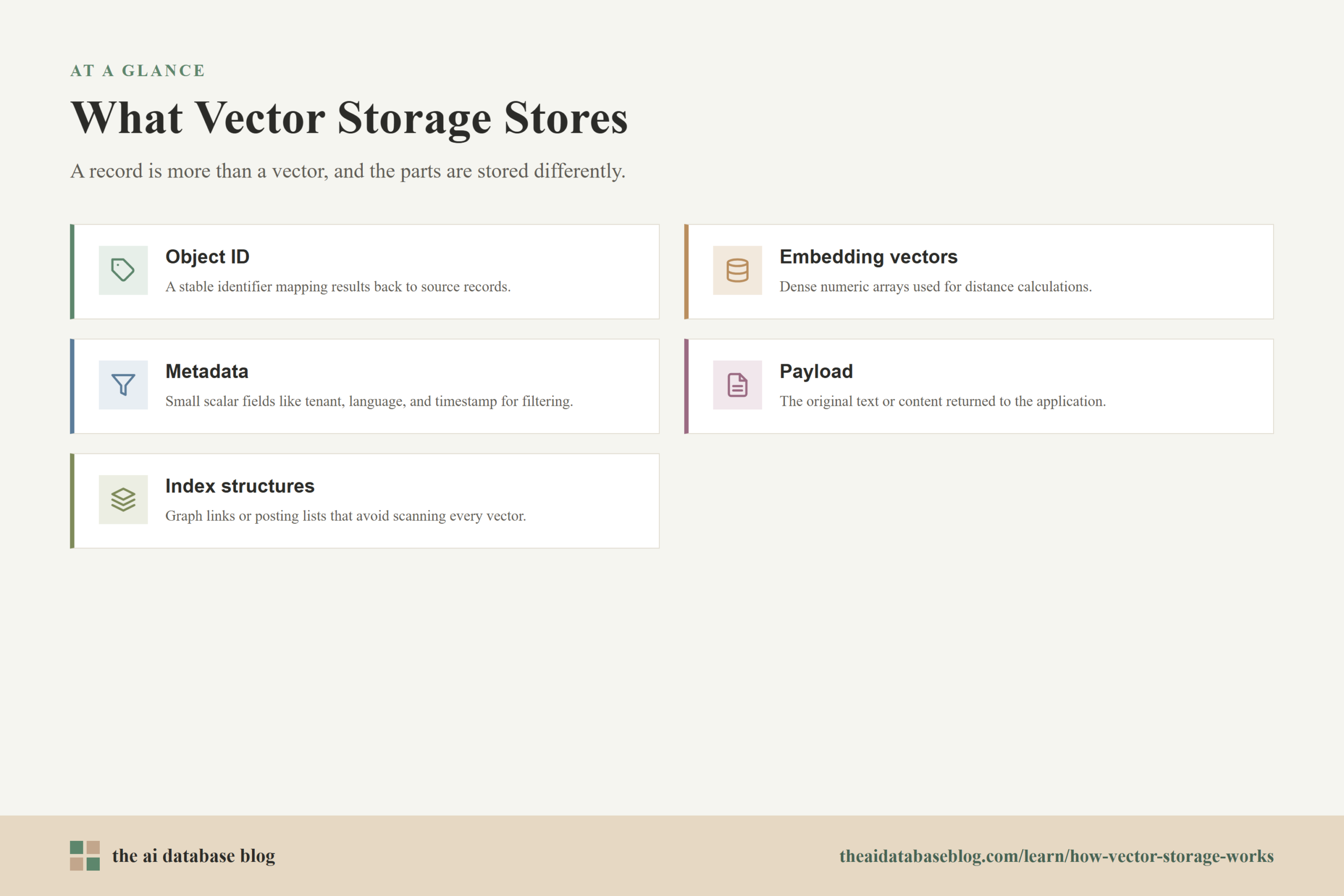
A vector database does not store only vectors. A typical record includes a stable object ID, one or more embedding vectors, metadata fields, and sometimes the original text or payload needed by the application. The database also stores one or more index structures that help it avoid comparing the query vector against every vector in the collection. These parts are related, but they are not always stored together because they serve different query paths.
The embedding is a fixed-length array of numbers. For example, a 768-dimensional embedding stored as 32-bit floating point values uses about 3 KB before compression or indexing overhead. A billion vectors at that size would require multiple terabytes just for raw vector values. That is why vector systems often use quantization, memory mapping, compression, tiered storage, or disk-optimized indexes when the dataset grows beyond what is practical to keep fully resident in memory.
Metadata is different. It may include fields such as document type, tenant ID, language, timestamp, product category, source, permissions, or status. These fields are usually small compared with the vector, but they have an outsized effect on query speed because filters often decide which records are eligible before or during vector search.
Once those pieces are separated conceptually, the next question is where each part lives at runtime. The answer is usually a mix of memory, disk, and operating system cache.
How Vectors Are Laid Out In Memory
In memory, vector storage is shaped by CPU access patterns. Similarity search performs repeated distance calculations between a query vector and candidate vectors, so dense numeric data benefits from contiguous layouts that let the CPU stream through values efficiently. A simple in-memory layout might store vectors as one large array, where each vector occupies a fixed-size slice.
[vector_0 dim_0, vector_0 dim_1, ..., vector_0 dim_n]
[vector_1 dim_0, vector_1 dim_1, …, vector_1 dim_n]
[vector_2 dim_0, vector_2 dim_1, …, vector_2 dim_n]
This layout is easy to address because the database can calculate the offset for a vector ID when all vectors have the same dimensionality and data type. It also supports fast sequential reads during brute-force scans or reranking because the next vector sits close to the previous one in memory. That locality matters because modern CPUs are much faster when they can read predictable blocks of memory instead of jumping around randomly.
Full-Precision, Quantized, And Compressed Vectors
Not every vector is stored as full 32-bit floating point values at query time. Many systems keep a compressed representation in memory and reserve full-precision vectors for reranking or rescoring. Quantized vectors may use fewer bits per dimension, product quantization codes, scalar quantization, or binary representations. This reduces memory pressure, allows more candidates to stay close to the CPU, and can improve throughput, but it can also introduce approximation error.
A common pattern is two-stage retrieval. The database searches a compact index first, gets a larger candidate set than the final requested result count, and then reranks those candidates using more precise vectors. This is one reason storage design affects relevance as well as speed. If full-precision vectors are far away on disk, reranking may become the slowest part of the query unless the system batches reads, caches hot vectors, or stores full vectors near the index entries that point to them.
Graph And Inverted Index Structures
The vector values are only one part of memory layout. Approximate nearest neighbor methods store additional structures. Graph indexes keep neighbor links for each vector. Inverted file indexes keep posting lists or clusters that map coarse regions of vector space to candidate vector IDs and compressed codes. These structures can be larger than many users expect, especially when graph connectivity, candidate pool settings, or multiple indexes are tuned for high recall.
When the index fits in memory, search avoids disk I/O for most of its work. When the index is disk-backed, layout becomes more delicate. Graph traversal can require many small random reads because each visited node may point to neighbors stored elsewhere. Disk-optimized systems try to reduce that cost by clustering related nodes, batching reads, using memory-mapped files, or keeping high-level graph entry points and frequently visited structures in RAM.
Memory layout explains why vector search can be extremely fast when the hot path is compact and resident. But real systems must also persist data, recover from crashes, and handle datasets larger than RAM. That is where disk layout becomes just as important.
How Vectors Are Laid Out On Disk
On disk, vector storage is designed around persistence, recoverability, and I/O efficiency. A database may store raw vectors in segment files, compressed vector codes in index files, metadata in separate files or columns, and object IDs in mapping tables. The exact layout varies, but the common goal is to avoid reading large amounts of unrelated data when answering one query.
A simple disk layout might place records one after another, with each record containing ID, vector, metadata, and payload. This is straightforward to write and recover, but it can be inefficient for filtered scans because the database must step through large vector payloads even when the query only needs a small metadata field. More advanced layouts separate the vector field from scalar metadata fields so that filtering can read compact metadata pages before touching vectors.
Segments, Pages, And Object IDs
Many vector systems store data in segments or shards. A segment is a manageable chunk of a collection that can be indexed, compacted, loaded, or memory-mapped independently. Inside a segment, vectors may be stored in fixed-width pages, metadata may be stored in column chunks, and object IDs may map logical record IDs to physical offsets.
This mapping matters because approximate search often returns internal IDs first. The database then has to translate those IDs into user-facing objects, retrieve metadata, and possibly fetch the original payload. If that lookup path is scattered across files, result assembly can add latency even after the nearest neighbors have already been found.
Memory-Mapped Storage
Memory mapping is a common technique for large vector collections. Instead of loading an entire file into application memory, the system maps the file into the process address space and lets the operating system page data in as needed. This can make disk-backed vectors behave more like memory from the application perspective, while still relying on SSD performance and OS page cache behavior underneath.
Memory mapping works best when access patterns have locality. If the query repeatedly touches nearby pages, the OS cache can help. If graph traversal jumps across distant disk pages for every candidate, memory mapping alone does not remove the cost of random I/O. This is why disk-backed vector systems care about physical placement, prefetching, and cache-aware index design.
Disk layout gives the database a durable foundation, but query speed depends on whether the database has to read whole records or only the fields relevant to the query. That leads directly to the row versus column storage question.
Row Storage Versus Columnar Storage For Vectors And Metadata
Row-oriented and columnar storage layouts answer different questions. A row layout keeps the fields for one object close together. A columnar layout keeps the values for one field close together across many objects. Neither is universally better. The right layout depends on whether the database usually reads whole objects, scans selected fields, applies filters, or computes vector distances over candidate sets.
In a row-oriented layout, a record might look like this:
[id][vector][category][timestamp][tenant_id][payload]
This is convenient when the application often retrieves the complete object after finding a match. Once the database lands on the record, the vector, metadata, and payload are nearby. Row layouts can also be simpler for writes because inserting one object means appending one full record or updating one record location.
In a columnar layout, the same data is split by field:
[id column]

[vector column]

[category column]

[timestamp column]

[tenant_id column]

[payload column]
This is often better for filters and scans. If a query filters on tenant ID and timestamp, the database can read those compact columns first, find matching row IDs, and avoid loading vector or payload pages for records that cannot match. Columnar layouts can also use per-column compression, statistics, dictionaries, and bitmap-like structures to make filtering faster.
Why Vectors Complicate The Usual Row-Column Tradeoff
Vector fields are large, fixed-length numeric arrays, so they do not behave like a normal scalar column. A vector column may be columnar at the record level, but each vector itself is still a dense block of dimensions. For distance calculations, the database usually needs the whole vector for each candidate, not just one dimension. This means a vector field benefits from being stored separately from metadata, but it still needs internal locality so the dimensions of a candidate vector can be read efficiently.
That leads to hybrid layouts. Metadata may be stored column-by-column for fast filtering. Vectors may be stored in contiguous fixed-width blocks for fast distance computation. Index structures may be stored separately again because graph links, compressed codes, and posting lists have their own access patterns. The result is less like a single table file and more like a coordinated set of files and memory structures.
When Row Layouts Still Make Sense
Row storage can still work well when queries retrieve full objects, filters are light, datasets are modest, and the system values write simplicity. It can also be useful for payload storage after search has already narrowed the candidate set. For example, if a query retrieves the top 10 chunks after vector search, reading the complete payload for 10 rows is not a major bottleneck.
The problem appears when the database must evaluate filters or scans across millions of records. If every record includes a large vector and payload inline, the system may waste I/O reading bytes that are not needed for the filter. That is why many AI database designs separate eligibility checks from vector scoring.
Once vectors and metadata are stored in different shapes, the filter strategy becomes a core performance decision. The database has to decide whether to filter before search, during search, or after search.
How Storage Format Affects Metadata Filtering
Metadata filtering is the process of limiting vector search to records that satisfy scalar conditions. A query might ask for the nearest vectors among English documents, active products, records from one customer, or content created after a certain date. The storage format affects how quickly the system can identify that eligible subset and how much vector data it must touch afterward.
There are three broad filter strategies. Pre-filtering applies metadata conditions first and searches only eligible vectors. In-search filtering evaluates eligibility while traversing the vector index. Post-filtering performs vector search first and removes non-matching results afterward. Each approach has tradeoffs, and storage layout can make one approach much more practical than another.
Pre-Filtering
Pre-filtering works well when metadata indexes can quickly produce a candidate set. For example, a tenant ID filter might use an inverted index or bitmap to find all records belonging to one tenant. A timestamp range might use sorted values, zone maps, or column statistics to skip irrelevant blocks. Once the database has the eligible IDs, it can search or scan only that subset.
The challenge is that approximate nearest neighbor indexes are not always designed to search arbitrary subsets efficiently. If the eligible set is tiny or fragmented across the vector index, the database may fall back to a filtered brute-force scan, build per-partition indexes, or over-sample from the ANN index and check eligibility as it goes.
In-Search Filtering
In-search filtering checks metadata while the ANN algorithm is exploring candidates. This can reduce wasted work, but it requires fast access to metadata for candidate IDs. If metadata is stored in compact columns or bitmap structures, eligibility checks can be quick. If the system has to fetch full records from disk to check one field, filtered search can slow down sharply.
Graph indexes make this especially interesting. If a filter excludes many nodes, the search may have fewer useful paths through the graph. Some systems compensate by increasing search breadth, using allow-lists, maintaining filter-aware indexes for common partitions, or combining vector search with scalar indexes.
Post-Filtering
Post-filtering is simple but risky. The database runs vector search, gets candidates, and then discards results that fail the metadata condition. This can be acceptable for loose filters, but it can fail for selective filters. If only one percent of the collection is eligible, the top unfiltered vector matches may mostly belong to the wrong subset, forcing the system to search deeper or return too few relevant results.
Storage format does not solve every filtered search problem, but it determines how expensive each eligibility check is. A compact metadata layout can make filtering cheap enough to happen early. A scattered row layout can push the system toward post-filtering because checking filters earlier would require too much random I/O.
Filtering shows why metadata should not be treated as an afterthought. The same principle also applies to scans, where the database needs to read many records rather than traverse a small nearest-neighbor path.

How Storage Format Affects Scan Speed
Scan speed matters whenever the system must evaluate many records, rebuild an index, compact segments, run analytics, apply a broad filter, or perform exact vector search over a subset. In these cases, the database is less concerned with one graph traversal and more concerned with how efficiently it can stream through data. Columnar layouts, contiguous vector blocks, compression, and block-level statistics can make a large difference.
For metadata scans, columnar storage is usually advantageous because the database can read only the fields needed by the predicate. If the query asks for records where status is active and language is English, there is no reason to read vector bytes or payload text until matching IDs are known. This reduces disk reads, memory bandwidth, and CPU decoding work.
For vector scans, the best layout is usually a dense, predictable vector block. Exact search over a subset needs to compute distances over candidate vectors. That operation benefits from contiguous arrays, aligned buffers, batching, and data types that match the CPU or accelerator path. Compression can reduce memory bandwidth, but decompression or approximation can add CPU cost, so the best choice depends on whether the bottleneck is memory, disk, or compute.
Skipping Data Is Often Faster Than Reading It Efficiently
The fastest scan is the one the database can avoid. Columnar storage formats often store statistics for blocks of data, such as minimum and maximum values, dictionaries, or bloom filters. These summaries let the query engine skip blocks that cannot contain matching rows. In vector databases, similar ideas apply to metadata filters, segment pruning, and partition pruning.
For example, if a segment contains only records from one tenant, a query for a different tenant can skip the entire segment. If a timestamp column has block-level min and max values, a time-range query can skip old blocks. This does not directly compute vector similarity, but it reduces how many vectors become candidates for scoring.
Random Access Versus Sequential Access
Scan-heavy workloads prefer sequential access. Graph traversal, by contrast, can produce random access because the next candidate may be anywhere in the index. Disk-backed systems try to bridge this gap by storing related vectors and graph nodes near each other, grouping likely co-accessed nodes, using SSD parallelism, and caching frequently used pages.
This is why storage format is not just a file format question. It is also a physical locality question. Two systems might both use disk-backed HNSW, but the one that places neighbors and candidate vectors close together can issue fewer costly reads during search.
Scan and filter behavior also depends on the query plan. A good vector database does not blindly choose one path for every request. It estimates whether the filter is selective, whether the vector index can handle the subset, and whether exact scan might be cheaper than approximate search.
Common Storage Patterns In AI Databases
Modern AI database storage often combines several patterns instead of relying on a single layout. This is because vector search, metadata filtering, payload retrieval, and persistence have different needs. A practical system may keep hot index structures in memory, store raw vectors in memory-mapped files, keep metadata in columnar segments, and store large payloads separately.
- Separate vector and metadata storage: This lets the database filter on compact scalar fields before loading large vectors or payloads. It is especially useful for tenant filters, time filters, category filters, and permission checks.
- Segmented storage: Collections are split into segments or shards so that data can be loaded, compacted, indexed, and searched in manageable units. Segments also make pruning possible when filters align with segment-level statistics.
- Memory-mapped vector files: Large vector or index files can be mapped into process memory so the operating system loads pages on demand. This can reduce application memory requirements while still benefiting from the OS page cache.
- Compressed candidate indexes: Quantized or compressed representations reduce memory needs during first-stage search. Full vectors may be used later for reranking when higher precision is needed.
- Metadata indexes: Inverted indexes, bitmaps, sorted columns, dictionaries, or block statistics help the system quickly identify eligible records for filtered search.
- Payload separation: Large text, JSON, images, or document content may be stored separately so that search and filtering do not repeatedly move large payload bytes through the hot path.
These patterns are not only engineering details. They determine whether a retrieval system can support real application constraints, such as tenant isolation, permissions, freshness, low latency, and large-scale RAG workloads.
Practical Implications For Retrieval Systems
For application builders, the main lesson is that storage layout affects retrieval quality and latency in visible ways. A vector database may appear fast on unfiltered benchmark queries but slow down when real users add metadata filters, access controls, or time windows. The difference often comes from whether metadata checks are cheap and whether the vector index can search filtered subsets effectively.
If your workload has heavy filtering, pay attention to how metadata is indexed and whether filters are applied before, during, or after vector search. Selective filters need more than a simple post-filter step. If your workload has large collections with strict latency requirements, pay attention to whether vectors and indexes are fully memory-resident, compressed, disk-backed, or memory-mapped. Each choice changes cost, recall, and tail latency.
If your workload frequently retrieves full payloads, storage systems also need efficient object lookup after search. Returning IDs quickly is not enough if fetching the final text chunks, documents, or metadata requires scattered reads. In RAG systems, this matters because the retrieval step must assemble usable context for the language model, not just identify approximate neighbors.
The best storage design is therefore workload-specific. A small internal knowledge base may work well with simple in-memory vectors and basic metadata storage. A multi-tenant retrieval platform with billions of vectors needs stronger separation between vectors, metadata, index files, and payloads, plus careful planning around compression, filtering, and disk locality.
FAQs
1. Are vectors stored in rows or columns?
They can be stored either way, but many systems use a hybrid approach. Metadata may be stored in columns for fast filtering, while vectors are stored as dense fixed-width blocks for fast distance calculation. The ANN index is often stored separately because graph links, posting lists, or compressed codes have different access patterns from both metadata and payloads.
2. Why not store each vector with all of its metadata in one record?
That layout is simple, but it can make filters and scans slower. If the database only needs to check a small metadata field, reading a full record that includes a large vector and payload wastes I/O and memory bandwidth. Separating metadata from vectors lets the system identify eligible records before loading heavier data.
3. Does columnar storage make vector search faster?
Columnar storage can make filtering and metadata scans faster, but it does not automatically make nearest neighbor search faster. Vector search needs efficient access to whole candidate vectors and index structures. The best designs combine columnar metadata with vector layouts that preserve dense numeric locality.
4. What is memory mapping in vector databases?
Memory mapping lets a database expose disk files through memory addresses and rely on the operating system to load pages as needed. It can help large indexes or vector files exceed application memory limits, but performance still depends on access locality, SSD speed, caching, and how randomly the search algorithm touches pages.
5. Why do filtered vector searches sometimes run slowly?
Filtered vector searches can be slow when the filter is selective, metadata checks require random reads, or the ANN index is not designed to search a subset efficiently. If the system searches first and filters afterward, it may need to examine many extra candidates to find enough valid results.
6. How does storage format affect RAG applications?
RAG applications depend on retrieving the right context quickly. Storage format affects how fast the database can filter by source, permissions, recency, or document type, how quickly it can score candidate vectors, and how efficiently it can fetch the final text chunks. Poor storage layout can turn retrieval into the slowest part of the application.
Takeaway
Vector storage works well when vectors, metadata, index structures, and payloads are laid out according to how queries actually read them. Dense vectors need locality for distance calculations, metadata needs compact layouts and indexes for filtering, and disk-backed indexes need careful placement to avoid expensive random I/O. This guidance is most useful for engineers and technical teams building AI search, recommendation, or RAG systems where filtered retrieval matters. A practical use case is a multi-tenant knowledge retrieval system: separating metadata filters from vector scoring can help the system enforce access rules, skip irrelevant data, and return useful context without reading the whole collection.
Watch this video to learn more