GPU acceleration can make vector search faster, but it is not automatically the best choice for every vector database workload. GPUs help most when the work is highly parallel, such as building large indexes, searching across very large vector collections, or serving enough query volume to keep the GPU busy. The main tradeoffs are GPU memory limits, data movement overhead, operational complexity, and cost. For many production systems, the most practical pattern is to use GPUs for expensive index builds and then serve queries from CPU infrastructure.
This guide explains where GPU acceleration fits in vector search architecture, why it is especially useful for index building and high-throughput workloads, where memory and cost constraints appear, and how teams can combine GPU-based indexing with CPU-based serving. By the end, you should be able to reason about whether a GPU belongs in your retrieval system, what kind of workload justifies it, and what tradeoffs to evaluate before changing your infrastructure.
What GPU Acceleration Means in Vector Search
Vector search finds the nearest vectors to a query vector, usually by comparing embeddings that represent text, images, audio, users, products, or other data. In small systems, this can be done by scanning all vectors directly. At larger scale, a vector database usually builds an approximate nearest neighbor index so it can avoid comparing the query against every stored vector. That index is what makes retrieval fast enough for applications such as semantic search, recommendations, and retrieval-augmented generation.
GPU acceleration means using graphics processing units to speed up one or more parts of that process. A GPU is good at running many similar operations in parallel, which fits parts of vector search well because similarity comparison, clustering, quantization, and graph construction can involve huge numbers of repeated mathematical operations. Instead of treating the GPU as a universal replacement for the CPU, it is better to see it as a specialized accelerator for parts of the vector search pipeline that have enough parallel work to justify the extra hardware.
There are two broad places where GPUs may be used. The first is index construction, where the system builds structures such as graph indexes, inverted file indexes, or compressed indexes over a large vector collection. The second is query serving, where the system uses the index to answer live search requests. These two stages have different performance and cost profiles, so the best architecture for one stage may not be the best architecture for the other.
Once the distinction between building and serving is clear, the GPU question becomes more practical. Instead of asking whether vector search should use GPUs, the better question is which stage is slow, how large the data is, how much query traffic exists, and whether the GPU can stay highly utilized.
When GPUs Help Most
GPUs are most useful when vector search has enough parallel work to keep them busy. A single low-traffic application with a small collection may not benefit much, because CPU-based vector search can already be fast and easier to operate. The benefit becomes clearer as the dataset grows, the index becomes more expensive to build, or the application needs to process many queries at once. In those cases, the GPU can reduce the time spent on repeated distance calculations, graph construction, clustering, and compressed candidate generation.
Index Builds and Rebuilds
Index building is one of the strongest use cases for GPU acceleration. Approximate nearest neighbor indexes often require the system to analyze relationships among many vectors before queries can be served efficiently. Graph indexes, for example, need to identify useful neighbor links; inverted indexes need to assign vectors to partitions; quantized indexes need to learn compression structures and encode vectors. These operations are computationally heavy and can become a bottleneck when a database is first loaded, refreshed, or rebuilt after an embedding model change.
A GPU can shorten this build window because it can perform many vector operations in parallel. This matters when a team has millions or billions of embeddings and cannot wait hours or days for an index build to finish. It also matters when the index has to be rebuilt regularly because the underlying data changes, the embedding model is replaced, or relevance tuning requires trying different index parameters.
The practical value is not only speed. Faster index construction changes how teams operate retrieval systems. It can make reindexing less risky, reduce the delay between data ingestion and searchable availability, and make experimentation with recall, compression, and partition settings easier. For AI database workloads, that flexibility can be as important as raw query latency.
Billion-Scale Collections
GPU acceleration becomes more attractive as vector collections move toward very large scale. At billion-vector scale, even approximate search has to manage a large amount of computation, memory traffic, and index metadata. A CPU-only system can still work, especially with well-designed graph, partitioned, compressed, or disk-backed indexes, but the build and search costs become much more visible.
Large vector collections also create more pressure to use compression. Product quantization, scalar quantization, binary quantization, and other compression techniques reduce the memory footprint of vectors or index structures. GPUs can help with these workflows because compression and candidate scoring involve repeated numerical operations across large batches of vectors. The tradeoff is that compression can affect recall, so the system may need reranking or careful parameter tuning to maintain result quality.
At this scale, the GPU is usually part of a broader architecture rather than a simple drop-in performance switch. The database may partition the collection, keep hot data in memory, store colder data on SSDs, or use CPU and GPU resources together. The right design depends on whether the bottleneck is index build time, query throughput, memory capacity, storage access, or recall quality.
High-Throughput Query Workloads
GPU serving can help when an application has enough concurrent queries or batchable search requests to keep the device busy. GPUs are built for throughput. If queries arrive one at a time with strict low-latency expectations, the overhead of launching GPU work and moving data between CPU and GPU memory can reduce or erase the benefit. But when the system can process many queries together, the GPU can amortize that overhead across a larger batch.
This is why GPU query serving often fits workloads such as large-scale recommendation retrieval, offline evaluation, batch enrichment, high-volume semantic search, or multi-tenant systems with sustained traffic. These workloads can generate enough parallel search work to make the GPU economically useful. By contrast, a small RAG application with sporadic traffic may see better cost and operational simplicity from CPU serving.
Throughput also depends on the index type. Brute-force search, IVF-style indexes, and GPU-native graph indexes can map well to GPUs when the data and index structures fit the hardware. Some graph traversal patterns are more irregular, so their performance depends heavily on the specific algorithm and implementation. The important point is that GPU serving should be evaluated with the actual workload shape, not only with a generic benchmark.
These use cases show why GPUs can be powerful, but they also reveal the first major constraint: the GPU can only accelerate what it can access efficiently. That leads directly to the question of memory.
Memory Limits Are Often the Hardest Constraint
Vector search is frequently memory-bound, not just compute-bound. Each vector has a dimensionality, a data type, and index overhead around it. A collection of high-dimensional embeddings can consume large amounts of memory before adding graph links, partition metadata, quantization codebooks, deleted record handling, payload references, or replication. GPU memory is fast, but it is usually more limited and more expensive than CPU memory or SSD storage.
A simple example makes the issue visible. One hundred million vectors with 768 dimensions stored as 32-bit floating point values require roughly 307 GB for the raw vectors alone, before index overhead. Compression can reduce this dramatically, but compression introduces tradeoffs in recall, reranking, and implementation complexity. A billion-vector collection can easily exceed the memory of a single GPU, especially when the system also needs space for graph structures or temporary build buffers.
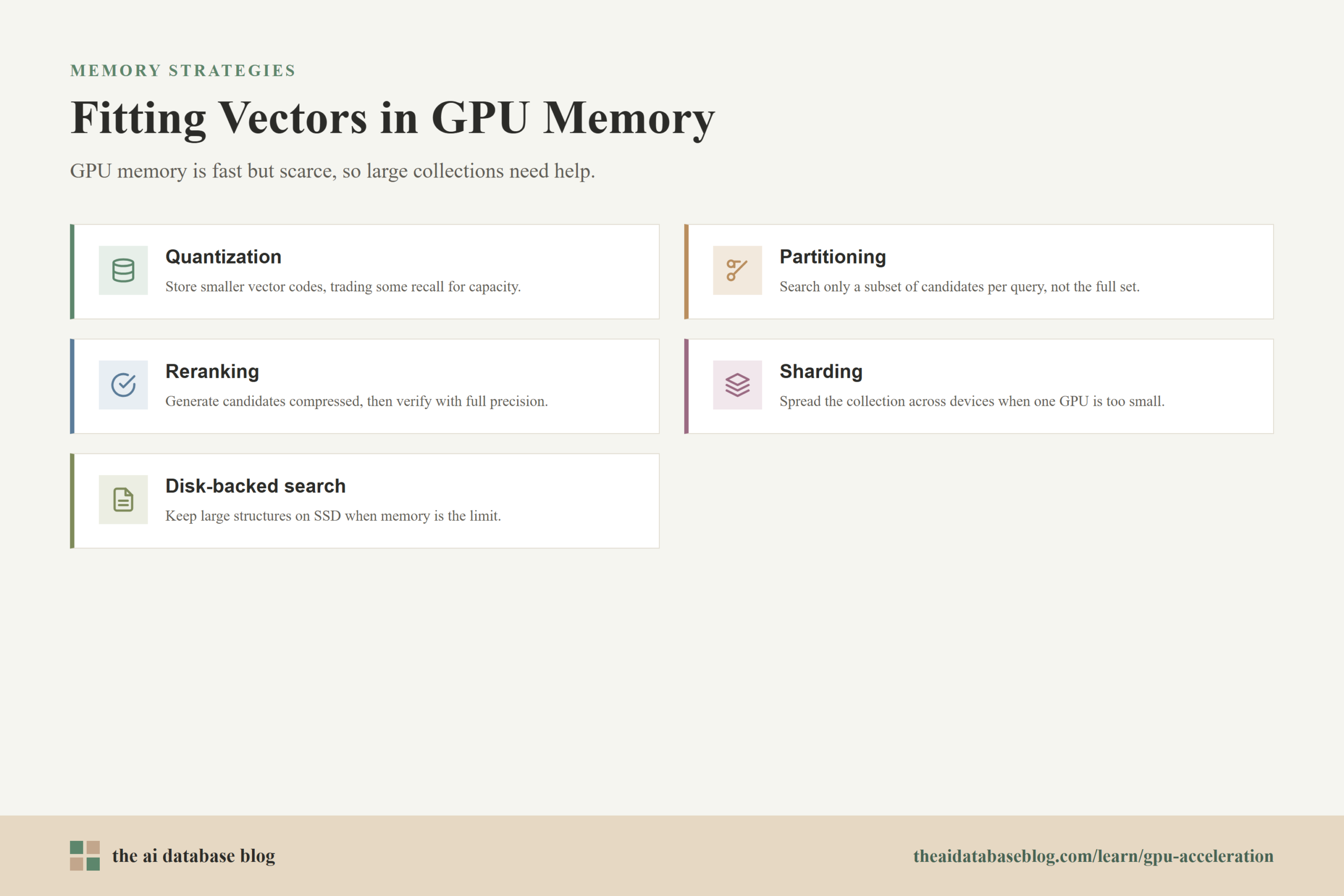
This is why many GPU-accelerated vector search systems use one or more memory reduction strategies:
- Quantization stores smaller representations of vectors so more of the index fits in memory, with some potential loss in precision.
- Partitioning divides the vector space so each query searches only a subset of candidate vectors instead of the full collection.
- Reranking uses a smaller compressed index for candidate generation, then checks a smaller set of candidates with higher-precision vectors.
- Sharding spreads the collection across multiple machines or devices when one GPU cannot hold the working set.
- Disk-backed search keeps larger structures or full-precision vectors on SSDs when memory capacity is the limiting factor.
Each strategy changes the performance profile. Quantization reduces memory traffic but can reduce recall. Sharding increases capacity but adds distributed coordination. SSD-backed designs improve capacity but introduce slower and less predictable access than memory. Reranking can recover quality, but it adds another stage to the query path. These tradeoffs are normal in large vector systems, and they become more important when GPU memory is the scarce resource.
Memory also affects index building. Some GPU builds need temporary working memory that is larger than the final index. A design that seems to fit based on raw vector size may still fail or spill if the build process needs extra buffers. For this reason, capacity planning should include raw vector memory, index memory, build-time memory, query-time workspace, and replication overhead.
Once memory is included in the decision, cost becomes more concrete. The real question is not whether a GPU is fast, but whether it is fast enough, utilized enough, and memory-efficient enough to justify its price.
Cost Tradeoffs: GPU Speed Versus Utilization
GPUs can reduce the elapsed time of expensive vector search work, but they also introduce a different cost model. A GPU that finishes index builds quickly can be cost-effective if it is rented or scheduled only when needed. A GPU that sits mostly idle while waiting for occasional queries can be expensive. The economics depend on utilization, workload shape, infrastructure model, and whether the GPU replaces or merely adds to existing CPU capacity.
For index building, the cost case is often easier to justify. If a GPU shortens a large index build from many hours to a much smaller window, the team may pay for the accelerator only during the build. This can be especially useful for batch ingestion, reindexing, and model migration. The system gets the benefit of GPU parallelism without permanently reserving GPU serving capacity.
For live query serving, the cost case is more workload-dependent. GPU serving makes sense when traffic is sustained, parallel, and high enough that the GPU remains busy. If the workload is bursty or low-volume, CPU replicas may be cheaper and simpler to scale. CPUs are widely available, easier to replicate horizontally, and often sufficient for many RAG and semantic search applications, especially when the index fits in memory and query volume is moderate.
The cost comparison should include more than instance price. Teams should also consider engineering time, observability, deployment complexity, failure modes, data transfer overhead, and whether the database already supports the desired GPU path. A highly optimized GPU search system can perform very well, but a poorly utilized GPU can become an expensive way to solve a problem that a simpler CPU architecture already handles.
This is why a hybrid approach is increasingly attractive. It spends GPU resources where they are most likely to pay off, then keeps the serving layer on infrastructure that is easier to scale for ordinary query traffic.
Mixing GPU Index Builds With CPU Serving
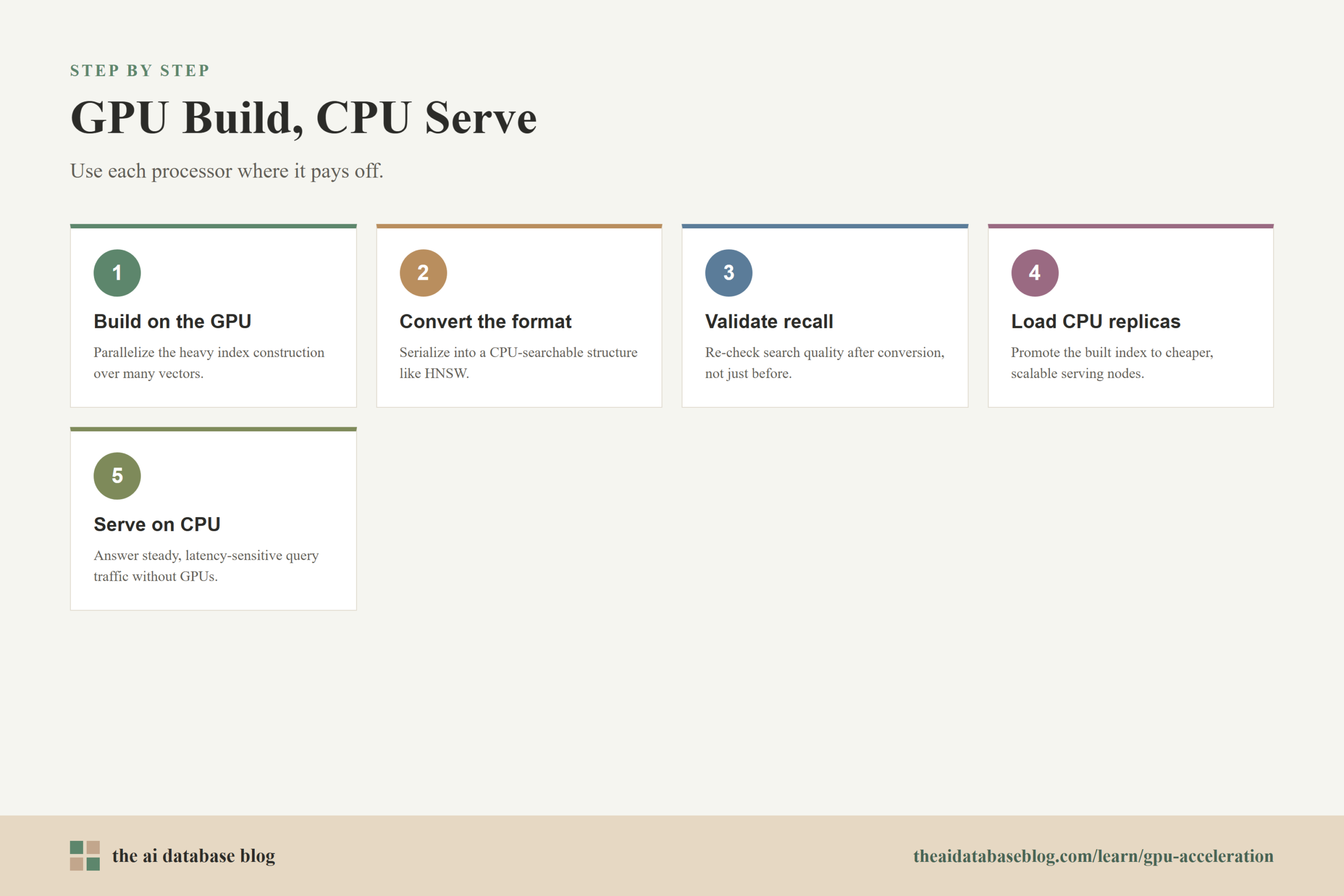
A practical architecture is to build the vector index on GPUs, convert or serialize it into a CPU-friendly format, and serve production queries on CPUs. This pattern is useful because index construction is often compute-heavy and batch-oriented, while query serving is often latency-sensitive, operationally continuous, and cost-sensitive. It lets the system use the GPU during the most parallel stage without requiring GPUs to be available for every live query.
In a graph-based workflow, for example, a GPU can build a nearest-neighbor graph quickly. The system can then convert that graph into a CPU-searchable structure such as an HNSW-style index. Production replicas load the built index and answer queries on CPU nodes. The result is a split pipeline: the GPU accelerates the expensive offline or nearline construction step, and the CPU layer handles steady online retrieval.
This model has several advantages:
- Lower serving cost because CPU replicas can often be cheaper and easier to scale than GPU replicas.
- Faster reindexing because the build stage can use GPU parallelism when large data changes arrive.
- Simpler production serving because query infrastructure can stay close to the database’s existing CPU runtime.
- Better resource scheduling because GPUs can be treated as build workers rather than always-on serving nodes.
The pattern also has constraints. The GPU-built index must be compatible with the CPU search format. Conversion may change index parameters or recall behavior, so teams should evaluate search quality after the conversion, not only before it. The pipeline also needs versioning, validation, and rollback so a newly built index can be promoted safely. If the application requires very fresh data, the system must decide how new vectors become searchable while a larger GPU build is still running.
For many AI database applications, this split is a sensible default to evaluate. It does not assume that the GPU is always the best serving engine. Instead, it treats GPU acceleration as a way to reduce the operational pain of large index builds while preserving the cost and scaling advantages of CPU-based retrieval.
Even with a hybrid design, teams still need a decision framework. The best choice depends on data size, traffic pattern, freshness requirements, and relevance targets.
How to Decide Whether to Use GPUs
The decision should start with the bottleneck. If indexing is slow but query serving is healthy, GPU-accelerated index builds may be enough. If query latency rises only during bursts, adding CPU replicas, improving filters, or tuning the index may be more cost-effective than moving serving to GPUs. If sustained query throughput is high and search work is batchable, GPU serving becomes more attractive. If the dataset does not fit comfortably in GPU memory, compression, sharding, or CPU/disk-backed designs may matter more than raw GPU compute.
A useful evaluation begins with four questions:
- How large is the vector collection? Small and moderate collections often perform well on CPUs, while very large collections may need acceleration or more sophisticated indexing.
- What is the slowest stage? If the pain is reindexing, use the GPU for builds. If the pain is sustained query throughput, test GPU serving.
- Can the workload batch queries? GPUs benefit when they can process enough parallel work to hide overhead and stay utilized.
- Does the working set fit in memory? If not, the architecture must account for compression, sharding, CPU memory, or SSD-backed access.
The evaluation should include relevance metrics, not just speed. A faster index is not useful if recall drops below what the application needs. Test with representative queries, metadata filters, update patterns, and concurrency levels. Measure recall, latency percentiles, throughput, memory use, build time, and total cost. Vector search is rarely optimized by a single knob; it is usually tuned across index type, compression, hardware, filtering, and reranking.
It is also important to separate experimentation from production requirements. A GPU can be excellent for offline benchmarking, bulk index creation, and large-scale candidate generation. Production serving may still choose CPUs because they are easier to replicate, simpler to budget, and adequate for the target latency. The best design is the one that matches the system’s actual bottleneck rather than the most powerful hardware available.
With that decision framework in place, the remaining question is how these ideas show up in real AI database use cases.
Common Use Cases for GPU-Accelerated Vector Search
GPU acceleration is most relevant in AI database systems where vector retrieval is large, repeated, or operationally expensive. These systems often include semantic search, recommendation engines, multimodal search, fraud or anomaly retrieval, and RAG pipelines with large knowledge collections. The common pattern is not simply that the application uses embeddings. The pattern is that the embedding collection and retrieval workload are large enough for acceleration to matter.
In a RAG system, GPU acceleration may be useful during ingestion if the knowledge base is large and must be indexed quickly after documents are embedded. Serving may still run on CPUs because the vector search portion is often only one part of the request path, alongside query rewriting, metadata filtering, reranking, generation, and response formatting. If the language model call dominates total latency, moving vector search to GPUs may not improve the user experience enough to justify the cost.
In a recommendation or personalization system, the case for GPU serving can be stronger. These systems may run many nearest-neighbor searches over large candidate pools, sometimes in batches or with sustained high concurrency. If the retrieval workload is continuous and high-throughput, GPU serving can help reduce latency or increase the number of searches each machine can handle.
In search systems with frequent reindexing, the GPU-build and CPU-serve pattern can be especially useful. The system can accelerate rebuilds when product catalogs, documents, embeddings, or relevance settings change, while keeping online query handling on CPU nodes. This is often a practical compromise because it reduces index maintenance time without forcing the entire serving architecture onto specialized hardware.
The main lesson across these use cases is that GPU acceleration is a tool for specific pressure points. It is strongest when the system has large-scale parallel work and weakest when the workload is small, irregular, memory-constrained, or unable to keep the GPU busy.
FAQs
1. Does GPU acceleration always make vector search faster?
No. GPUs help when the workload has enough parallel computation to keep the device busy. A small collection, low query volume, or one-query-at-a-time serving pattern may run just as well, or more economically, on CPUs. GPU acceleration should be tested against the actual index type, data size, query pattern, and recall target.
2. Why are GPUs useful for vector index building?
Index building often requires many repeated vector operations, such as distance calculations, clustering, graph construction, pruning, and compression. These operations can be parallelized across many vectors, which fits GPU hardware well. Faster builds are useful when loading a large dataset, rebuilding after an embedding model change, or experimenting with index parameters.
3. When does GPU query serving make sense?
GPU query serving makes the most sense when traffic is sustained, high-volume, and batchable. It can be a good fit for large recommendation systems, batch semantic search, offline evaluation, or multi-tenant workloads with enough concurrent queries. It is less compelling when query volume is low, latency is dominated by other parts of the application, or the GPU would sit idle most of the time.
4. What is the biggest limitation of GPU vector search?
Memory capacity is often the biggest limitation. GPU memory is fast, but large vector collections and their indexes can exceed it quickly, especially with high-dimensional embeddings and graph metadata. Compression, partitioning, sharding, reranking, and SSD-backed architectures can help, but each one introduces tradeoffs in recall, latency, complexity, or cost.
5. Why would a system build an index on GPU but serve queries on CPU?
This pattern uses each processor where it is most practical. GPUs can speed up the expensive, parallel index construction step, while CPUs can provide cheaper and simpler production serving. It is useful when index builds are slow but live query traffic does not justify always-on GPU serving capacity.
6. How should teams evaluate GPU acceleration for an AI database?
Teams should measure build time, query latency, throughput, recall, memory usage, update behavior, and total cost under representative workloads. The evaluation should include real query patterns, metadata filters, concurrency, and freshness requirements. A GPU is worth considering when it improves the actual bottleneck without creating larger memory, cost, or operational problems.
Takeaway
GPU acceleration for vector search is most useful when the workload is large, parallel, and expensive enough to justify specialized hardware. It can dramatically improve index build workflows, support billion-scale retrieval architectures, and increase throughput for sustained high-volume search, but it also brings memory limits, cost considerations, and operational complexity. This guidance is most useful for teams building AI databases, RAG systems, semantic search platforms, or recommendation systems that need to decide whether GPUs belong in the retrieval path; in many practical cases, the strongest design is to build large indexes with GPUs and serve day-to-day queries on CPUs.
Watch this video to learn more