Data tiering helps AI database teams control infrastructure cost by placing each tenant’s data on the storage tier that matches how often it is used. Active tenants stay on fast hot resources for low-latency retrieval, less active tenants can move to warm storage with lower operating cost, and inactive tenants can be offloaded to cold storage until they need to be reactivated. The goal is not just cheaper storage; it is a lifecycle model that keeps retrieval reliable while avoiding the waste of keeping every tenant fully loaded all the time.
This guide explains how hot, warm, and cold tiers work in AI databases, why tenant lifecycle management matters for multi-tenant retrieval systems, how inactive tenants can be offloaded and reactivated on demand, and where the real cost savings come from. By the end, you should understand how to think about tiering as an architectural pattern for vector search, retrieval-augmented generation, and AI applications that serve many customers or workspaces.
Why Data Tiering Matters for AI Databases
AI databases often store more than ordinary records. They may hold text chunks, embeddings, metadata, inverted indexes, graph-like relationships, vector indexes, and sometimes generated summaries or reranking features. In a multi-tenant system, each customer, workspace, project, or user group may have its own slice of this data. Some tenants query their data constantly, while others may go quiet for weeks or months after onboarding, seasonal use, project completion, or account inactivity.
If every tenant remains fully active, the database keeps paying for fast storage, memory, index resources, and operational capacity even when much of the data is rarely searched. That is especially expensive for vector retrieval because fast query paths often depend on loaded indexes, cached metadata, and compute resources sized for low latency. Data tiering gives teams a way to separate “stored and available” from “loaded and immediately queryable.”
The practical idea is simple: tenants should move through storage states as their access patterns change. A tenant that is serving production search traffic belongs on a hot tier. A tenant that is used occasionally may fit a warm tier. A tenant that is inactive but still must be retained can be moved to cold storage. This lets the system match cost and performance to actual demand instead of treating all data as equally urgent.
Once the reason for tiering is clear, the next question is what each tier actually means. Hot, warm, and cold are not just labels; they describe different expectations around latency, resource use, recovery time, and cost.
Hot, Warm, and Cold Tiers Explained
Hot, warm, and cold tiers describe how ready the data is for use. The exact implementation depends on the database and cloud environment, but the same principle appears across modern storage systems: frequently accessed data stays on the fastest and most expensive resources, while rarely accessed data moves to cheaper resources with more access friction. For AI databases, the tiers usually apply not only to raw data, but also to index files, tenant shards, metadata, and sometimes cached retrieval artifacts.
Hot Tier
The hot tier is for tenants and datasets that need immediate retrieval. In an AI database, hot data is typically indexed, loaded, and ready for low-latency vector search, keyword search, hybrid search, filtering, and retrieval-augmented generation workflows. This tier is appropriate for active customers, live applications, frequently queried knowledge bases, and workloads with strict response-time expectations.
Hot storage is the most expensive because it uses the resources that make fast retrieval possible. That may include faster disks, memory-resident index structures, active shards, replicas, caches, and compute capacity. The tradeoff is straightforward: hot data costs more to keep ready, but it avoids the delay and operational steps involved in loading or restoring data before search can happen.
Warm Tier
The warm tier is for data that is still expected to be queried, but not constantly. Warm tenants may remain online, searchable, or partially indexed, but they usually receive fewer performance guarantees than hot tenants. A warm tier can be useful for customers with occasional usage, internal archives that still need periodic search, recently inactive projects, or datasets that are important but not latency-critical.
In practice, warm storage often reduces memory pressure and compute requirements while keeping reactivation relatively simple. Some systems keep index files on disk but unload them from memory. Others store durable data in object storage and rebuild or reload parts of the search index when needed. The important point is that warm data should still be reasonably accessible without the full delay of deep cold retrieval.
Cold Tier
The cold tier is for tenants that are retained but not actively used. Cold tenants may be offloaded to object storage, archive storage, backups, or another low-cost durable storage layer. They are not normally part of the active query path. This makes cold storage a strong fit for dormant accounts, expired trials that may return, completed projects, regulatory retention, and historical knowledge bases that must be preserved but are unlikely to be searched every day.
Cold storage lowers cost by reducing the need for active database resources. However, it also introduces reactivation work. Before a cold tenant can be searched again, the system may need to fetch stored files, restore archived objects, rebuild or reload indexes, validate metadata, and mark the tenant active. The user experience depends on whether that process takes seconds, minutes, or hours.
These tiers become especially powerful when they are connected to tenant lifecycle states. Instead of manually moving data around, the system can treat each tenant as an entity that changes state based on activity, policy, and retention requirements.
Tenant Lifecycle Management in Multi-Tenant AI Databases
Tenant lifecycle management is the practice of moving each tenant through operational states over time. In a multi-tenant AI database, a tenant might represent a company, an application workspace, a user account, a project, or another isolated unit of data. Lifecycle management helps the platform decide which tenants should stay active, which should be cooled down, which should be offloaded, and which should eventually be deleted if retention rules allow it.
This is different from ordinary data cleanup. A tenant lifecycle is not only about age; it is about readiness. A tenant can be old but active if users still search it every day. A tenant can be new but inactive if a trial was abandoned. Good lifecycle rules look at access patterns, customer status, service-level commitments, compliance needs, and the cost of reactivation.
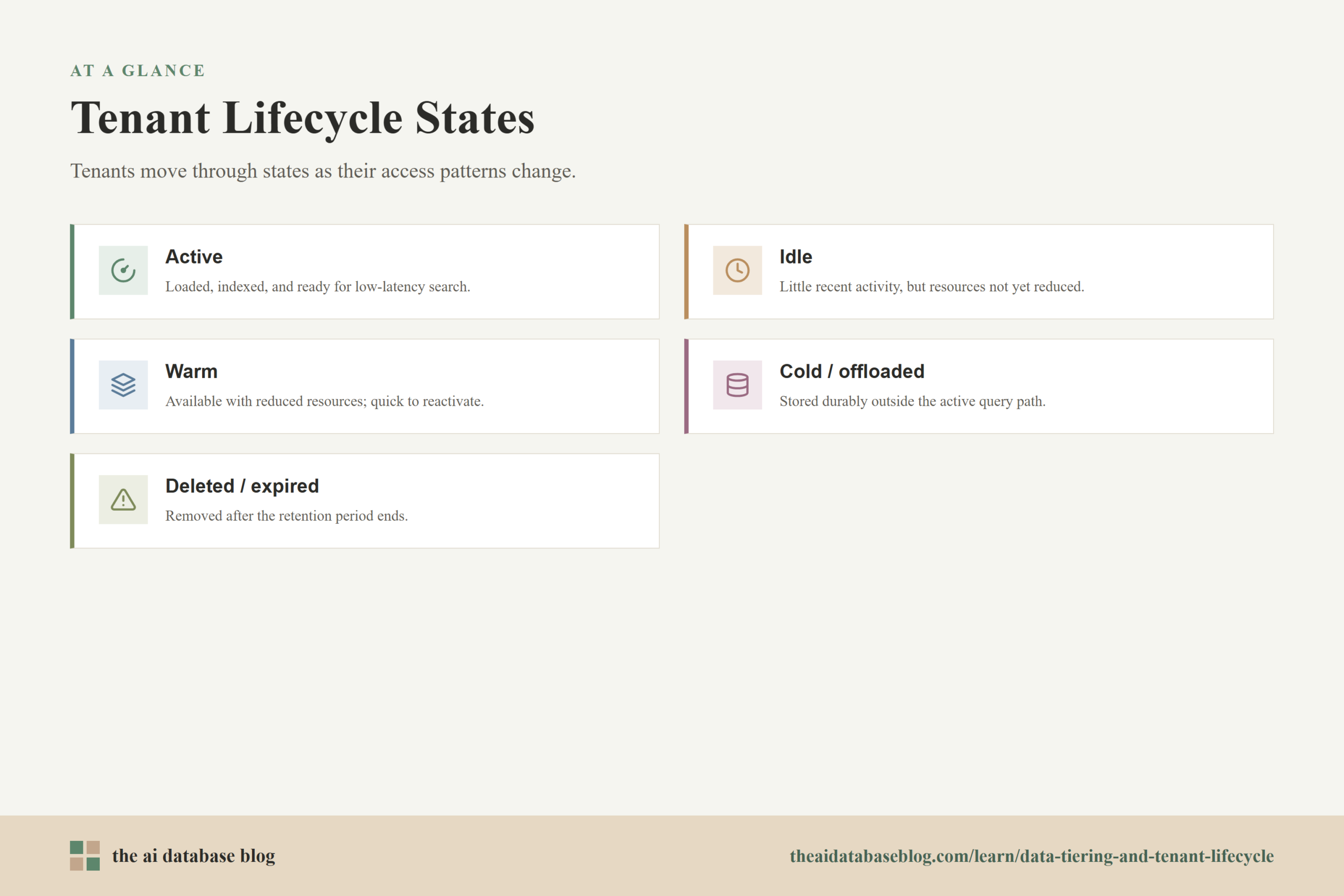
A simple lifecycle might include these states:
- Active: The tenant is loaded, indexed, and ready for normal search traffic. Queries should behave as expected with low latency.
- Idle: The tenant has had little recent activity, but the system has not yet reduced its resource footprint. This state can prevent unnecessary tier changes caused by short pauses in usage.
- Warm: The tenant remains available with reduced resource use. Some index or cache resources may be unloaded, but reactivation should be relatively quick.
- Cold or offloaded: The tenant’s data is stored durably outside the active query path. Search normally requires a reactivation workflow before queries can run.
- Deleted or expired: The tenant is removed after the required retention period, account policy, or contractual obligation has ended.
The lifecycle should be explicit rather than accidental. If the database only reacts when storage bills become painful, teams often end up with emergency cleanup projects. If lifecycle states are designed into the system, inactive tenants can be handled predictably, and active tenants can keep the performance they need.
With the lifecycle defined, the most important operational step is offloading. Offloading is where the platform actually converts inactivity into lower cost, so it needs to be reliable, reversible, and visible to operators.
Offloading Inactive Tenants to Cold Storage
Offloading an inactive tenant means moving that tenant out of the active database footprint while preserving the data needed to restore service later. For an AI database, that usually includes the original objects or document chunks, embeddings, metadata, tenant configuration, index state or rebuild instructions, and enough version information to ensure the tenant can be reconstructed consistently. The system should know not only where the tenant’s data is stored, but also what must happen before it can be searched again.
A common mistake is to think of cold storage as a simple file move. In AI retrieval systems, the searchable state is made from several connected parts. If the embeddings are stored but the metadata filters are missing, retrieval quality may break. If the documents are retained but the embedding model version is unknown, rebuilding the index may produce inconsistent results. If tenant permissions are not preserved, reactivation can become a security risk.
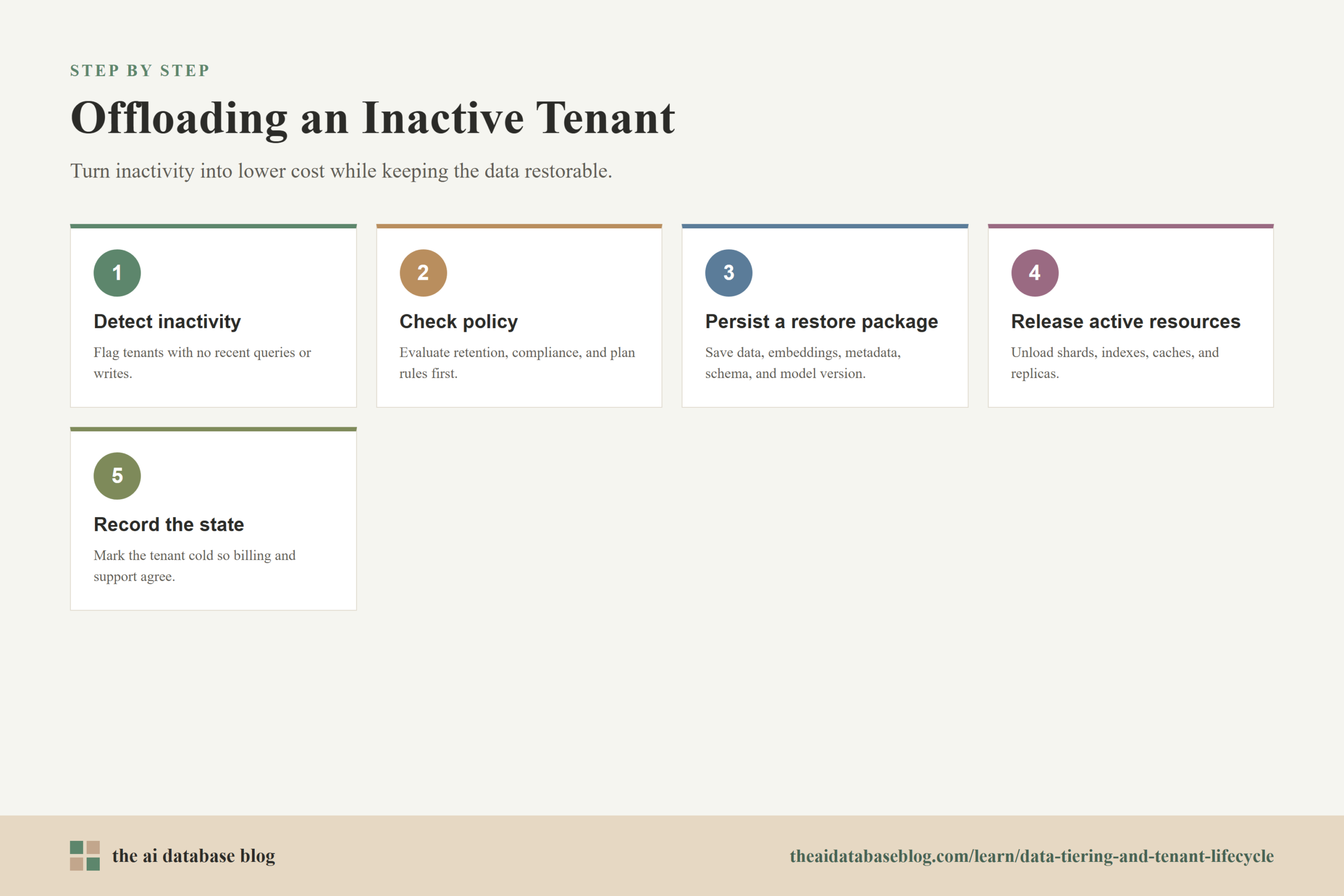
A well-designed offload process usually includes several steps:
- Detect inactivity: The system identifies tenants with low or no query activity, no recent writes, or account status that indicates dormancy.
- Check policy: The tenant is evaluated against retention, compliance, service-level, and customer-plan rules before being moved.
- Persist a restore package: The database stores the data, embeddings, metadata, schema information, index configuration, and model-version details needed for reactivation.
- Remove active resources: Loaded shards, memory-resident indexes, caches, replicas, and other hot resources are released where the database supports it.
- Record the lifecycle state: The control plane marks the tenant as cold or offloaded so queries, billing, monitoring, and support tools understand its status.
Cold storage does not have to mean the data is unreachable. It means the data is no longer paying for immediate query readiness. The distinction matters because many AI applications still need the option to bring a dormant tenant back when a customer returns or a historical project becomes relevant again.
That leads naturally to the reactivation side of the lifecycle. A cold tenant saves money only if the system can restore it without confusion, data loss, or a poor user experience.
Reactivating Tenants on Demand
Reactivation is the process of moving a tenant from cold or warm storage back into an active state. The best reactivation design depends on the product. Some applications can show a short “preparing your workspace” message while the tenant is restored. Others need a background prefetch when a user logs in, opens a project, or renews a subscription. High-value accounts may require proactive reactivation before expected usage windows.
The core question is how much delay the application can tolerate. If cold storage uses an online tier with immediate object access, reactivation may mostly involve loading indexes and warming caches. If the tenant is stored in a deeper archive tier, the restore process may take much longer and may include retrieval fees. This is why cold-tier decisions should be tied to service expectations, not only storage price.
A practical reactivation workflow often follows this pattern:
- Trigger: A user action, scheduled job, account change, or support request asks for the tenant to become active again.
- Restore: The system retrieves the tenant’s stored data and any saved index files or rebuild inputs.
- Validate: The database checks schema, embedding dimensions, metadata fields, permissions, and object counts before allowing queries.
- Load or rebuild indexes: The tenant’s vector and search structures are loaded into the active database path or rebuilt from durable data.
- Warm the query path: Common filters, caches, and replicas may be prepared so the first real user query does not carry the full restore cost.
- Mark active: The tenant state changes so application queries route normally.
The reactivation workflow should also handle failure gracefully. If an archive restore is still running, the product should communicate that the tenant is being prepared instead of returning confusing search failures. If the restore detects schema drift or model-version mismatch, the operator should see a clear remediation path. Lifecycle management is strongest when both the cost-saving and recovery paths are treated as first-class operations.
Once offloading and reactivation are in place, the next concern is how to measure whether lifecycle management is actually saving money. The answer is broader than storage price per gigabyte.
Where the Cost Savings Come From
The most visible savings from tenant lifecycle management come from cheaper storage, but that is only part of the picture. AI database costs are also shaped by memory, compute, replication, index maintenance, backup size, monitoring overhead, and the amount of infrastructure kept ready for low-latency search. Moving inactive tenants to colder tiers can reduce several of these costs at once.
Storage tier pricing matters because cloud object stores commonly offer lower-cost tiers for infrequently accessed or archived data. Hot tiers usually have higher storage cost and lower access cost. Cooler tiers usually reduce storage cost but increase access cost, impose minimum storage durations, or add restore delay. For tenant lifecycle planning, that means the cheapest tier is not always the best tier. It is only cheaper when the tenant is truly inactive enough to justify the retrieval tradeoff.
Cost savings usually come from five areas:
- Lower storage cost: Tenant data that is rarely accessed can move from expensive hot storage to cheaper object or archive storage.
- Lower memory pressure: Inactive tenant indexes do not need to remain loaded in memory or cache layers.
- Lower compute demand: The database can reduce active shards, replicas, background indexing, and query-serving capacity for dormant tenants.
- More efficient backups: Systems can avoid repeatedly backing up fully inactive tenants in the same way as active tenants, depending on database behavior and retention requirements.
- Better capacity planning: Operators can size hot infrastructure for active demand instead of total retained data.
The strongest savings usually appear in systems with many tenants and uneven usage. For example, a customer-support AI application might have thousands of tenant workspaces, but only a portion are queried daily. Keeping every workspace hot would overstate the real demand on the retrieval system. A lifecycle policy can keep active customers fast while moving long-idle workspaces to a cheaper state.
Cost optimization should still be measured carefully. Cold tiers can add retrieval fees, rehydration costs, operational complexity, and support burden if tenants are moved too aggressively. The next step is to define practical policies that reduce waste without creating surprise delays for users.
Designing Lifecycle Policies That Work
A good lifecycle policy balances cost, latency, retention, and customer experience. It should be based on measured activity rather than assumptions. Query frequency, recent writes, tenant size, account status, plan level, contractual obligations, and expected return patterns all matter. A tenant with no searches for 90 days might be safe to offload, but a tenant with seasonal usage may need a different policy.
The simplest policy is age-based: move tenants after a fixed period of inactivity. That is easy to implement, but it can be too blunt. A stronger policy combines multiple signals, such as last query time, last write time, tenant size, plan type, and historical reactivation rate. This reduces the risk of moving tenants that are quiet but still important.
Teams should also define reactivation targets for each tier. A warm tenant might need to return to full speed within seconds or minutes. A cold tenant might be allowed a longer restore window. An archive tenant may be suitable only when delayed access is acceptable. These targets should be visible to product, support, and operations teams so expectations are consistent.
Useful lifecycle metrics include:
- Active tenant count: How many tenants are currently consuming hot resources.
- Inactive tenant storage: How much retained data has moved out of the active query path.
- Reactivation time: How long it takes to make a tenant searchable again.
- Reactivation frequency: How often offloaded tenants return, which helps identify overly aggressive policies.
- Restore failures: How often cold tenants fail validation or require manual intervention.
- Cost per active tenant: How infrastructure cost changes as tenants move through lifecycle states.
These metrics keep lifecycle management honest. If costs fall but reactivation failures rise, the policy is too risky. If nearly all cold tenants reactivate within a week, the inactivity window may be too short. If hot infrastructure remains oversized after offloading, the team may need to revisit shard allocation, replicas, or compute scaling.
With the mechanics and measurements in place, it is useful to step back and consider the architectural tradeoffs. Tiering is powerful, but it changes how the AI database, application, and user experience interact.
Tradeoffs and Risks to Plan For
Data tiering introduces operational complexity. A single active-state database is easier to reason about than a system where tenants move between hot, warm, and cold states. However, that simplicity can become expensive at scale. The goal is to add lifecycle controls carefully enough that the savings are real and the user experience remains predictable.
The main risk is reactivation latency. If users expect instant search but the tenant is in deep cold storage, the product may feel broken. Another risk is incomplete restore data. AI retrieval systems depend on more than raw documents, so the offload package must preserve embeddings, metadata, schema, permissions, and index configuration. Without that information, restoring the tenant may technically work but produce different search behavior.
Lifecycle policies also need to account for data freshness. If a tenant is inactive but still receives background updates, the system must decide whether to update cold storage, keep the tenant warm, or queue changes until reactivation. In retrieval-augmented generation systems, stale or partially restored data can affect answer quality, so the lifecycle design should include consistency checks.
Finally, teams should avoid moving data solely because a colder tier has a lower storage price. Access costs, restore delays, minimum storage durations, and operational effort can offset savings. The right tier is the one that matches the tenant’s real access pattern and the application’s promise to the user.
These tradeoffs do not make tiering less valuable. They simply show why tenant lifecycle management works best as a deliberate architecture pattern rather than a last-minute cost-cutting task.
FAQs
1. What is data tiering in an AI database?
Data tiering in an AI database means placing data on different storage and resource tiers based on how frequently it is accessed and how quickly it must be searchable. Active data stays on fast hot resources, occasionally used data may move to warm resources, and inactive data can move to cold storage until it is needed again.
2. How are hot, warm, and cold tiers different?
Hot tiers are designed for immediate search and low latency, so they usually cost the most. Warm tiers reduce resource usage while keeping data reasonably accessible. Cold tiers prioritize low storage cost and long-term retention, but they usually require reactivation before the tenant can be searched again.
3. Why does tenant lifecycle management matter for vector databases?
Vector databases can consume significant memory, compute, and index resources when many tenants are kept active. Tenant lifecycle management lets the system keep active tenants fast while reducing the footprint of tenants that are idle, dormant, or retained only for future use.
4. What should be stored before offloading a tenant?
The system should preserve the tenant’s source data, embeddings, metadata, schema, permissions, index configuration, model-version details, and any information needed to rebuild or reload the search state. Storing only raw documents may not be enough to restore the same retrieval behavior later.
5. How long does tenant reactivation take?
Reactivation time depends on the storage tier and database design. A warm tenant may be ready quickly if the system only needs to reload indexes or caches. A cold tenant may take longer if data must be fetched from object storage, restored from archive storage, validated, and reindexed before search traffic can resume.
6. Does cold storage always save money?
Cold storage saves money when the tenant is inactive enough that lower storage and resource costs outweigh retrieval fees, restore delay, and operational complexity. It may not save money for tenants that reactivate frequently or require immediate access after long idle periods.
Takeaway
Data tiering and tenant lifecycle management help AI database teams match infrastructure cost to actual usage. Hot tiers keep active tenants fast, warm tiers reduce resource pressure for occasional use, and cold tiers preserve inactive tenants without keeping them fully loaded. This guidance is most useful for teams building multi-tenant vector search, RAG, or knowledge retrieval systems where many tenants are stored but only some are active at any given time. A practical use case is a SaaS AI assistant that keeps daily users searchable in real time while offloading dormant workspaces and reactivating them when customers return.