A first RAG pipeline is a system that loads your own data, breaks it into searchable chunks, turns those chunks into embeddings, stores them in a searchable database, retrieves the most relevant pieces for a user question, and gives those pieces to a language model as context before it answers. The basic idea is simple, but the quality depends heavily on practical choices: clean input data, sensible chunk boundaries, useful metadata, reliable retrieval, and prompts that tell the model to answer from the retrieved context instead of guessing.
This guide walks through the full beginner workflow for building a retrieval-augmented generation pipeline. You will learn what happens at each stage, why each stage matters, how the pieces fit together, and which common mistakes cause early RAG projects to return weak, incomplete, or misleading answers.
What a RAG Pipeline Does
Retrieval-augmented generation, usually shortened to RAG, connects a language model to information outside the model itself. Instead of asking the model to answer only from its training data, a RAG system first searches a controlled data source and then passes relevant retrieved text into the model’s prompt. This makes RAG useful when an application needs answers based on private documents, internal knowledge, product documentation, research notes, support articles, policies, or fast-changing information.
A beginner-friendly way to understand RAG is to separate it into two flows. The first flow is ingestion, where source data is prepared and stored for search. The second flow is query time, where a user asks a question, the system retrieves relevant chunks, and the language model uses those chunks to generate an answer. Both flows matter. A clean query flow cannot rescue poorly prepared data, and a well-built index will still underperform if the retrieval and prompting steps are careless.
The core pipeline usually follows this order:
- Load the source data.
- Clean and normalize the data.
- Split the data into chunks.
- Create embeddings for each chunk.
- Store the chunks, embeddings, and metadata in a database.
- Embed the user’s query.
- Retrieve the most relevant chunks.
- Build a prompt with the retrieved context.
- Ask the language model to answer from that context.
- Evaluate the answer and improve the pipeline.
Once that high-level flow is clear, the next question is where the source data comes from and how it should be prepared before it ever reaches the embedding model.
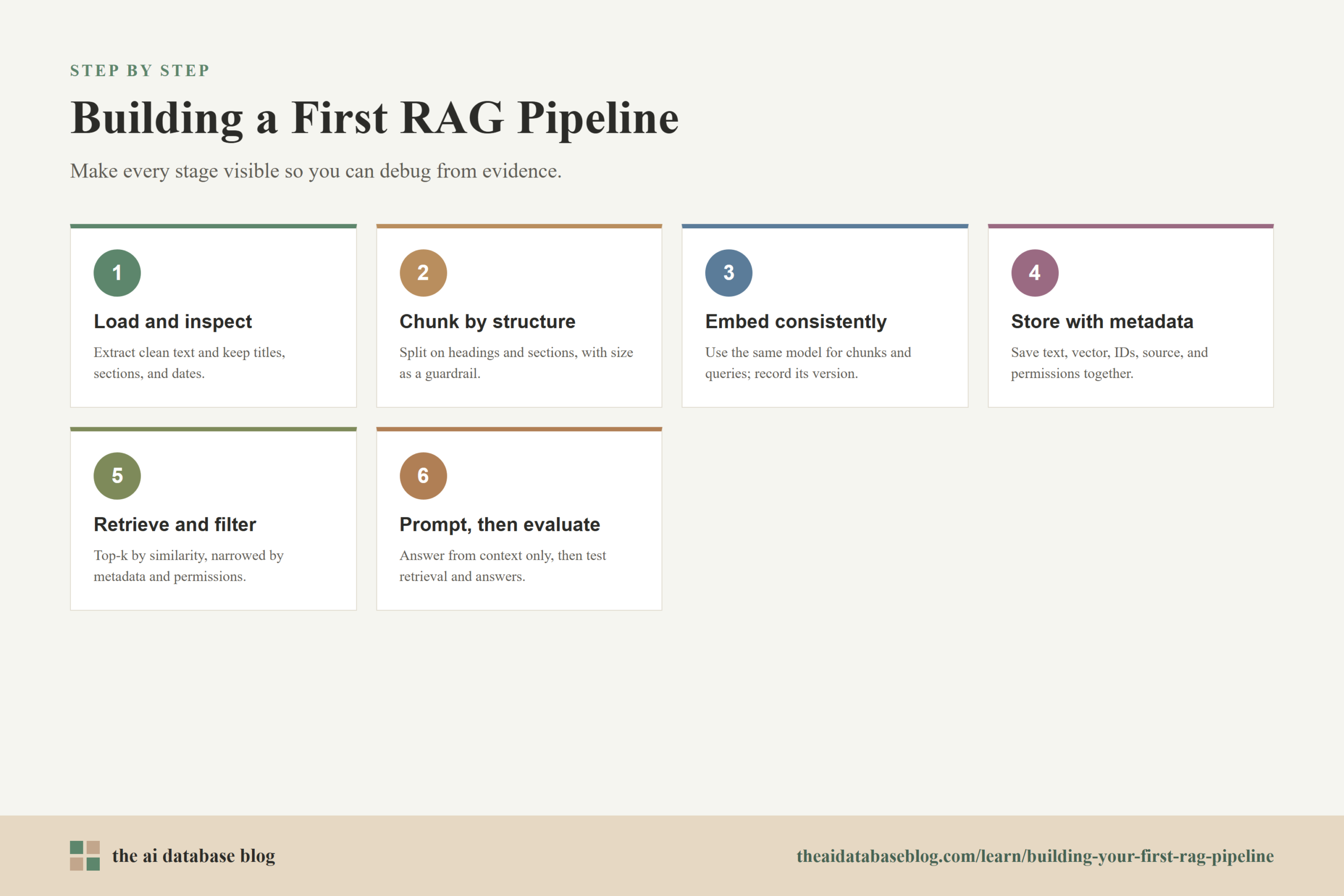
Step 1: Load the Data
The first step in a RAG pipeline is loading the content your application should be able to answer from. This might include PDFs, HTML pages, Markdown files, customer support articles, database records, spreadsheets, transcripts, product manuals, or internal documentation. Loading data sounds simple, but it is often where beginner RAG projects quietly lose quality because the text extracted from the source is incomplete, duplicated, badly ordered, or missing important document structure.
Good loading does more than read files. It should preserve the information needed later for retrieval and citation. For example, if you load a policy document, the pipeline should keep the document title, section heading, page number, revision date, and source path when possible. If you load website documentation, the pipeline should preserve page titles, URLs, headings, and anchors. These details become metadata that helps the system filter results, display sources, and debug why a certain answer was produced.
For a first project, start with a small and clean data set rather than a large messy one. A focused set of documents makes it easier to see whether the pipeline is working. If the first test corpus includes old files, repeated drafts, scanned PDFs with extraction errors, and unrelated topics, it becomes difficult to tell whether the problem is the RAG design or the data itself.
After loading, inspect a sample of the extracted text before moving on. Look for broken sentences, missing tables, repeated headers, navigation clutter, or text that appears in the wrong order. These problems can make embedding and retrieval less reliable because the system is indexing noise as if it were useful knowledge.
Once the raw content is loaded and checked, the pipeline needs to decide how to divide long documents into pieces that are small enough to retrieve but complete enough to answer real questions.
Step 2: Chunk the Data
Chunking is the process of splitting loaded documents into smaller units that can be embedded, stored, and retrieved. A language model might eventually see only a handful of these chunks when answering a question, so chunk quality has a direct effect on answer quality. If chunks are too small, they may lack the surrounding context needed to answer correctly. If chunks are too large, they may blur several topics together and make retrieval less precise.
A good beginner approach is to chunk by document structure first, then use size limits as a guardrail. Headings, sections, paragraphs, list boundaries, and page breaks often carry meaning. A section from a product guide or policy document usually makes a more useful chunk than an arbitrary slice of text cut every fixed number of characters. Fixed-size chunking can still work well for simple documents, but it should not ignore structure when structure is available.
Choose a Practical Chunk Size
There is no universal best chunk size. The right size depends on the document type, the embedding model’s input limits, the questions users ask, and how much context the language model can handle. Short FAQ entries may work as individual chunks. Dense legal, medical, or technical sections may need larger chunks because key meaning depends on surrounding clauses or definitions. Documentation pages often benefit from chunks that preserve the heading path so the same term can be understood in the right section.
For a first pipeline, choose a reasonable baseline, test it, and adjust from evidence. A common beginner mistake is spending days searching for a perfect chunk size before building an evaluation set. It is better to start with a simple structure-aware strategy, retrieve results for real example questions, and inspect whether the returned chunks contain enough information to answer.
Use Overlap Carefully
Chunk overlap means repeating a small amount of text from one chunk in the next chunk. It can help when important context falls near a boundary, but too much overlap increases storage, duplicate retrieval, and prompt clutter. Overlap should be used as a repair for boundary loss, not as a substitute for thoughtful chunking.
When chunks preserve headings and natural sections, heavy overlap is often less necessary. When documents are long and continuous, such as transcripts or reports, light overlap can help the system retain context across boundaries. The goal is to keep each chunk understandable on its own without flooding the index with nearly identical text.
After chunking, each chunk needs to become searchable by meaning. That is where embeddings enter the pipeline.
Step 3: Create Embeddings
An embedding is a numerical representation of text. In a RAG pipeline, the embedding model converts each chunk into a vector so the system can compare chunks by semantic similarity. A user query is also embedded at search time, and the database looks for stored vectors that are close to the query vector. This allows the system to find text that is conceptually related to the question, even when the wording is not exactly the same.
For beginners, the most important embedding rule is consistency. Use the same embedding model for stored chunks and incoming queries. If the document chunks are embedded with one model and the query is embedded with a different incompatible model, similarity search may perform poorly or fail entirely. Also store the embedding model name and version in your pipeline configuration so you know when a re-embedding job is required.
The text you send to the embedding model should be meaningful and clean. Avoid embedding boilerplate navigation, repeated legal footers, malformed tables, or isolated fragments that no human could understand. In many cases, it helps to include a compact breadcrumb in the chunk text, such as the document title and section heading, because the same paragraph can mean different things depending on where it appears.
Embeddings are powerful, but they are not magic. They can miss exact terms, codes, identifiers, dates, or rare product names if the retrieval strategy relies only on semantic similarity. This is one reason many mature systems combine vector search with keyword search, metadata filters, or reranking after the first retrieval pass.
Once each chunk has an embedding, the pipeline needs somewhere to keep the vector, the original text, and the metadata that will support filtering and traceability.
Step 4: Store Chunks, Embeddings, and Metadata
The storage layer is where your RAG pipeline becomes searchable. A typical record includes the chunk text, its embedding vector, a unique chunk identifier, a document identifier, and metadata such as title, source, section, page, timestamp, access permissions, and content type. The database must support similarity search over embeddings, but the surrounding data model is just as important as the vector itself.
Metadata is what lets the application narrow retrieval to the right part of the corpus. For example, a user might ask a question that should only use current policy documents, only public help articles, only records from a specific product line, or only documents the user is allowed to access. Without metadata filtering, the system may retrieve semantically similar text from the wrong source and produce an answer that sounds plausible but is not valid for the user’s situation.
A useful beginner schema might include:
- chunk_id: a stable identifier for the chunk.
- document_id: an identifier that connects the chunk back to its source document.
- chunk_text: the text that will be passed to the language model if retrieved.
- embedding: the vector created from the chunk text.
- title: the human-readable document or page title.
- section_path: the heading path or location inside the source document.
- source_uri: the file path, URL, or internal reference for traceability.
- updated_at: the source update time, useful for freshness and re-indexing.
- permissions: access-control information when the corpus is not public to every user.
Storage should also account for updates. Documents change, and a RAG index that cannot refresh stale chunks will eventually answer from old information. For a first version, plan how you will delete, replace, or re-embed chunks when a source document changes. This does not need to be elaborate at the start, but it should not be ignored.
With the searchable index in place, the next stage happens when a user asks a question and the system needs to find the most relevant context.
Step 5: Retrieve Relevant Context
Retrieval is the step that turns a user question into a small set of candidate chunks. The system embeds the query, searches the stored vectors, applies any required metadata filters, and returns the top results. This is where many beginner RAG systems succeed or fail. The language model can only answer from the context it receives, so if retrieval misses the right chunks, the final answer is likely to be incomplete or wrong.
Start with simple top-k retrieval, where the database returns the most similar chunks by vector distance. Then inspect the results manually for a set of realistic questions. Ask whether the retrieved chunks actually contain the answer, whether they include enough surrounding context, and whether unrelated chunks are crowding out better evidence. This manual review is one of the fastest ways to improve a first RAG pipeline.
Add Filters When the Corpus Has Boundaries
Metadata filters are important when the same concept appears in different contexts. A question about onboarding might refer to employee onboarding, customer onboarding, or developer onboarding. If your metadata includes document type, department, product, version, or audience, the application can narrow the search before ranking results.
Filters are also essential for permissions. A RAG system should not retrieve private chunks and then rely on the language model to avoid revealing them. Access control belongs in the retrieval layer so unauthorized content never enters the prompt.
Consider Hybrid Search and Reranking
Vector search is good at semantic similarity, but keyword search is often better for exact names, error codes, identifiers, and domain-specific terms. Hybrid search combines semantic search with lexical search so the system can handle both meaning and exact wording. Reranking adds another step after initial retrieval: a more precise model scores the candidate chunks and orders the best ones before they are sent to the language model.
You do not need every advanced retrieval technique on day one. For a first pipeline, the priority is to make retrieval observable. Log the query, retrieved chunk IDs, scores, metadata, and final answer. If you cannot see what was retrieved, you cannot reliably explain or improve the answer.
After retrieval, the pipeline has the evidence it needs. The next step is to package that evidence clearly so the language model can use it without being encouraged to invent unsupported details.
Step 6: Prompt the LLM With Retrieved Context
The prompt connects retrieval to generation. It should include the user’s question, the retrieved chunks, and instructions that tell the language model how to use the context. The goal is not to make the model sound clever. The goal is to make it answer accurately, explain uncertainty when the context is insufficient, and avoid using information that was not retrieved.
A simple RAG prompt usually has three parts. First, it sets the task: answer the user’s question using the provided context. Second, it supplies the retrieved context in a clear format, often with source labels or chunk identifiers. Third, it includes the user’s question and any output requirements, such as keeping the answer concise or citing sources from the retrieved context.
A beginner-friendly prompt pattern looks like this:
You are answering a question using only the provided context.
If the context does not contain the answer, say that the available context is insufficient.
Do not invent facts.

Context:
[Source 1]
...

[Source 2]
...

Question:
...

Answer:
The exact wording can vary, but the principle should stay the same: retrieved evidence comes first, and the model is instructed to stay grounded in that evidence. If the application needs citations, preserve source metadata when building the prompt so the answer can point back to the retrieved documents.
Prompting is also where context limits matter. Sending too many chunks can dilute the answer, increase cost, and push useful evidence out of the model’s attention. Sending too few chunks can leave the model without enough information. A practical first system should tune the number of chunks based on real questions and inspect whether the final prompt contains the evidence a human would need.
At this point, the pipeline can produce answers. The remaining work is making sure those answers are dependable enough for the intended use case.
Step 7: Test and Evaluate the Pipeline
Evaluation is what turns a RAG demo into a system you can trust. Beginners often test a pipeline by asking a few questions in a chat interface and judging whether the answer feels right. That is a useful first smoke test, but it is not enough. RAG systems need evaluation at both the retrieval level and the answer level because failures can come from either side.
Retrieval evaluation asks whether the system found the right chunks. Useful questions include: did the correct document appear in the top results, did the retrieved chunks contain the answer, and were irrelevant chunks ranked too highly? Answer evaluation asks whether the final response was faithful to the retrieved context, directly answered the question, and avoided unsupported claims.
For a first pipeline, create a small test set of realistic questions and expected source documents. Include easy questions, ambiguous questions, questions that require exact terms, and questions that should return “not enough information.” Then review the retrieved chunks and final answers side by side. This will reveal whether you need better chunking, cleaner metadata, hybrid retrieval, reranking, prompt changes, or source-data cleanup.
Evaluation should become part of the normal development loop. Every time you change chunk size, embedding models, metadata filters, retrieval settings, or prompts, run the same test questions again. Without a repeatable test set, it is easy to improve one example while quietly making several others worse.
Testing makes the weak spots visible. The most common weak spots for beginners tend to repeat, so it helps to know what to watch for before they become hard-to-debug production problems.
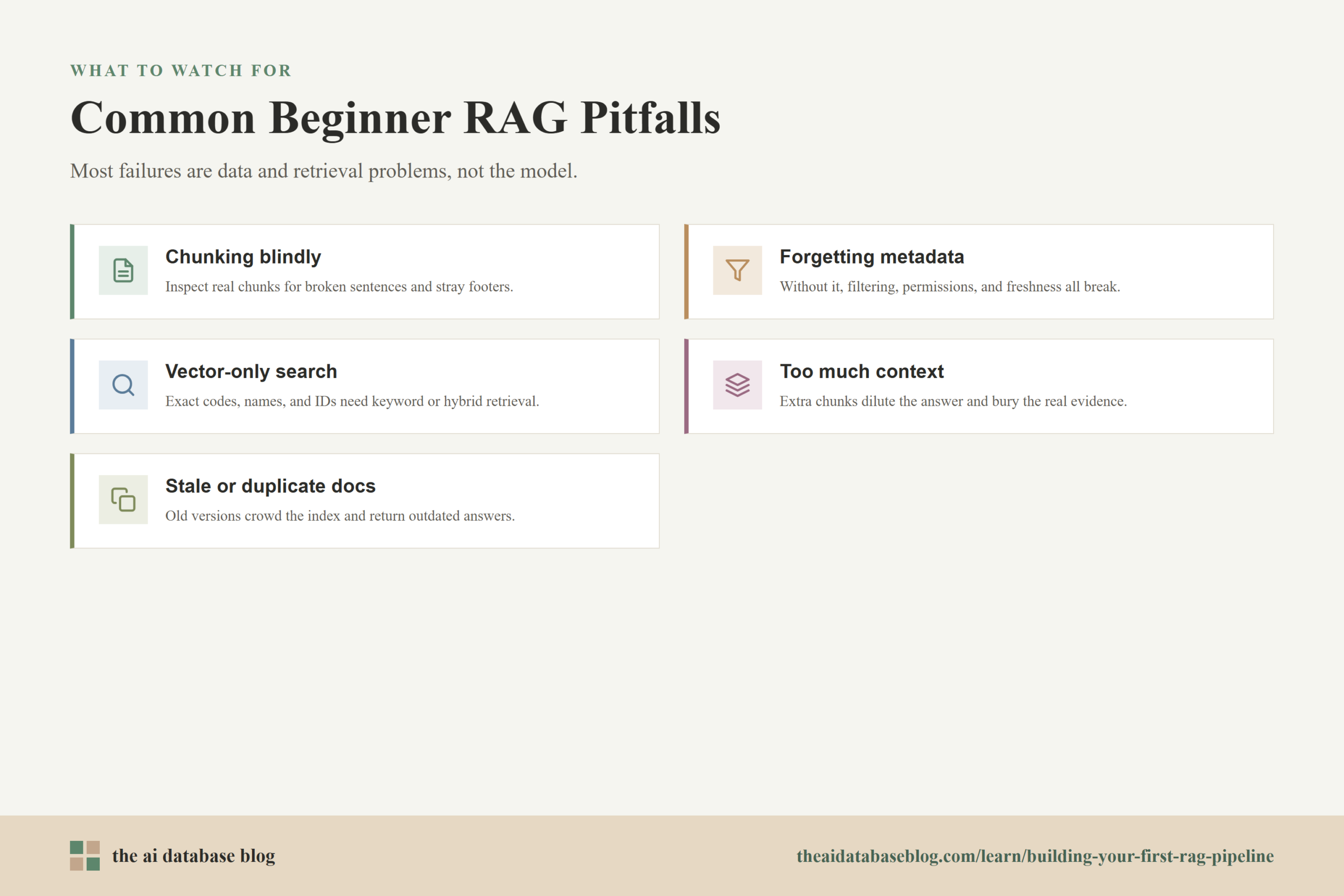
Common Pitfalls for Beginners
The first RAG pipeline often works just well enough to be exciting and just poorly enough to be confusing. Many beginner mistakes come from treating RAG as a single feature instead of a chain of dependent choices. If one stage is weak, the rest of the pipeline may still run, but the answers will be unreliable.
Chunking Without Looking at the Output
It is easy to apply a default splitter and assume the chunks are fine. Always inspect the actual chunks. If they contain broken sentences, missing headings, repeated footers, or isolated fragments, the embedding model will index low-quality inputs and retrieval will suffer.
Forgetting Metadata
Text alone is rarely enough. Metadata helps with filtering, permissions, freshness, source display, debugging, and re-indexing. A RAG pipeline without useful metadata may work on a small demo corpus but struggle as soon as the content grows or becomes more varied.
Relying Only on Vector Similarity
Semantic retrieval is valuable, but exact terms still matter. Error codes, product names, legal phrases, dates, and IDs can be missed or diluted by vector-only search. If your users ask questions involving exact identifiers, consider keyword search, hybrid retrieval, or reranking.
Sending Too Much Context to the Model
More context is not always better. Too many chunks can introduce irrelevant information and make the model’s job harder. The goal is to send the smallest set of context that gives the model enough evidence to answer well.
Ignoring Stale or Duplicate Documents
If old and new versions of the same content live in the index together, retrieval may return outdated information. If duplicate documents are indexed repeatedly, they can crowd out more useful sources. Keep the corpus clean and design a simple update process from the start.
Testing Only Happy-Path Questions
A RAG system should be tested with unclear questions, missing-answer questions, narrow exact-match questions, and questions that require filters. Happy-path tests can make a pipeline look better than it is. Harder tests reveal whether the system is actually grounded and useful.
These pitfalls are common because RAG makes it easy to build a working prototype quickly. The better approach is to keep the first version simple, but make every stage visible and testable.
A Simple Beginner Architecture
A first RAG architecture does not need to be complicated. The best beginner design is one that lets you understand every step and debug failures without guessing. You can start with a small ingestion script, a vector-capable database, a retrieval function, a prompt builder, and a chat or API endpoint that calls the language model.
The ingestion side should load documents, clean text, chunk content, create embeddings, and store records with metadata. The query side should receive a user question, optionally apply filters, retrieve candidate chunks, build a grounded prompt, call the language model, and return the answer with source references when appropriate.
A simple architecture can look like this:
- The ingestion job reads approved source documents.
- The parser extracts clean text and document metadata.
- The chunker creates section-aware chunks.
- The embedding step converts chunks into vectors.
- The database stores chunk text, vectors, metadata, and source references.
- The application receives a question from the user.
- The retriever embeds the question and searches the database.
- The prompt builder inserts the best retrieved chunks into a controlled prompt.
- The language model generates an answer based on the retrieved context.
- The application logs retrieval and answer data for evaluation.
This architecture is intentionally plain. It gives beginners a complete working loop without hiding the important choices. Once the loop works, you can improve it with better parsing, metadata enrichment, hybrid search, reranking, query rewriting, citations, access control, and automated evaluation.
The most important habit is to improve the pipeline from evidence. When an answer fails, inspect the source data, the chunk, the embedding input, the retrieved results, and the prompt before changing the language model. Many RAG problems are retrieval and data-quality problems, not generation problems.
FAQs
1. What is the simplest RAG pipeline I can build?
The simplest useful RAG pipeline loads a small set of clean documents, splits them into chunks, embeds each chunk, stores the chunks and embeddings in a searchable database, retrieves relevant chunks for a user question, and sends those chunks to a language model as context. It should also log retrieved chunks so you can inspect whether the system found the right evidence.
2. Do I need a vector database for my first RAG pipeline?
You need some way to store embeddings and search them by similarity. For a small experiment, this can be a local vector index or lightweight database. For a growing application, a database with vector search, metadata filtering, update support, and operational reliability is usually a better fit.
3. How big should RAG chunks be?
Chunk size depends on the document type and the questions users ask. A good starting point is to preserve natural document structure and then test whether retrieved chunks contain enough context to answer. Avoid assuming that one fixed size will work for every corpus.
4. Why does my RAG system retrieve irrelevant chunks?
Irrelevant retrieval can come from noisy source text, poor chunk boundaries, missing metadata filters, weak query wording, vector-only search for exact-term questions, or a corpus with duplicate and stale documents. Inspect the retrieved chunks directly before changing the prompt or language model.
5. Should a RAG prompt tell the model not to hallucinate?
Yes, but that instruction is only one part of the solution. The prompt should tell the model to answer from the provided context and say when the context is insufficient. However, the stronger protection comes from retrieving the right evidence, filtering unauthorized or irrelevant sources, and evaluating whether answers are grounded.
6. How do I know if my RAG pipeline is working well?
Create a test set of realistic questions and review both the retrieved chunks and the final answers. A good pipeline retrieves chunks that contain the needed evidence, answers directly from that evidence, avoids unsupported claims, and handles questions where the answer is not available.
Takeaway
Building your first RAG pipeline is mainly about creating a reliable path from source data to grounded answers: load clean documents, chunk them thoughtfully, embed them consistently, store them with useful metadata, retrieve the right context, and prompt the language model to answer from that context. This guidance is most useful for developers, technical founders, data teams, and AI application builders who want to add private or domain-specific knowledge to an LLM application, such as a documentation assistant, support chatbot, policy search tool, or internal knowledge assistant. Start simple, inspect every stage, and improve the pipeline using real retrieval and answer-quality tests.
Watch this video to learn more