A vector store disaster recovery plan should protect more than the embedding vectors themselves. It should preserve the objects or chunks those vectors represent, the metadata used for filtering and access control, the schema or collection definitions, index configuration, and enough operational context to rebuild service within a defined recovery time. Backups, restore testing, replication, and recovery objectives work together: backups protect against data loss and corruption, restore tests prove the plan works, replication keeps service available through node or zone failures, and recovery objectives define how much downtime and data loss the system can tolerate.
This guide explains how to think about backup and disaster recovery for vector stores used in AI search, retrieval-augmented generation, recommendation, and other embedding-driven applications. You will learn what needs to be backed up, how restore testing should work, why replication is useful but not a complete backup strategy, and how to set practical recovery objectives for systems where relevance, freshness, and availability all matter.
Why Vector Store Recovery Needs Its Own Plan
A vector store often sits at the center of an AI application, but it is not always treated with the same recovery discipline as a transactional database. That is risky because the vector store usually contains the searchable representation of product catalogs, documents, user knowledge, support articles, policies, or application memory. If it is unavailable, the application may still run, but retrieval quality can collapse, generated answers may lose grounding, and search experiences may stop returning useful results.
Disaster recovery for a vector store is also different from simply saving a table of records. A useful recovery point must include the data objects, embedding vectors, metadata, vector index state or enough information to rebuild it, and configuration that controls how queries behave. In many systems, the vector store also supports hybrid search, filtered retrieval, multi-tenancy, and access-aware query patterns, which means recovery must preserve both semantic search behavior and structured filtering behavior.
The most common mistake is assuming that embeddings can always be regenerated later. Sometimes they can, especially if the original source data, chunking rules, embedding model, and ingestion pipeline are all available and unchanged. But regeneration can be slow, expensive, and difficult to reproduce exactly, especially when the store holds historical content, user-generated data, deleted source records, or embeddings created with an older model version.
Once the vector store is understood as a recovery-critical system, the next question is what actually needs protection. The answer is broader than “the vectors,” because retrieval depends on several layers of data and configuration working together.
What to Back Up in a Vector Store
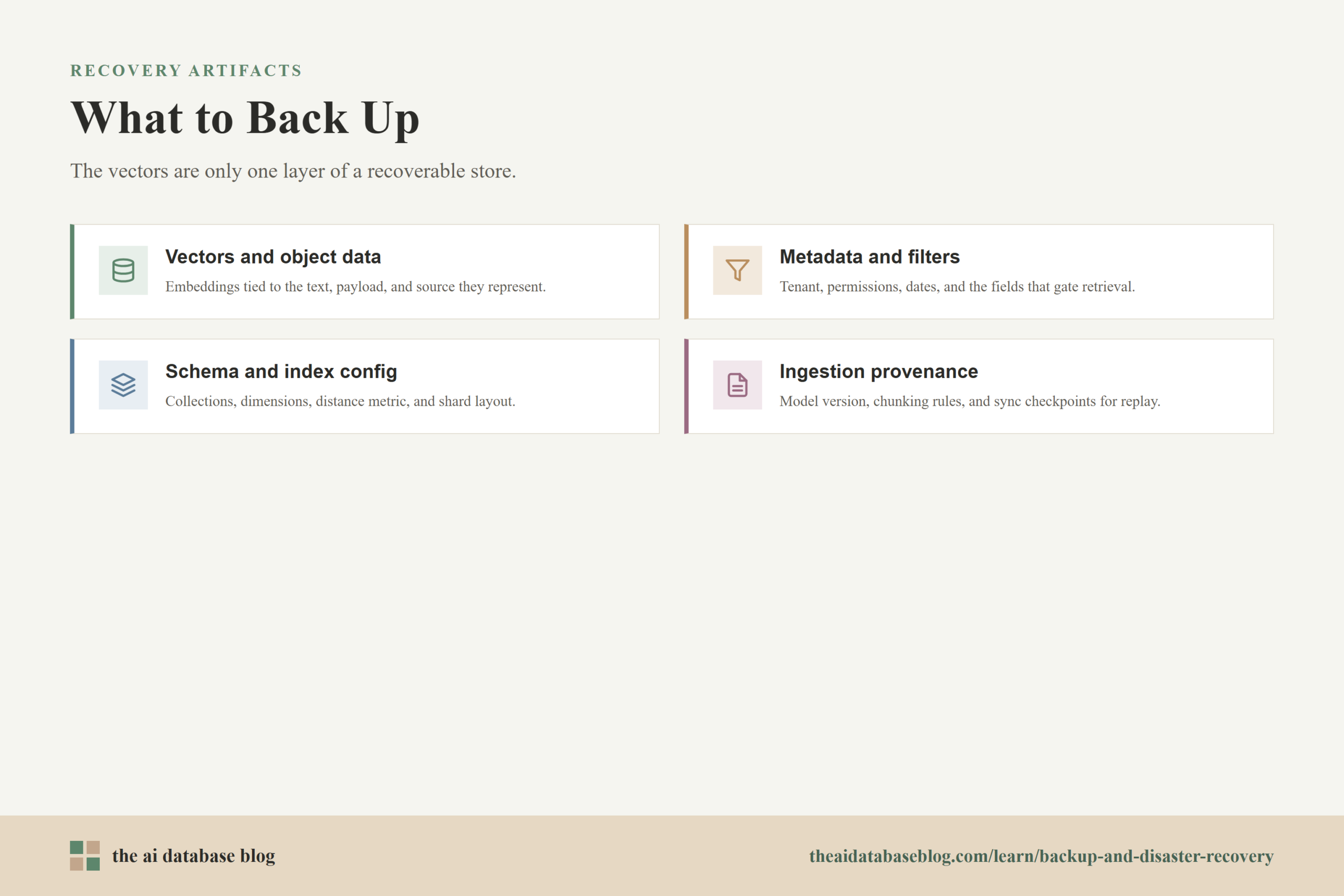
A complete vector store backup should capture every element required to restore both data and retrieval behavior. The vector array is only one part of that state. A restored system also needs to know which object each vector belongs to, what metadata can be filtered, how collections or indexes are defined, and what operational settings affect search, replication, tenancy, authorization, and ingestion.
Vectors and Object Data
Vectors represent the numerical embedding of a text chunk, image, product, event, or other stored item. They are useful only when tied back to an object or document record. A backup should therefore preserve the vector and its object identifier together, along with the text, payload, URI, source reference, or other content needed to return a useful result.
For retrieval-augmented generation, this is especially important. A language model does not need a vector by itself; it needs the passage, metadata, and source context attached to that vector. If a restore brings back embeddings without the associated content, retrieval may technically work but return incomplete or unusable results.
Metadata and Filterable Fields
Metadata controls much of the practical value of a vector store. It may include document type, customer ID, tenant ID, language, timestamp, source system, permissions, product category, lifecycle state, or freshness signals. In hybrid and filtered search, this metadata determines which objects are eligible for retrieval before or alongside similarity scoring.
Backups should include metadata values and the indexing configuration that makes those values queryable. If a restore loses metadata or rebuilds it inconsistently, the system may return semantically similar but unauthorized, outdated, or irrelevant results. That kind of failure can be harder to notice than total downtime because the application still appears to respond.
Schema, Collections, and Index Configuration
A vector store also needs its structural definition. This includes collection or class names, property definitions, vector dimensions, distance metrics, shard layout, replication settings, multi-tenant settings, and indexing choices. These settings shape how data is stored and queried, so they should be part of the recovery artifact or captured in infrastructure configuration that can be redeployed reliably.
Index configuration matters because a restored vector store must serve the same type of search workload as the original. A different distance metric, missing inverted index, wrong vector dimension, or changed filter configuration can alter relevance even when the raw objects and vectors are present. Disaster recovery should therefore test restored search behavior, not only restored data volume.
Ingestion State and Embedding Provenance
Backups are stronger when they are paired with enough ingestion state to explain how the data was produced. That includes chunking rules, embedding model version, source connectors, batch IDs, last successful sync time, and any transformation logic used before insertion. These details help the team resume ingestion after a restore and avoid duplicating, skipping, or corrupting records.
Embedding provenance is useful during partial recovery. If a backup is slightly old, the team may need to replay only the source changes that happened after the backup was taken. That replay is much easier when the system records source offsets, update timestamps, content hashes, or import checkpoints.
A backup that captures the right data is only the first layer of protection. The next layer is proving that the backup can actually be restored under realistic conditions, because backup success and recovery success are not the same thing.
Restore Testing for Vector Stores
Restore testing is the practice of regularly rebuilding a usable environment from backup and checking that the restored system behaves correctly. For vector stores, this should include both infrastructure validation and retrieval validation. It is not enough to confirm that a backup file exists or that a restore command finishes; the restored store must answer representative queries with acceptable relevance, filtering, latency, and completeness.
A good restore test starts with a controlled target environment, such as a staging cluster or isolated recovery environment. The team restores from the latest backup, checks whether expected collections and object counts are present, verifies metadata and schema, and then runs a standard set of search and retrieval tests. These tests should include simple vector searches, metadata-filtered searches, hybrid searches if used, and application-level retrieval flows.
The test should also measure recovery time. Record how long it takes to provision infrastructure, access backup storage, restore data, rebuild or validate indexes, resume ingestion, warm caches if relevant, and switch application traffic. This measurement turns recovery planning from an assumption into an operational number.
For AI applications, include quality checks as part of the test. A restored vector store may have the correct number of objects but still fail if permissions are missing, metadata filters behave differently, or the top results for important queries change unexpectedly. A small golden query set can help catch these problems. Each test query should have expected source documents, acceptable result ranges, and filters that reflect real application behavior.
Restore tests should happen on a schedule and after major changes. Important triggers include schema changes, embedding model changes, sharding changes, replication changes, new backup storage locations, major ingestion pipeline changes, and upgrades to the vector database engine. Each of these can alter whether an old backup remains restorable and whether a restored system still behaves as expected.
Restore testing proves that the system can come back from a backup, but it does not necessarily keep the application online during smaller failures. That is where replication becomes important, especially for production vector stores that need steady availability.
Replication for Resilience
Replication means keeping copies of data across multiple nodes, availability zones, or regions so the system can continue serving requests when one component fails. In a vector store, replication can improve availability, read throughput, and maintenance flexibility. It can also reduce the operational impact of node failures because another replica can still serve the same shard or collection data.
Replication is most useful for resilience against infrastructure failure. If a node goes down, a replicated cluster can continue handling reads and, depending on the system design and consistency settings, writes. If a zone fails, replicas in another zone may keep the application available. For high-traffic retrieval systems, replicas may also distribute query load, which helps keep latency stable during normal operations.
However, replication is not a replacement for backups. If an application deletes the wrong collection, writes corrupted data, imports bad embeddings, or applies an incorrect metadata update, replication may quickly copy that bad state to every replica. Backups protect against logical failures and allow the team to return to an earlier recovery point. Replication protects against many availability failures, while backups protect against data loss, corruption, and irreversible operational mistakes.
Vector store replication should also account for metadata. Some systems separate cluster metadata, such as collection definitions, from object metadata, such as timestamps, tenant IDs, or filterable fields attached to records. A resilience plan should understand which metadata is replicated automatically, which metadata follows the data replication factor, and which operational settings must be redeployed from configuration.
Cross-region replication can be valuable when the application must survive regional outages or serve users from multiple geographies. It also introduces tradeoffs. More replicas increase storage cost, write coordination complexity, monitoring surface area, and the risk of inconsistent reads if the system uses eventual consistency. The right design depends on the application’s tolerance for stale retrieval results, downtime, and operational cost.
Replication choices should not be made in isolation. They should be driven by recovery objectives, because the acceptable amount of downtime and data loss determines how much backup frequency, replica placement, automation, and testing the system needs.
Recovery Objectives for a Vector Store
Recovery objectives translate business and application needs into technical requirements. The two most important objectives are recovery time objective and recovery point objective. Recovery time objective, or RTO, is how long the system can be unavailable before the impact becomes unacceptable. Recovery point objective, or RPO, is how much data the system can afford to lose, measured as the time between the latest recoverable state and the failure.
Recovery Time Objective
For a vector store, RTO should include more than the time required to restore files. It should include provisioning or failing over infrastructure, restoring the database, validating index health, checking query behavior, reconnecting the application, resuming ingestion, and confirming that user-facing retrieval works. If the application depends on the vector store for core functionality, the RTO may need to be measured in minutes. If the vector store supports a less critical feature, several hours may be acceptable.
RTO is also affected by index size and rebuild behavior. Some vector stores can restore persisted index state, while others may need to rebuild indexes or replay logs. Large vector indexes can take meaningful time to validate, warm, compact, or rebalance. A practical RTO should be based on measured restore tests, not estimates from backup size alone.
Recovery Point Objective
RPO determines backup frequency and ingestion replay requirements. If the vector store changes only once per day, nightly backups may be enough. If it receives continuous document updates, user memory writes, product updates, or operational knowledge changes, the RPO may need to be much shorter. In that case, backups may need to be combined with change logs, event streams, source-system replay, or incremental backup mechanisms.
RPO should also consider whether lost vectors can be regenerated. If every vector can be recreated from an authoritative source, the system may tolerate a longer RPO as long as replay is reliable. If the vector store contains data that is not safely recoverable elsewhere, such as user-created records, deleted source content, or historical embeddings, the backup plan should be more aggressive.
Service Degradation Objectives
AI applications often need a third kind of objective: how degraded the service may become during recovery. For example, a search application might be allowed to serve keyword-only results for one hour, or a support assistant might be allowed to use a smaller restored corpus while a full index is rebuilding. These choices should be explicit because they affect user experience and operational decisions during an incident.
Define which retrieval features can be temporarily disabled, which datasets must come back first, and which queries must remain accurate. A vector store that powers customer support might prioritize current help articles and policy documents before older archived content. A product discovery system might prioritize in-stock products before historical catalog entries.
With objectives defined, the team can design a recovery strategy that matches the actual risk. The goal is not to make every vector store maximally redundant; it is to match the level of protection to the importance, freshness, and recoverability of the data.
A Practical Backup and Disaster Recovery Strategy
A practical strategy combines backups, replication, monitoring, restore testing, and clear ownership. The details vary by vector database and hosting model, but the pattern is consistent. Protect the persistent data, preserve the configuration that shapes retrieval behavior, keep enough replicas for expected availability, and regularly prove that the system can be restored within the target RTO and RPO.
Start by classifying the vector store workload. A prototype or internal experiment may only need periodic backups and a simple restore script. A production retrieval system that grounds customer-facing answers needs stronger controls: scheduled backups, offsite backup storage, tested restore procedures, replicated nodes, clear incident runbooks, and monitoring that detects failed backups or unhealthy replicas.
Next, decide what the authoritative source of truth is. If the vector store is derived entirely from another database or document system, the recovery plan can rely partly on re-ingestion. If the vector store contains unique application state, the backup plan must treat it as primary data. Many systems sit between these extremes, with some collections derived from source documents and others storing user-specific memory or feedback.
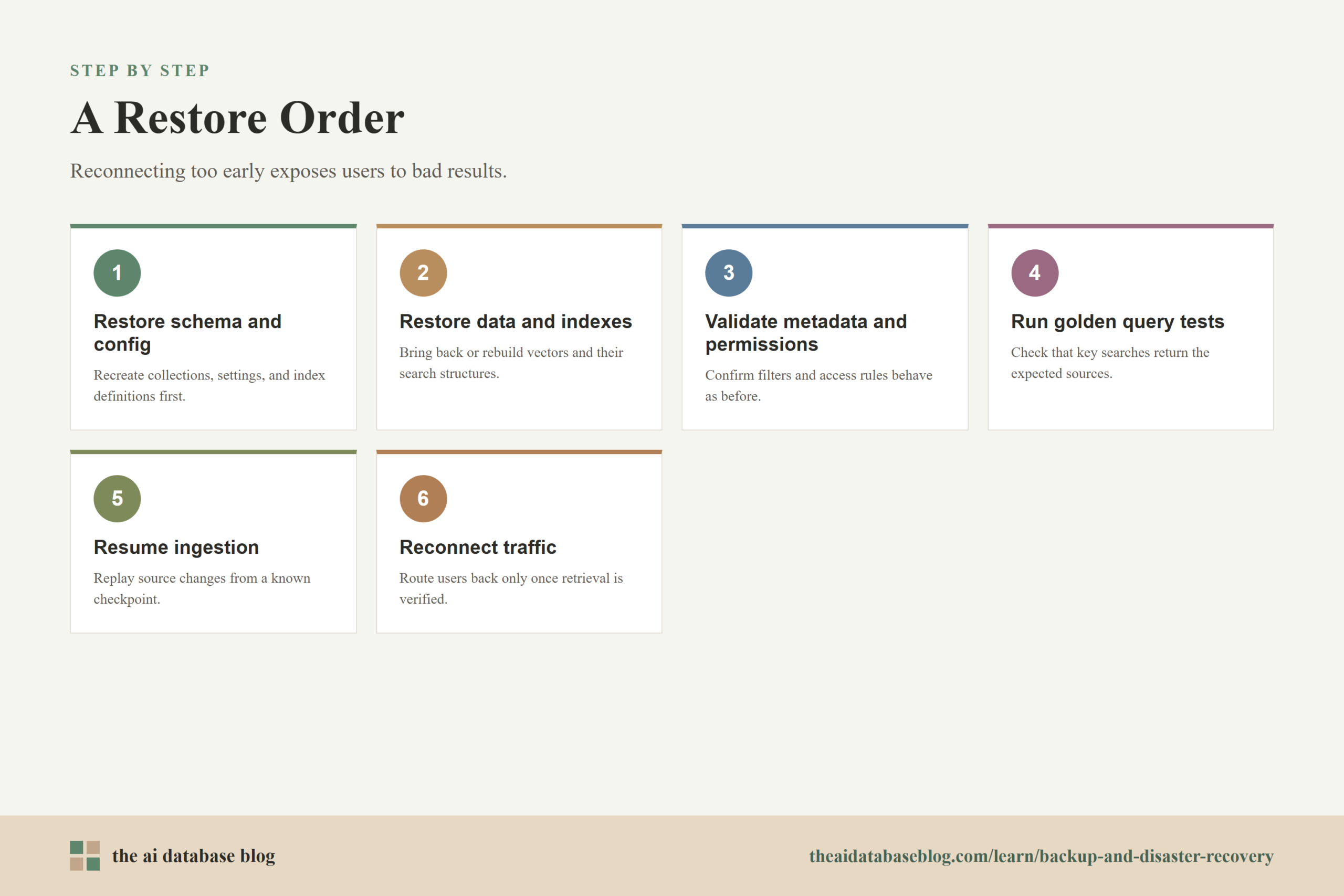
Then document a restore order. Restore the schema and configuration, restore or rebuild data and indexes, validate metadata and permissions, run golden retrieval tests, resume ingestion from a known checkpoint, and then reconnect application traffic. The order matters because reconnecting too early can expose users to incomplete or incorrect retrieval results.
Finally, monitor the recovery system itself. Track backup age, backup completion status, restore test results, replica health, shard distribution, storage growth, query latency, and ingestion lag. Disaster recovery plans decay when the underlying system changes and nobody notices. Monitoring and scheduled tests keep the plan aligned with the live vector store.
This strategy becomes easier to operate when the team has a concise checklist. The checklist does not need to be complicated, but it should cover the things most likely to fail under pressure.
Vector Store Disaster Recovery Checklist
A disaster recovery checklist gives operators a repeatable way to confirm that the vector store is protected before an incident and recoverable during one. It should be specific enough to execute, but not so detailed that it becomes impossible to keep current. The best checklist is tied to the actual collections, ingestion jobs, backup locations, and application workflows the team uses in production.
- Confirm that backups include vectors, object data, metadata, schema, collection settings, and relevant index configuration.
- Store backups outside the primary failure domain, such as separate storage from the production cluster or a different region when the risk requires it.
- Track backup frequency against the required RPO for each collection or workload.
- Run scheduled restore tests in an isolated environment and record actual restore duration.
- Validate restored query behavior with representative vector, hybrid, and metadata-filtered searches.
- Use replication for node, zone, or regional resilience, but keep backups for corruption, deletion, and bad-ingestion recovery.
- Document embedding model versions, chunking rules, ingestion checkpoints, and source-system replay procedures.
- Prioritize critical collections so the most important retrieval workloads can return first during recovery.
- Monitor backup completion, backup age, replica health, ingestion lag, storage growth, and post-restore query quality.
- Review the plan after schema changes, database upgrades, embedding model changes, and major application releases.
Once these basics are in place, the most important distinction is conceptual: availability and recoverability are related but different. A resilient vector store should be able to survive ordinary infrastructure failures and also recover from the less common incidents that replication alone cannot fix.
Common Failure Scenarios
Different failure scenarios require different recovery responses. A single failed node is usually an availability problem. A deleted collection, corrupted metadata field, or bad embedding import is a data recovery problem. A regional outage may require failover, while a slow relevance regression may require rollback to a known-good index or re-ingestion from a trusted source.
Node or Zone Failure
Replication is the main defense against node or zone failure. If the vector store has replicas in healthy locations, the application can continue serving search while the failed component is replaced or repaired. The recovery task is to confirm replica health, rebalance if needed, and restore full redundancy after the incident.
Accidental Deletion or Bad Import
Backups are the main defense against accidental deletion and bad imports. Replication may preserve availability, but it can also spread the incorrect state. Recovery may require restoring a collection from backup, replaying changes after the recovery point, and validating that metadata filters and query results match expectations.
Embedding or Schema Regression
Embedding and schema regressions are subtle because the system may remain online while retrieval quality drops. A new chunking strategy, model version, distance metric, or metadata mapping can change results in ways that are hard to detect with uptime monitoring alone. Golden query tests, versioned ingestion pipelines, and rollback-ready backups help reduce this risk.
These scenarios show why disaster recovery is not only an infrastructure topic. It is also a relevance, data modeling, and ingestion discipline. The FAQ section below addresses the practical questions teams often ask when turning these ideas into an operating plan.
FAQs
1. Do vector stores need backups if the original documents are stored elsewhere?
Usually, yes. If the original documents are complete, current, and easy to reprocess, they can reduce the risk of permanent loss. But rebuilding vectors from source may still require the same chunking logic, embedding model version, metadata mappings, and ingestion order. Backups provide a faster and more reliable path to a known recovery point.
2. Should metadata be backed up separately from vectors?
Metadata should be backed up with the vectors and object data it describes. Separating them can make recovery harder because filters, permissions, timestamps, and source references must match the correct vector records. If the system also stores metadata in another database, keep the two systems aligned with consistent recovery points or a clear replay process.
3. How often should a vector store be backed up?
The backup schedule should match the recovery point objective. If the business can tolerate losing one day of vector updates, daily backups may be enough. If the vector store changes constantly and recent updates are important, use more frequent backups, incremental backups, or source replay mechanisms that can recover changes made after the last backup.
4. Is replication the same as disaster recovery?
No. Replication improves availability by keeping copies of data across nodes or locations, but it does not automatically protect against bad writes, accidental deletion, or corrupted imports. Disaster recovery includes backups, restore procedures, testing, runbooks, and defined recovery objectives.
5. What should be tested after restoring a vector store?
Test object counts, schema, metadata fields, permissions, index health, representative searches, filtered searches, hybrid searches, latency, and application-level retrieval flows. Also confirm that ingestion can resume from the right checkpoint and that the restored system meets the expected recovery time objective.
6. What is a realistic recovery objective for a vector store?
A realistic objective depends on how critical the vector store is to the application. A customer-facing retrieval or AI assistant system may need recovery in minutes with minimal data loss. An internal analytics or experimental search system may tolerate hours of downtime and a longer recovery point. The best objective is one that has been validated through restore testing.
Takeaway
Backup and disaster recovery for a vector store means protecting the full retrieval system, not only the embedding vectors. A strong plan backs up vectors, object data, metadata, schema, and configuration; tests restores under realistic conditions; uses replication for resilience; and sets recovery objectives based on application impact. This guidance is most useful for teams building production AI search, RAG, recommendation, or knowledge retrieval systems where a vector store outage would affect user trust, answer quality, or service availability.
Watch this video to learn more