Production vector search works best when it is treated as a live retrieval system, not just a place to store embeddings. A reliable setup needs enough capacity for vectors, indexes, metadata, and query spikes; monitoring that tracks both system health and retrieval quality; tested backups and restores; strong access controls; clear freshness rules; cost visibility; and incident procedures that explain what to do when latency, recall, ingestion, or security breaks down.
This guide gives teams a practical checklist for operating vector search in production. It covers how to size a deployment, what to monitor, how to plan backups, how to secure retrieval, how to keep embeddings current, how to manage cost, and how to prepare for incidents before users are affected.
Why Production Vector Search Needs an Operational Checklist
Vector search often starts as an application feature, but it quickly becomes part of the production data layer. It stores embeddings, document chunks, metadata, permissions, indexing configuration, and sometimes derived search features such as sparse vectors or reranking inputs. When a user asks a question, the retrieval layer decides which records are visible, which records are relevant, and which records are passed downstream to an AI system or search interface. That makes vector search operationally important even if it is only one component in a larger application.
The main operational challenge is that vector search has two kinds of reliability. The first is ordinary infrastructure reliability: uptime, latency, throughput, storage, replication, backups, and security. The second is retrieval reliability: whether the system finds the right records, filters them correctly, and keeps them fresh as source data changes. A vector service can be technically healthy while still returning stale, incomplete, or poorly ranked results.
A checklist helps because production problems usually come from gaps between these two layers. A team may monitor CPU and memory but not recall. It may back up source documents but not the index configuration. It may secure the application API but forget that copied chunks in the retrieval store need the same access rules as the original system. The goal is to make these responsibilities explicit before production traffic exposes the weak spots.
Once vector search is recognized as a production system, the first question is whether the deployment is sized for the workload it must actually serve. Sizing is not just a storage estimate; it shapes latency, recall, indexing speed, cost, and how much room the system has to absorb growth.
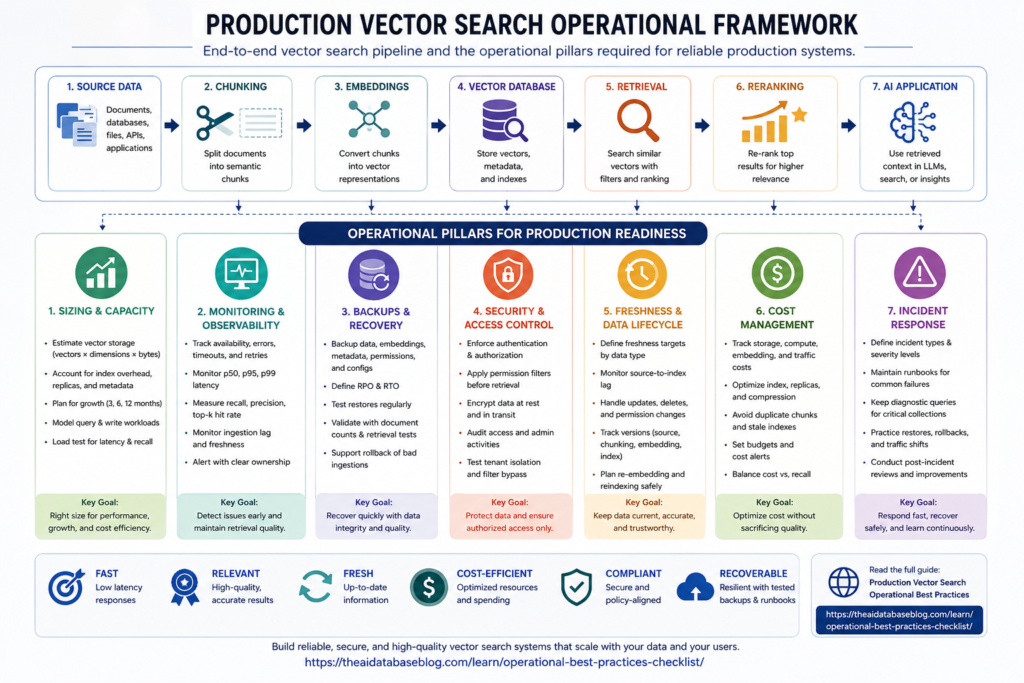
Sizing and Capacity Checklist
Sizing starts with understanding the shape of the data and the behavior of the workload. A small corpus with a few thousand stable documents may only need a simple index and modest capacity. A large, frequently updated knowledge base with strict latency targets needs more careful planning because vector dimensions, index overhead, metadata filters, write rates, and query concurrency all affect resource usage. The safest approach is to estimate capacity first, then validate the estimate with representative load and relevance tests.
Estimate Vector Storage Before Choosing Capacity
Calculate the raw vector footprint before adding index overhead. A simple estimate is the number of vectors multiplied by the number of dimensions multiplied by the bytes used by each dimension. For example, one million 1,536-dimensional float32 vectors require about 6.1 GB of raw vector data before index structures, metadata, replicas, deleted-document overhead, and storage engine overhead are included. This estimate is only a baseline, but it prevents teams from treating vector storage as a vague or invisible cost.
Include every vector field in the estimate. Some systems store separate embeddings for title, body, summary, image, or entity fields. Some retrieval designs also keep multiple versions during migrations or re-embedding projects. If the application stores dense vectors, sparse vectors, original text, metadata, and audit fields together, the full storage plan should include all of them.
Account for Index Overhead and Update Patterns
Approximate nearest neighbor indexes use additional structures to make search fast. That overhead varies by algorithm, configuration, dimensionality, compression, and how the system handles deletes and updates. Frequent updates can leave deleted or obsolete entries behind until compaction or cleanup occurs, which means the physical index can be larger than the current logical document count suggests.
The checklist item is simple: do not size only for clean, fully compacted data. Include headroom for index overhead, replicas, temporary build space, bulk ingestion, background maintenance, and growth. If the workload is update-heavy, test how quickly the system reclaims space and whether query latency changes as old records accumulate.
Size for Query Shape, Not Just Query Count
Queries are not equal. A top-5 nearest-neighbor query over one partition is different from a hybrid search with metadata filters, a larger candidate set, reranking, and cross-partition fan-out. The number of requested results, filter selectivity, vector dimensionality, index type, authentication path, and client retry behavior can all change latency and throughput.
Define the main query classes before load testing. For example, separate interactive search queries from background enrichment queries, administrator queries, and batch evaluation jobs. Each class should have its own expected latency target, concurrency level, result count, and freshness expectation. This prevents a low-priority batch job from silently consuming capacity needed for user-facing retrieval.
Validate With Load and Relevance Tests
Capacity testing should measure more than requests per second. It should confirm that the system still returns useful results under realistic load. Track latency, error rates, recall on a labeled query set, filter correctness, and freshness lag during ingestion. If the system uses compression, quantization, or lower-precision vectors, compare results against a higher-precision baseline so the cost savings do not quietly damage relevance.
A production readiness review should include clear answers to these sizing questions:
- How many vectors are stored today, and how many are expected in 3, 6, and 12 months?
- What vector dimensions and data types are used?
- How much storage is required for raw vectors, index overhead, metadata, replicas, and temporary build space?
- What are the expected query rate, write rate, update rate, and delete rate?
- Which query types are most expensive, and are they isolated from normal user traffic?
- What headroom exists before latency, recall, or cost becomes unacceptable?
Sizing gives the system enough room to operate, but it does not tell the team whether production behavior is healthy day to day. The next step is monitoring that connects infrastructure signals with retrieval quality signals.
Monitoring and Observability Checklist
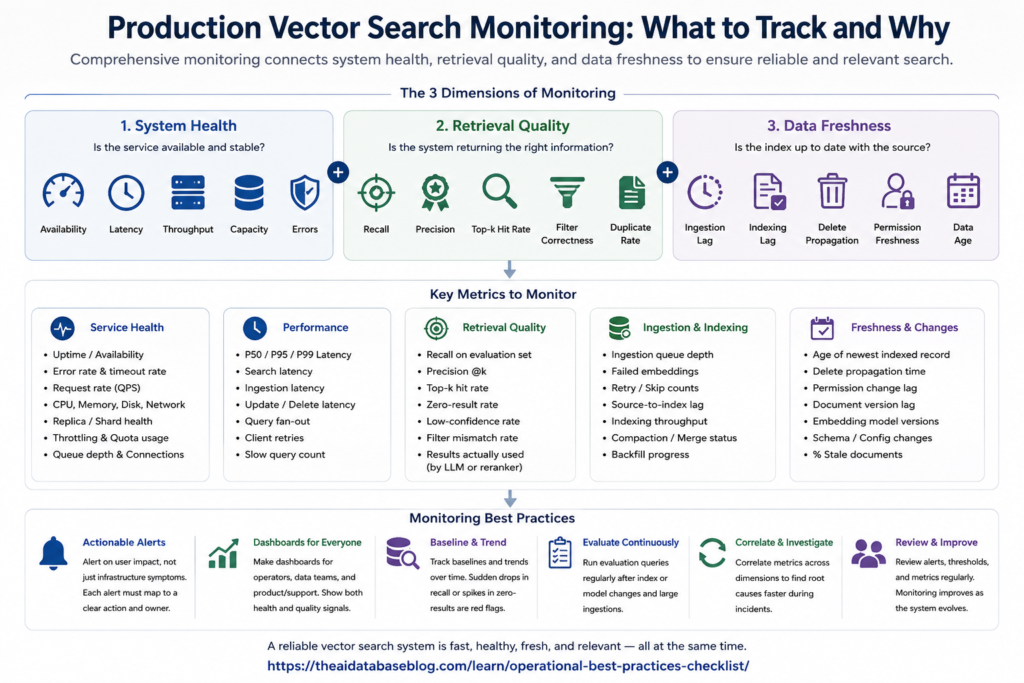
Monitoring for vector search should answer three questions at the same time: Is the service available? Is it fast enough? Is it returning the right information? Traditional database monitoring covers the first two questions fairly well, but production retrieval systems need additional visibility into relevance, filtering, freshness, and indexing behavior. Without those signals, teams often discover retrieval failures only after users report bad answers.
Monitor Core System Health
Track the standard operational metrics that show whether the service is under stress. These include CPU, memory, disk usage, network throughput, request rate, queue depth, connection count, error rate, timeout rate, retry rate, and saturation against service quotas. For managed services, also track capacity limits and throttling responses. For self-managed systems, track cluster health, shard or segment health, replica status, compaction, and background indexing work.
Use percentile latency rather than averages alone. Averages can hide the slow tail that users experience during traffic spikes or expensive filtered queries. At minimum, monitor p50, p95, and p99 latency for search, indexing, update, delete, and metadata-filtered queries. Separate read and write paths because a healthy search path can coexist with a failing ingestion path.
Monitor Retrieval Quality
Retrieval quality needs its own metrics because a fast wrong result is still a production failure. Track recall, precision, top-k hit rate, zero-result rate, low-confidence result rate, duplicate result rate, and the percentage of results filtered out by permissions or metadata. For RAG systems, also track whether retrieved chunks are actually used by the generation layer and whether user feedback points to missing or stale context.
The strongest monitoring setup includes a stable evaluation set of representative queries with expected documents or expected answer evidence. Run this set regularly after index changes, embedding model changes, chunking changes, metadata schema changes, and large ingestions. The goal is not to create a perfect academic benchmark; it is to detect when a production change makes retrieval worse.
Monitor Ingestion and Freshness
Freshness problems are common in production vector search because the vector index is often a copy of source data. Monitor ingestion queue depth, embedding job latency, failed document counts, retry counts, skipped records, source-to-index lag, and the age of the newest successfully indexed record. If the system supports deletes or permission changes, track how long it takes for those changes to become effective in search results.
Freshness monitoring should be visible to product and support teams, not only infrastructure teams. A retrieval system that is 45 minutes behind source data may be acceptable for documentation search but unacceptable for customer support, compliance, inventory, pricing, or incident response use cases.
Create Actionable Alerts
Alerts should map to user impact and operational action. A storage warning is useful only if the team knows whether to scale capacity, compact indexes, reduce ingestion, or remove old versions. A recall warning is useful only if someone can compare the last successful deployment, recent ingestion jobs, and recent schema or embedding changes.
Useful alert categories include:
- Availability alerts for failed requests, timeouts, unhealthy replicas, and unreachable search endpoints.
- Latency alerts for p95 or p99 search latency crossing agreed thresholds.
- Capacity alerts for disk, memory, index size, quota usage, and ingestion queue growth.
- Quality alerts for recall drops, zero-result spikes, filter mismatch, or unusual result duplication.
- Freshness alerts for source-to-index lag, failed embedding jobs, and delayed deletes.
- Security alerts for denied access spikes, unusual query volume, suspicious exports, and permission-sync failures.
Monitoring shows what is happening now, but it cannot replace recovery planning. If a vector index is corrupted, accidentally deleted, or built with bad embeddings, the team needs a reliable way to restore service and trust the restored data.
Backups and Recovery Checklist
Backups for vector search should protect more than the visible index. A production retrieval system usually depends on source documents, chunks, embeddings, metadata, index configuration, schema definitions, access-control fields, ingestion code, and evaluation sets. If any of those pieces are missing, a restore may produce a system that is technically running but semantically different from the original.
Decide What Must Be Recoverable
The safest backup plan starts by listing the assets needed to rebuild search. This includes raw source data, normalized text, chunk boundaries, embedding vectors, embedding model version, metadata, document identifiers, access-control attributes, index settings, collection or table schemas, application configuration, and any reranking or hybrid-search configuration. Store enough information to explain which source record produced each searchable object.
Some teams treat vector indexes as disposable because they can be rebuilt from source data. That can work if the source data, chunking logic, model version, and rebuild pipeline are all preserved and tested. It fails when the rebuild takes too long, the old embedding model is unavailable, or the rebuilt index no longer matches the production behavior users depended on.
Set Recovery Objectives
Define a recovery point objective and a recovery time objective for vector search. The recovery point objective answers how much indexed data the business can afford to lose. The recovery time objective answers how long search can be degraded or unavailable. These targets should reflect the use case. A customer-facing support assistant may need faster recovery than an internal research tool.
Recovery objectives should also cover retrieval quality. A restored system that comes back quickly but uses stale embeddings, incomplete metadata, or missing permissions is not a complete recovery. Include quality validation in the recovery plan so the team checks representative queries before declaring the incident resolved.
Test Restores, Not Just Backups
A backup is only useful if it can be restored under pressure. Schedule restore drills that rebuild the index in a separate environment, run sanity checks, compare document counts, verify metadata and permissions, and run the retrieval evaluation set. Record how long the restore takes and whether manual steps are required.
The backup checklist should confirm the following:
- Backups include data, metadata, permissions, schemas, index settings, and embedding version information.
- Restore procedures are documented and tested in a non-production environment.
- Rebuild time is measured for the current corpus size, not estimated from a small sample.
- Old and new indexes can be compared before traffic is moved.
- Bad ingestions can be rolled back without deleting good historical data.
- Recovery validation includes both infrastructure checks and retrieval-quality checks.
Recovery protects the system from loss, but production readiness also depends on preventing unauthorized retrieval in the first place. Security matters because vector search often contains copied, transformed, and chunked versions of sensitive source data.
Security and Access-Control Checklist
Vector search security should follow the same principle as any production data system: users should only retrieve data they are allowed to see. This sounds obvious, but it becomes harder once source documents are split into chunks, embedded, copied into a search index, filtered by metadata, and passed into an AI application. The security model must survive that transformation.
Preserve Source Permissions Through Retrieval
Every searchable object should carry enough access-control metadata to enforce the source system’s rules. If permissions are enforced only before ingestion, the vector store can become stale when a user’s role changes or a document becomes restricted. If permissions are enforced only after retrieval, the system may waste capacity retrieving records that must be discarded, and it may create logging or exposure risks if restricted text reaches downstream components.
A strong design usually combines permission-aware filtering at retrieval time with careful synchronization from the source system. The exact implementation depends on the application, but the checklist is consistent: permissions must be testable, auditable, and updated quickly enough for the sensitivity of the data.
Protect Embeddings as Sensitive Data
Embeddings are not plain text, but they can still reveal information about the underlying content, categories, users, or business processes. Treat embeddings, metadata, and chunks as sensitive production data. Encrypt data at rest and in transit, restrict administrative access, rotate credentials, separate environments, and avoid placing production embeddings in unmanaged notebooks or local test scripts.
Also review what is logged. Query text, retrieved chunks, document identifiers, metadata filters, and generated answers may contain sensitive information. Logs should be useful for debugging and auditing, but they should not become an uncontrolled copy of the knowledge base.
Validate Tenant and Metadata Isolation
Multi-tenant retrieval needs explicit isolation tests. A metadata filter that works in normal cases may fail during query rewrites, hybrid search, fallback search, or administrative tools. Test that one tenant cannot retrieve another tenant’s chunks through vector search, keyword search, cached results, reranking inputs, logs, or exported evaluation data.
Security checks should include:
- Authentication and authorization for every search, ingestion, update, and admin path.
- Permission filters that are applied before restricted content can reach the model or user.
- Fast propagation of permission changes, document deletes, and legal holds.
- Encryption for stored vectors, metadata, backups, and network traffic.
- Audit logs for access to sensitive collections, administrative changes, and bulk exports.
- Tests for tenant isolation, metadata-filter bypass, and stale permission behavior.
Security establishes who can see what. The next operational question is whether the information they can see is current enough to trust, because stale retrieval can produce confident but outdated answers.
Freshness and Data Lifecycle Checklist
Freshness is one of the most important differences between a demo vector search system and a production one. In a demo, the data is usually loaded once and queried many times. In production, source data changes, permissions change, documents are deleted, new content arrives, and embedding models evolve. The vector index must reflect those changes at a pace that matches the use case.
Define Freshness Requirements by Data Type
Not every collection needs the same freshness target. Product inventory, pricing, policy, legal, support, and operational incident data may need near-real-time or frequent updates. Historical documentation, archived reports, and static reference material may tolerate slower updates. Define freshness service levels by data type so the system can spend engineering effort and compute budget where staleness is most harmful.
Freshness requirements should be written in measurable terms. Instead of saying “keep search current,” define the maximum acceptable source-to-index lag for each content class. Also define how quickly deletes, permission changes, and corrections must take effect. Deletes and permission changes often deserve stricter targets than ordinary content additions.
Track Versions Across the Pipeline
Each searchable record should be traceable back to a source document version, chunking version, embedding model version, and ingestion job. This makes it possible to answer practical questions during incidents: Did this bad result come from an old source record? Did the chunking strategy change? Was only part of the corpus re-embedded? Did a permission update fail?
Version tracking is especially important when teams change embedding models or chunking logic. Mixing old and new embeddings can be acceptable during a controlled migration, but it should be intentional and measurable. If relevance drops, the team needs to know which records were produced by which pipeline version.
Plan for Re-Embedding and Reindexing
Embedding models, data formats, and search requirements change over time. Production systems need a safe process for re-embedding and reindexing without taking search offline. A common pattern is to build a new index in parallel, evaluate it against production queries and labeled examples, then move traffic gradually once quality and latency are acceptable.
The freshness checklist should include:
- Defined freshness targets for each data source and content type.
- Monitoring for source-to-index lag, failed ingestion, and stale permissions.
- Stable document identifiers that support updates, deletes, and deduplication.
- Version fields for source data, chunking logic, embedding model, and index configuration.
- A tested process for backfills, re-embedding, and parallel index validation.
- Clear rules for retiring old chunks, obsolete vectors, and outdated metadata.
Freshness work often increases compute, storage, and indexing activity, which leads naturally to the next operational concern: cost. Cost control should not be a late-stage cleanup exercise; it should be part of the design from the beginning.
Cost Management Checklist
Vector search cost is shaped by storage, memory, compute, replicas, query volume, indexing work, embedding generation, network traffic, backups, and evaluation jobs. The expensive part may not be the vector database alone. In many production systems, cost comes from the full retrieval pipeline: parsing documents, chunking text, generating embeddings, storing multiple versions, running hybrid search, reranking candidates, and keeping enough capacity for spikes.
Separate Fixed and Variable Costs
Fixed costs include baseline storage, always-on compute, replicas, backups, monitoring, and reserved capacity. Variable costs include embedding jobs, query traffic, batch reindexing, high-candidate retrieval, cross-partition search, and reranking. Separating these categories helps teams understand whether cost is growing because the corpus is larger, because queries are more expensive, or because the application is doing more background work.
Cost dashboards should show cost per collection, tenant, query class, data source, and environment when possible. Development and staging indexes can quietly become expensive if they keep full production copies, old embeddings, or unneeded replicas.
Tune Precision, Compression, and Candidate Counts Carefully
Lower-precision vectors, quantization, compression, partitioning, and smaller candidate sets can reduce cost, but they can also reduce recall. The right tradeoff depends on the application. A casual recommendation feature may tolerate a small relevance drop. A legal, medical, compliance, or customer-support retrieval system may need stronger recall guarantees.
Every cost optimization should be tested against a representative relevance set. Do not approve a lower-cost configuration only because latency or storage improved. Confirm that the system still retrieves the records users need, especially for filtered queries and less common topics.
Prevent Waste in the Retrieval Pipeline
Common waste patterns include storing duplicate chunks, embedding unchanged documents, searching too many partitions, returning more candidates than the reranker needs, keeping obsolete indexes alive, and running evaluation jobs against full production capacity when a sample would answer the question. Metadata modeling can also affect cost: a good partition key or selective filter can reduce the amount of vector work needed per query.
The cost checklist should confirm:
- Storage, compute, embedding, backup, and evaluation costs are tracked separately.
- Large collections have growth forecasts and budget thresholds.
- Expensive query classes are measured and, when needed, rate-limited or isolated.
- Compression or lower-precision vectors are validated against recall and quality tests.
- Duplicate chunks, stale indexes, and unused environments are regularly removed.
- Cost alerts are tied to ownership so someone is responsible for investigation.
Cost controls keep the system sustainable, but even a well-sized, monitored, secure, fresh, and cost-aware deployment will eventually have incidents. The final checklist area is readiness: knowing how the team will respond when retrieval breaks.
Incident Readiness Checklist
Vector search incidents can look different from ordinary database incidents. Some are obvious, such as outages, high latency, failed indexing, or storage exhaustion. Others are subtle, such as a relevance drop after re-embedding, stale permissions, missing chunks, duplicate results, or a hybrid search configuration that favors the wrong signal. Incident readiness means preparing for both visible infrastructure failures and quiet retrieval-quality failures.
Define Incident Types and Severity
Create incident categories that reflect the retrieval system’s real failure modes. Availability incidents cover downtime, errors, and timeouts. Performance incidents cover latency, throttling, and saturation. Quality incidents cover recall drops, bad rankings, missing sources, duplicate results, and poor filter behavior. Freshness incidents cover delayed ingestion, stale source data, failed deletes, and old permissions. Security incidents cover unauthorized retrieval, suspicious access, and data exposure.
Each category should have severity levels based on user impact. A stale internal documentation index may be low severity. A permission leak in a customer-facing system is high severity even if latency and uptime are normal.
Prepare Runbooks for Common Failures
Runbooks should be specific enough for someone to act during a stressful incident. They should explain how to check service health, pause ingestion, roll back a bad index, switch to a previous index, reduce candidate counts, disable expensive batch jobs, restore from backup, invalidate caches, and verify that search quality has recovered. Include owner names or team responsibilities so incidents do not stall while people decide who is accountable.
For retrieval quality incidents, include a small set of diagnostic queries that are known to be important. These queries can quickly show whether the issue affects all search, one data source, one tenant, one language, one metadata filter, or one recent deployment.
Practice Safe Deployment and Rollback
Many vector search incidents are caused by normal changes: new chunking logic, a new embedding model, altered metadata fields, index parameter changes, or ingestion pipeline updates. Treat these changes like production releases. Use staging environments, evaluation sets, shadow indexes, canary traffic, and rollback plans. Keep old indexes long enough to recover from a bad migration, but retire them once they are no longer needed.
The incident readiness checklist should include:
- Severity definitions for availability, latency, quality, freshness, and security incidents.
- Runbooks for rollback, restore, reindexing, traffic shifting, and ingestion pauses.
- Known-good diagnostic queries for critical collections and tenants.
- Ownership for infrastructure, data pipeline, application, and security response.
- Post-incident review that checks both technical failure and retrieval behavior.
- Regular game-day exercises for restore, permission failure, stale-data, and relevance-drop scenarios.
These checklist areas are easiest to apply when they are consolidated into one operational review. The final checklist below can be used before launch, during architecture reviews, or as a recurring production health check.
Consolidated Production Vector Search Checklist
This consolidated checklist brings the operational categories together. It is useful for launch reviews, quarterly production audits, migration planning, and incident-preparedness work. Teams can adapt the exact thresholds to their own workload, but every item should have a clear owner, measurement method, and review cadence.
Sizing
- Estimate raw vector size from document count, dimensions, and data type.
- Add headroom for index overhead, replicas, metadata, deleted records, and temporary build space.
- Model growth for at least the next 6 to 12 months.
- Define separate capacity assumptions for search, ingestion, updates, deletes, and evaluation jobs.
- Load test realistic query classes, including filtered, hybrid, and high-candidate queries.
Monitoring
- Track availability, error rate, timeout rate, retry rate, throttling, and quota usage.
- Monitor p50, p95, and p99 latency for search and ingestion paths.
- Measure recall, top-k hit rate, zero-result rate, duplicate rate, and filter correctness.
- Track ingestion failures, queue depth, indexing lag, and delete propagation time.
- Create alerts that map to clear operational actions and owners.
Backups
- Back up source data, chunks, embeddings, metadata, permissions, schemas, and index configuration.
- Record embedding model versions and chunking versions with indexed records.
- Define recovery point and recovery time objectives for each production collection.
- Test restores in a separate environment and measure actual recovery time.
- Validate restored indexes with document counts, permission checks, and retrieval-quality tests.
Security
- Enforce authentication and authorization on search, ingestion, update, delete, and admin paths.
- Carry source permissions into searchable records and keep them synchronized.
- Apply permission filters before restricted content can reach downstream AI components.
- Encrypt vectors, metadata, backups, and network traffic.
- Audit access, administrative changes, bulk exports, and suspicious query patterns.
Freshness
- Define freshness targets by data source, content type, and risk level.
- Monitor source-to-index lag and the age of the newest successfully indexed record.
- Support reliable updates, deletes, deduplication, and permission changes.
- Track source, chunking, embedding, and index versions.
- Use parallel indexes or staged rollout for major re-embedding and reindexing projects.
Cost
- Separate storage, compute, embedding, backup, evaluation, and traffic costs.
- Track cost by collection, tenant, environment, query class, and data source when possible.
- Validate compression, quantization, and lower-precision vectors against recall tests.
- Remove duplicate chunks, obsolete indexes, unused replicas, and stale environments.
- Set budget alerts with clear owners and investigation steps.
Incident Readiness
- Define incident severity for outage, latency, quality, freshness, and security failures.
- Maintain runbooks for restore, rollback, traffic shift, ingestion pause, and reindexing.
- Keep known-good diagnostic queries for important collections and tenants.
- Assign ownership across infrastructure, data pipeline, application, and security teams.
- Run periodic incident drills for stale data, permission failure, relevance drop, and restore scenarios.
A checklist is not useful unless it changes how the system is operated. The most mature teams turn these items into recurring reviews, dashboards, release gates, and incident exercises so vector search remains dependable as data, models, users, and retrieval patterns change.
FAQs
1. What is the most important production metric for vector search?
There is no single most important metric because production vector search has to be both healthy and useful. Latency, error rate, and capacity show whether the service is functioning, while recall, filter correctness, and freshness show whether retrieval is trustworthy. A strong monitoring setup combines infrastructure metrics with retrieval-quality metrics.
2. How much storage does a vector index need?
The baseline estimate is the number of vectors multiplied by the number of dimensions multiplied by the bytes per dimension. That only covers raw vectors. Real production storage also includes index overhead, metadata, replicas, deleted or updated record overhead, backups, and temporary space for rebuilds or migrations.
3. Should vector indexes be backed up if they can be rebuilt?
Sometimes rebuilding is enough, but only if the source data, chunking logic, embedding model version, metadata, permissions, and rebuild pipeline are all available and tested. If rebuilding would take too long or might produce different retrieval behavior, backing up the index and its configuration becomes much more important.
4. How should teams handle stale data in vector search?
Teams should define freshness targets for each data source, monitor source-to-index lag, and track ingestion failures. Deletes and permission changes should usually have stricter freshness requirements than ordinary new content because stale access rules can create security and compliance risks.
5. Can compression or lower-precision vectors reduce cost safely?
They can reduce storage and sometimes improve efficiency, but they should be tested against real retrieval examples. Lower precision, quantization, and compression can affect recall, especially for filtered queries or edge cases. The safest path is to compare the cheaper configuration against a higher-quality baseline before using it in production.
6. What should a vector search incident runbook include?
A runbook should include steps for checking service health, reviewing recent deployments, pausing ingestion, switching to a known-good index, restoring from backup, validating permissions, and running diagnostic queries. It should also identify owners for infrastructure, ingestion, application behavior, and security response.
Takeaway
Production vector search is an operational data system that needs capacity planning, monitoring, recovery, security, freshness management, cost control, and incident readiness. This checklist is most useful for engineering, data platform, search, and AI application teams preparing retrieval systems for real users. For use cases such as support assistants, internal knowledge search, product discovery, or compliance retrieval, the practical goal is the same: keep the system fast, secure, current, recoverable, affordable, and relevant enough that users can trust what it returns.
Watch this video to learn more