An AI database is a data system designed to store, organize, search, and retrieve information for AI applications, especially applications that need to find meaning rather than only exact matches. In practice, this often means storing vector embeddings, supporting similarity search, filtering results with metadata, combining vector search with keyword search, and returning useful context to a model or application. A vector database is a major type of AI database, but the broader AI database category also includes the surrounding storage, indexing, retrieval, governance, and query patterns that make AI systems reliable.
This guide explains what AI databases and vector databases are, why they emerged, how they differ from traditional databases, and where they fit in the modern AI stack. It also gives you a roadmap through the Fundamentals cluster so you can move from basic definitions to retrieval architecture, embeddings, indexing, hybrid search, metadata filtering, and evaluation with a clear sense of how the pieces connect.
What Is an AI Database?
An AI database is a database or data platform built to support AI-native retrieval, search, and application workflows. Its job is not simply to hold records. It helps an AI application find the right information at the right moment, usually from a large collection of documents, messages, product data, images, code, tickets, transcripts, or other content that does not fit neatly into traditional structured tables.
The most common capability associated with an AI database is vector search. Vector search allows a system to compare pieces of data by meaning, similarity, or pattern instead of relying only on exact words. For example, a user might ask, “How do I reset access for a locked account?” and the system may retrieve a document titled “Restoring user login permissions” even though the words are not identical. That kind of retrieval is useful because many AI applications need conceptual matches, not just literal matches.
An AI database may include several capabilities working together:
- Vector storage, which stores embeddings generated from text, images, audio, or other data.
- Similarity search, which finds records close to a query vector.
- Metadata filtering, which narrows search results by attributes such as date, source, user permissions, language, region, category, or document type.
- Hybrid search, which combines semantic vector search with keyword or full-text search.
- Ranking and reranking, which improve the order of retrieved results before they are shown to a user or sent to a model.
- Operational controls, such as indexing, access control, updates, deletes, monitoring, and performance tuning.
This definition matters because the phrase “AI database” is sometimes used loosely. Some people use it to mean only a vector database. Others use it to describe any database with AI features added. A practical definition is broader: an AI database is the retrieval and data layer that helps AI systems use stored knowledge accurately, efficiently, and securely.
Once the basic definition is clear, the next question is why AI applications needed a different kind of database behavior at all. Traditional databases were already powerful, but they were optimized for a different search problem.
Why AI Databases Emerged
AI databases emerged because modern AI applications need to work with meaning, context, and unstructured information at a scale that older database patterns were not designed to handle by themselves. Traditional databases are excellent for structured records, exact filters, joins, transactions, and known query patterns. Search engines are strong at keywords, text ranking, and document retrieval. But AI applications often ask a different question: “Which stored information is most relevant to this user intent?”
That question became especially important as large language models became common in applications. A language model can generate fluent responses, but it does not automatically know a company’s private data, the latest support article, a newly updated policy, or the contents of a user’s knowledge base. Instead of trying to train every piece of new information into a model, many systems retrieve relevant context at query time and pass it to the model. This pattern is usually called retrieval-augmented generation, or RAG.
AI databases grew around this retrieval need. They help applications keep knowledge outside the model, update it more easily, and retrieve it when needed. This is useful for customer support assistants, enterprise search, research tools, recommendation systems, product discovery, legal or policy search, code assistants, and many other systems where the answer depends on stored information.
The Shift From Exact Match to Meaning-Based Retrieval
Older search and database systems often depend on exact values, structured fields, or keywords. That works well when the user knows the exact term, product ID, account number, or field value. It works less well when the user’s wording differs from the stored wording, when the content is long and messy, or when the user is asking a conceptual question.
Embeddings changed this pattern. An embedding is a list of numbers that represents the meaning or features of some input. Similar inputs should produce vectors that are close together in the embedding space. With embeddings, a database can retrieve records that are conceptually related even when they do not share the same surface words.
The Growth of RAG and AI Applications
RAG made AI databases more important because retrieval quality directly affects answer quality. If the retrieval layer finds the wrong passages, the model may produce an incomplete or misleading answer. If the retrieval layer finds relevant, current, and permission-safe context, the model has a better chance of responding usefully.
This is why AI databases are not just storage systems. They are part of the application logic. They influence what the model sees, what the user receives, how fast the system responds, and whether the application can be trusted with changing or private information.
Understanding why AI databases emerged also helps clarify the term most closely associated with them: vector database. The two ideas overlap, but they are not identical.
What Is a Vector Database?
A vector database is a database designed to store vectors and search them efficiently by similarity. In an AI application, those vectors are usually embeddings created by an embedding model. Each vector may represent a document chunk, product description, image, support ticket, user query, code snippet, or other piece of content.
When a user asks a question, the application can turn that question into a query embedding. The vector database then compares the query vector with stored vectors and returns the closest matches. This is often called nearest neighbor search or similarity search. Because comparing a query against every vector can be slow at large scale, vector databases often use specialized indexes and approximate nearest neighbor methods to make search faster while trying to preserve enough recall.
A vector database usually stores more than the vector itself. It also stores an identifier, the original text or a pointer to it, and metadata that helps the application filter and interpret results. For example, a record might include a text chunk, its vector, the document title, the source URL, the author, the publication date, the access level, and the section heading.
How Embeddings Make Vector Search Possible
Embeddings are the bridge between raw content and vector search. An embedding model converts text, images, or other input into a numeric representation. The database does not understand meaning in a human way. It compares numbers using distance or similarity measures such as cosine similarity, dot product, or Euclidean distance. The useful part is that the embedding model has learned to place related items near one another in the vector space.
For example, a support article about “password reset” and a user question about “recovering account access” may end up near each other because the model represents them as semantically related. That allows the retrieval system to find relevant information even when the wording differs.
What Vector Databases Usually Store
A practical vector database record often includes several pieces of information:
- The embedding, which is the vector used for similarity search.
- The content, such as a text chunk, image reference, product description, or document excerpt.
- Metadata, such as document source, category, timestamp, user permissions, language, geography, or version.
- An identifier, which connects the retrieved item back to the original source or application record.
This combination is what makes vector databases practical for AI applications. Similarity search finds candidates by meaning, while metadata and identifiers help the application apply rules, show citations, enforce permissions, update records, and trace results back to sources.
A vector database is one important type of AI database, but an AI database strategy often includes more than vectors. To see why, it helps to compare AI databases with traditional databases directly.
How AI Databases Differ From Traditional Databases
Traditional databases and AI databases solve overlapping but different problems. A traditional relational database is typically designed around structured data, schemas, transactions, constraints, and exact queries. An AI database is typically designed around retrieval for AI applications, where the system may need to search unstructured content by meaning, combine semantic and lexical signals, and return context for a model or user experience.
This does not mean traditional databases are obsolete. Many AI systems still depend on relational databases, document databases, search engines, caches, and object storage. The difference is that AI applications add retrieval requirements that classic database designs did not always prioritize: high-dimensional vector indexing, semantic similarity, embedding lifecycle management, chunk-level retrieval, metadata-aware search, and relevance evaluation.
Query Style
Traditional databases are strongest when the query is exact or structured. For example, “find invoices where status equals overdue” or “return users created after a certain date” are classic database queries. AI databases are strongest when the query is semantic or exploratory, such as “find documents that explain why this invoice may be delayed” or “retrieve policies related to account recovery.”
Data Shape
Traditional databases often organize data into tables, rows, columns, documents, or key-value records. AI databases often work with chunks of unstructured or semi-structured content. A single source document may be split into multiple retrievable passages, each with its own embedding and metadata. This chunking step matters because retrieval usually works better when the database can return focused context rather than a whole large document.
Indexing and Ranking
Traditional databases use indexes to speed up exact lookups, range queries, joins, and sorting. AI databases use vector indexes to speed up similarity search over high-dimensional embeddings. Many also combine vector indexes with inverted indexes for keyword search and metadata indexes for filtering. The ranking goal is different too: instead of returning records that match a condition exactly, the system returns candidates ordered by relevance.
Correctness and Evaluation
In a traditional database, correctness often means the query returned the records that satisfy a precise condition. In an AI database, correctness often includes relevance: did the system retrieve the most useful context for the user’s intent? This makes evaluation more nuanced. Teams may measure recall, precision, answer quality, latency, citation accuracy, and whether the retrieval system respects permissions and freshness requirements.
The best way to think about the difference is not “traditional database versus AI database.” It is “structured data operations plus AI-aware retrieval.” Once that distinction is clear, the next step is understanding where the AI database belongs in the larger AI stack.
Where AI Databases Sit in the AI Stack
An AI database usually sits between raw source data and the model or application that needs retrieved context. It is part of the retrieval layer. This layer turns stored knowledge into searchable context that can be used by chatbots, agents, search interfaces, recommendation engines, analytics tools, and other AI-powered experiences.
A typical AI retrieval stack has two sides: ingestion and query-time retrieval. Ingestion prepares content for search. Query-time retrieval finds relevant information when the user or application asks for it. The AI database connects those two sides by storing embeddings, content references, metadata, and indexes.
Ingestion: From Source Data to Searchable Records
During ingestion, the system collects source content and prepares it for retrieval. This may include cleaning text, extracting content from files, splitting long documents into chunks, generating embeddings, attaching metadata, and writing records into the database. Good ingestion is one of the most important parts of AI database design because poor chunking or missing metadata can make even a strong search system return weak results.
A simple ingestion flow looks like this:
Source content
Clean and normalize content
Split content into chunks
Generate embeddings
Attach metadata and identifiers
Store vectors, content, and metadata in the AI database
Retrieval: From User Query to Useful Context
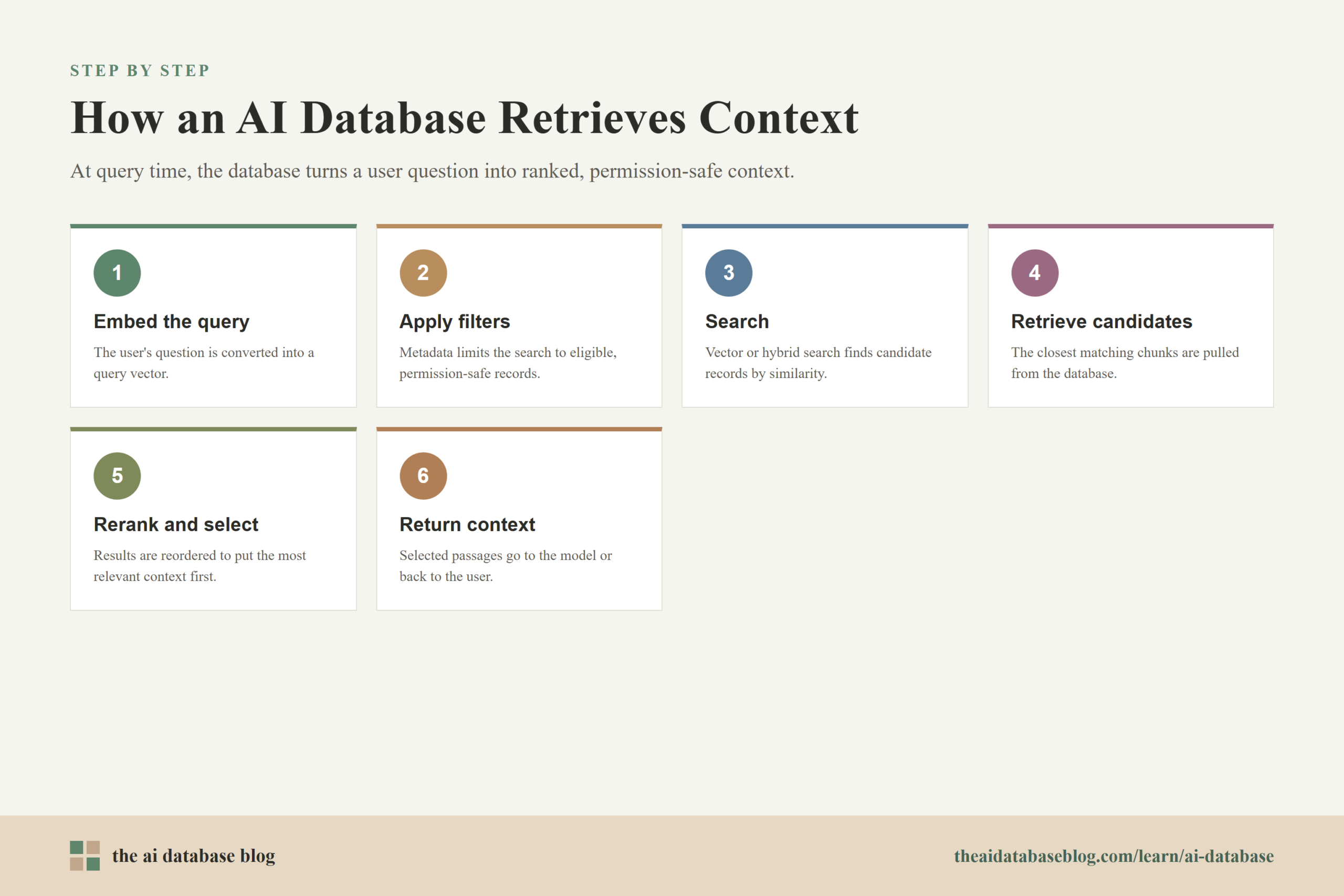
At query time, the application receives a user question or task. It may rewrite the query, generate a query embedding, apply filters, run vector search or hybrid search, rerank the results, and select the best context. If the application uses a language model, the retrieved context may be passed into the prompt so the model can answer using relevant source material.
A simple retrieval flow looks like this:
User query
Generate query embedding
Apply filters and search strategy
Retrieve candidate records
Rerank or select context
Send context to the application or model
Return answer, search results, or recommendation
The AI Database Is Not the Whole AI System
The AI database is important, but it is not the entire AI stack. The full system may also include source systems, data pipelines, embedding models, language models, orchestration code, evaluation tools, monitoring, access control, and user interfaces. The database stores and retrieves the knowledge layer, while the rest of the system decides how to prepare, use, evaluate, and present that knowledge.
Seeing the database inside the stack makes the design choices more concrete. The next question is what capabilities matter most when choosing or designing an AI database for a real application.
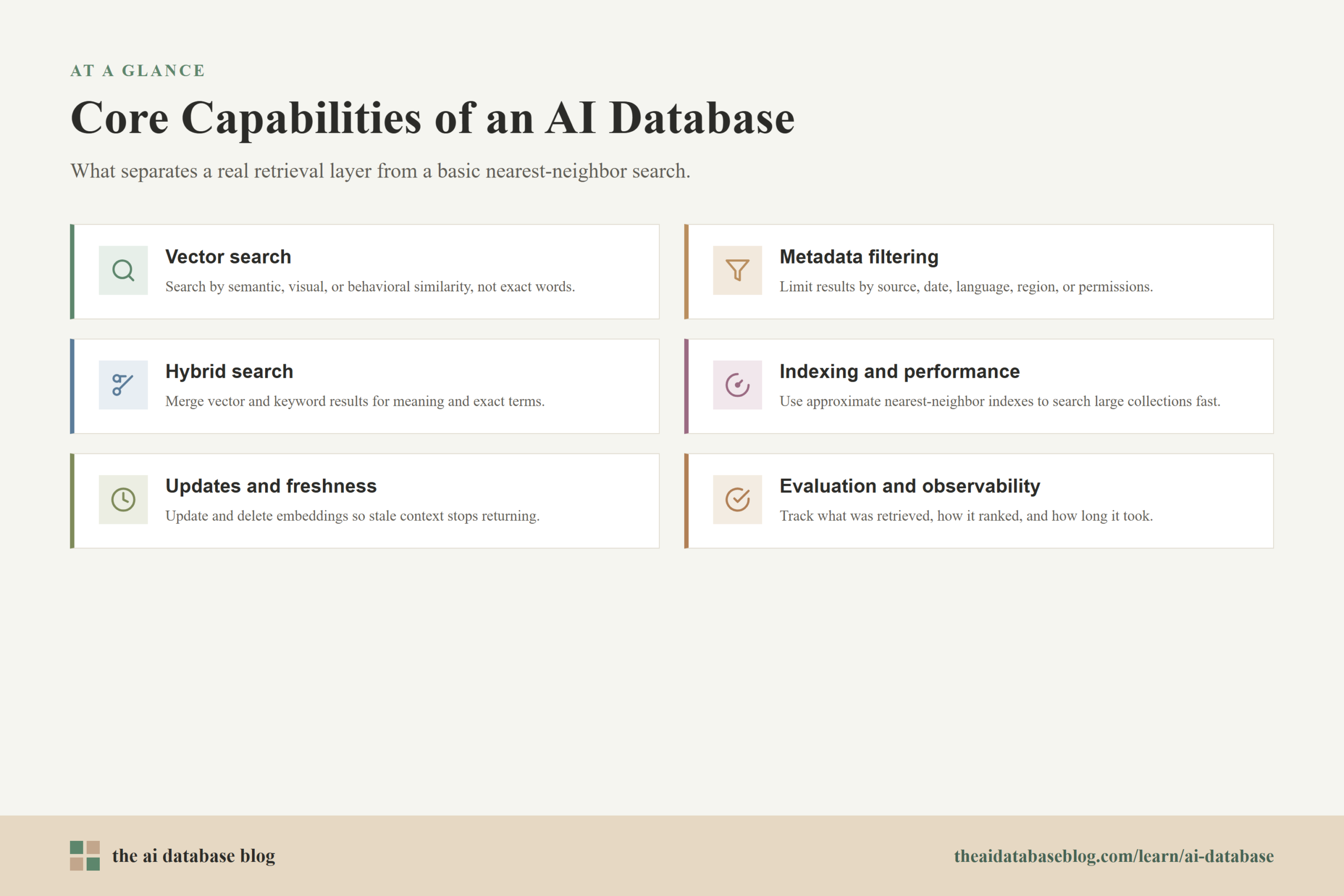
Core Capabilities of an AI Database
An AI database should be judged by how well it supports retrieval, not only by whether it can store vectors. In production systems, the hard parts often involve relevance, filtering, updates, permissions, latency, and observability. A database that can run a basic nearest neighbor search may still fall short if it cannot support the application rules around the search.
Vector Search
Vector search is the foundation of many AI database use cases. It allows the application to search by semantic similarity, visual similarity, behavioral similarity, or another embedding-based representation. This is especially useful for unstructured content and natural language queries where users do not know the exact wording of the stored material.
Metadata Filtering
Metadata filtering helps the system search only within eligible records. A user may need results from a specific product, language, account, region, time period, or access level. Without filtering, semantic search can return conceptually relevant results that are still wrong for the user’s context. Filtering is also important for security because retrieval should not expose content the user is not allowed to see.
Hybrid Search
Hybrid search combines vector search with keyword or full-text search. This matters because vector search is strong at meaning, while keyword search is often better for exact terms, names, IDs, acronyms, error codes, and rare phrases. Many practical systems use both signals and merge the results into one ranked list.
Indexing and Performance
AI databases need indexing strategies that can search large vector collections quickly. Approximate nearest neighbor indexes often trade a small amount of exactness for much better speed. The right choice depends on scale, latency needs, update frequency, memory budget, and acceptable recall. Performance tuning is not separate from relevance because a slow retrieval system may force teams to return fewer candidates than the model or user experience needs.
Updates, Deletes, and Freshness
AI applications often depend on changing information. Policies are revised, products change, tickets are resolved, and documents become stale. An AI database must support update and delete workflows so old embeddings do not keep returning outdated context. Freshness is especially important for RAG systems because the model may sound confident even when the retrieved source is no longer valid.
Evaluation and Observability
Teams need ways to understand whether retrieval is working. This includes tracking which records were retrieved, how they were ranked, how long each step took, and whether the final answer used the right sources. Evaluation may involve test queries, human judgments, relevance metrics, answer checks, and production monitoring. Without evaluation, teams may not notice retrieval failures until users lose trust.
These capabilities explain why AI database design is more than choosing a storage engine. The database has to support the retrieval patterns that the application and users actually need.
Common Use Cases for AI Databases
AI databases are useful whenever an application needs to retrieve relevant information from a large or complex knowledge base. The use case may be user-facing, internal, operational, or analytical. What these examples share is that the application needs to search by meaning, context, or similarity rather than relying only on exact structured queries.
- RAG assistants: A chatbot or assistant retrieves policy documents, help center articles, internal notes, or product documentation before generating an answer.
- Semantic search: A search interface lets users find documents, products, research, or support content even when they do not know the exact terms used in the source material.
- Recommendations: A system finds items similar to a product, article, image, customer profile, or previous behavior.
- Knowledge management: Teams organize internal information so employees can find relevant context across documents, tickets, conversations, and wikis.
- Multimodal retrieval: Applications search across text, images, audio, or video using embeddings that represent different kinds of content.
- Agent memory and tool use: AI agents retrieve prior context, task notes, user preferences, or relevant records before deciding what action to take.
Use cases are helpful, but they can also make AI databases sound simpler than they are. In real systems, the main challenge is not storing vectors. It is designing a retrieval process that returns the right evidence for the task.
Practical Design Questions Before Building an AI Database Layer
Before choosing tools or designing schemas, it helps to define the retrieval problem clearly. AI database projects often struggle when teams start with a technology choice rather than a user question, data shape, and evaluation plan. A practical design process begins by asking what the system must retrieve, for whom, under which rules, and how success will be measured.
What Content Needs to Be Retrieved?
The right database design depends on the content. Short support articles, long PDFs, product catalogs, code repositories, chat transcripts, and images all require different ingestion and chunking choices. Long documents may need careful section-aware splitting. Product records may need strong metadata. Code may need structure-aware parsing. The database can only retrieve what the pipeline stores in a useful form.
What Makes a Result Relevant?
Relevance is not always the same as semantic similarity. Sometimes the best result is the newest document, the most authoritative source, the exact error code match, the policy for a specific region, or the record the user has permission to view. Defining relevance helps decide whether the system needs metadata filtering, hybrid search, reranking, source weighting, or freshness rules.
What Are the Latency and Scale Requirements?
A small internal knowledge base has different requirements from a high-traffic recommendation system. Scale affects index choice, storage layout, batching, caching, and monitoring. Latency affects how many candidates the system can retrieve and rerank before the user experience becomes slow.
How Will Retrieval Be Evaluated?
Evaluation should be planned early. Teams can create a set of representative queries, expected source documents, and quality checks. They can then compare retrieval strategies such as vector-only search, keyword search, hybrid search, different chunk sizes, different embedding models, and reranking. This turns AI database design from guesswork into an iterative engineering process.
With those design questions in mind, the Fundamentals roadmap becomes easier to follow. Each article in the cluster should answer one part of the larger retrieval problem.
What to Learn Next
Once you understand what an AI database is, the natural next step is to explore the building blocks it depends on. Begin with the core definitions: what a vector database is, how vector embeddings turn text, images, and other data into searchable numeric representations, and how vector search finds results by similarity rather than exact matching. From there it helps to understand the retrieval architecture around the database, including how retrieval-augmented generation supplies external context to language models, where the database sits within the wider AI stack, and how it differs from a traditional database in query patterns, indexing, and relevance. The next layer is the search building blocks, such as hybrid search, metadata filtering, and vector indexing, which make retrieval more accurate, controlled, and fast enough for real applications. Finally, moving into practical design means learning how to choose an embedding model, how chunking splits source content into retrievable units, and how to evaluate retrieval quality through recall, precision, and relevance testing. Taken together, these ideas show that an AI database is best understood as a connected system: embeddings make semantic search possible, indexing makes it fast, metadata keeps it controlled, hybrid search makes it more robust, and evaluation tells you whether the system is actually helping users.
FAQs
1. Is an AI database the same as a vector database?
No. A vector database is a major type of AI database, but an AI database is the broader retrieval and data layer for AI applications. It may include vector storage, keyword search, metadata filtering, ranking, access control, ingestion workflows, and evaluation processes.
2. Why do AI applications need vector search?
AI applications often need to find information by meaning rather than exact wording. Vector search makes that possible by comparing embeddings, which are numeric representations of content or queries. This helps applications retrieve relevant documents, examples, products, or context even when the user’s words differ from the stored text.
3. Can a traditional database be used as an AI database?
Sometimes, yes. Some traditional databases now support vector search or can be extended with vector capabilities. Whether that is enough depends on the application. A small or moderate retrieval system may work well with an existing database, while a large or latency-sensitive system may need more specialized indexing, filtering, or search infrastructure.
4. Where does an AI database fit in a RAG system?
In a RAG system, the AI database usually stores embedded document chunks, metadata, and source references. When a user asks a question, the system searches the database for relevant context and passes that context to the language model. The database acts as the external knowledge layer.
5. What is the difference between semantic search and hybrid search?
Semantic search uses embeddings to find results based on meaning or similarity. Hybrid search combines semantic search with keyword or full-text search. Hybrid search is often useful because exact terms, IDs, names, acronyms, and rare phrases may be better handled by keyword search, while broader concepts may be better handled by vector search.
6. What makes an AI database reliable?
An AI database is reliable when it retrieves relevant, current, permission-safe information quickly enough for the application. Reliability depends on good ingestion, useful metadata, appropriate indexing, careful filtering, strong ranking, update and delete workflows, and ongoing evaluation with realistic queries.
Takeaway
An AI database is the retrieval-focused data layer that helps AI applications search by meaning, combine semantic and structured signals, and return useful context from stored knowledge. This guide is most useful for readers who are new to AI databases, planning a RAG system, or trying to understand how vector databases, embeddings, hybrid search, metadata filtering, and indexing fit together. A common use case is an internal knowledge assistant that retrieves the most relevant, permission-safe document chunks before a language model generates an answer.